Error Code 521: Urgent Cloudflare Troubleshooting Guide
Learn what error code 521 visit cloudflare means, its urgent causes, and proven fixes to restore access fast. Why Error Code provides a step-by-step diagnostic flow, cost ranges, and safety tips for developers and IT pros.


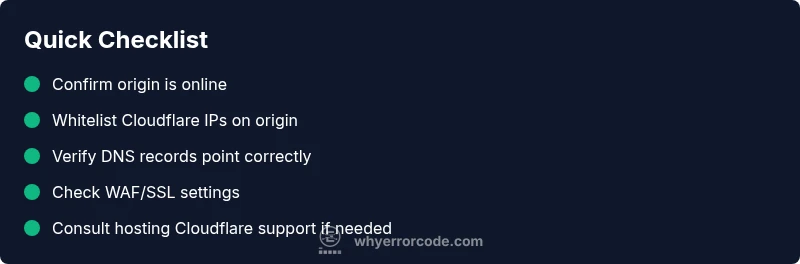
Error code 521 indicates that Cloudflare cannot reach your origin server. This is a connectivity fault rather than a coding error, and it often shows up as a gateway or site not reachable message. The quick fix is to verify that the origin is online, confirm Cloudflare IPs aren’t blocked by a firewall, and check DNS records point to the correct origin IP. If it persists, see the detailed flow below. error code 521 visit cloudflare
What Error Code 521 Means for Your Site
Error code 521 means Cloudflare cannot reach your origin server. This is a connectivity fault, not a coding bug. When users see the 521 error, they’re blocked from loading the page as Cloudflare cannot establish a connection to your web server. The exact wording may vary by browser, but the symptom is the same: Cloudflare sits in front and the origin doesn’t respond. According to Why Error Code, understanding the root cause is essential to prevent recurring outages and minimize downtime. A common interpretation is that 521 denotes a failure in the handshake or a blocked path between Cloudflare and your host. In practice, most incidents begin with a network or firewall issue, a DNS misconfiguration, or a temporary outage at the origin. If you’re encountering the error code 521 visit cloudflare, the recommended first steps focus on origin reachability, firewall allowances, and DNS accuracy.
Immediate Diagnostic Principles
In urgent outages, speed matters. Start by confirming basic reachability from multiple networks, then verify that the DNS records are healthy and that Cloudflare’s edge can connect to the origin without being blocked. Why Error Code emphasizes a layered approach: confirm availability first, then rule out network blocks, and finally verify configuration mismatches. Taking a structured path helps you distinguish between a transient glitch and a sustained misconfiguration. This is not just about fixing a single page—it's about restoring reliable access and minimizing risk to users and stakeholders.
Steps
Estimated time: 30-60 minutes
- 1
Verify origin availability
Ping the origin and try a direct HTTP request to the origin IP from multiple networks. If the origin doesn’t respond, the issue is at the server or network edge. Collect logs and timestamps for reference.
Tip: Use multiple measurement points (home, office, mobile) to confirm consistency. - 2
Check DNS records
Inspect A/AAAA/CNAME records to ensure they resolve to the correct origin URL/IP. If you recently changed DNS, allow time for propagation and clear local DNS caches.
Tip: Use dig/nslookup from different networks to validate propagation status. - 3
Whitelist Cloudflare IPs on origin
Compare Cloudflare’s published IP ranges with your origin firewall rules. Add all relevant Cloudflare IPs to the allowlist and re-test access.
Tip: Avoid broad allowlists; apply least-privilege rules where possible. - 4
Review Web Application Firewall (WAF) settings
Disable suspicious WAF rules temporarily to see if they block Cloudflare’s handshake or requests. If fixes, re-enable rules selectively.
Tip: Document which rule change resolves the issue for future reference. - 5
Check TLS/SSL configuration
Mismatched TLS settings between Cloudflare and origin can cause handshake failures. Validate certificates, ciphers, and SNI configuration.
Tip: Ensure the origin’s certificate chain is valid and not expired. - 6
Engage hosting or Cloudflare support if needed
If the issue persists after the above steps, contact your hosting provider and Cloudflare support with logs, timestamps, and a detailed description of attempts.
Tip: Have a backup plan ready (temporary DNS changes, rollback) to minimize downtime.
Diagnosis: Error 521: Cloudflare cannot reach the origin server
Possible Causes
- highOrigin server is offline or unreachable
- mediumCloudflare IPs blocked by origin firewall/security rules
- lowDNS misconfiguration or incorrect A/CAA/CNAME records
Fixes
- easyCheck origin server status and restart if needed; verify it responds to pings/HTTP requests directly
- mediumWhitelist Cloudflare IP ranges on the origin firewall and security software
- easyVerify DNS records (A/AAAA/CNAME) point to the correct origin IP and that DNS propagation is complete
- mediumReview hosting provider blocks or rate limits; contact support if the origin is behind a firewall or traffic filter
Frequently Asked Questions
What does error code 521 mean in Cloudflare?
Error 521 means Cloudflare can’t reach the origin server. It’s a connectivity issue between Cloudflare and your web hosting environment, not a programming error. The fix is usually to verify origin availability, allow Cloudflare IPs, and correct DNS records.
Error 521 means Cloudflare can’t reach your origin server. Check origin availability, whitelist Cloudflare IPs, and verify DNS records.
What’s the quickest way to fix 521?
Quick fixes include confirming origin online, ensuring Cloudflare IPs aren’t blocked by firewalls, and validating that DNS records point to the correct origin IP. If the issue persists, follow the diagnostic steps in our guide.
First, make sure the origin is online, check firewall rules, and verify DNS. If needed, follow the full diagnostic steps.
Can DNS issues cause 521 errors?
Yes. Misconfigured A/AAAA/CNAME records or DNS propagation delays can prevent Cloudflare from locating the origin, leading to a 521. Double-check propagation status and ensure records resolve to the correct origin.
DNS misconfig or propagation delay can cause 521. Verify DNS records and their propagation.
Should I contact Cloudflare support for 521?
If you’ve verified origin accessibility and DNS with no resolution, contact Cloudflare support with logs and timestamps. They can help identify edge-related or account-specific issues affecting the handshake.
If basic checks don’t help, reach out to Cloudflare with logs so they can investigate edge or handshake problems.
Is 521 related to SSL/TLS issues?
TLS misconfig can contribute to a 521 if the handshake fails between Cloudflare and the origin. Validate certificates, ciphers, and SNI settings to rule out TLS problems.
TLS misconfig can trigger 521; verify certificates and handshake settings.
Can a 521 affect SEO?
Temporary outages due to 521 can affect user experience and crawl frequency. However, once the site becomes reachable again, SEO impact is typically minimal unless outages recur.
A 521 outage can hurt user experience briefly, but long-term SEO impact is usually limited if access is restored quickly.
Watch Video
Top Takeaways
- Identify origin reachability before chasing misconfigurations
- Whitelist Cloudflare IPs and verify DNS alignment
- Test in segments to isolate the root cause quickly
- Escalate to hosting Cloudflare support when needed