Error Code Like 404: Urgent Troubleshooting Guide
An authoritative, urgent guide to understanding and fixing an error code like 404 on websites and APIs. Learn causes, quick fixes, and prevention strategies to minimize downtime and preserve user trust.


An error code like 404 means a requested resource could not be found on the server. It usually signals a broken link, moved or deleted content, or a misconfigured route. The quickest fixes start with verifying the URL, checking for typos, and clearing caches. If the problem persists, implement proper routing checks and server redirects to prevent user pain and loss of trust.
What a 404 error means in practice
An error code like 404 signals that the server can’t locate the requested resource. For developers and IT pros, this often results from a moved page, a deleted asset, or a broken internal link. To users, it’s a dead end that interrupts their journey. In both cases, repeated 404s hurt experience, SEO, and trust. The immediate implication is that your server is reachable, but a specific path is wrong—so start by validating the path and the resource’s existence. In the context of APIs, a 404 could indicate an endpoint that no longer exists or a resource identifier that doesn’t map to any record. Treat 404s as a symptom of a navigation or content-management gap that needs quick, decisive remediation. This distinction matters when you’re prioritizing triage in a live environment and communicating with stakeholders.
Why time matters: the urgency of fixing 404s
404 errors are more than cosmetic glitches; they directly impact user retention and conversion. A high frequency of 404s on critical entry points (homepages, product pages, checkout) signals broken user flows and can trigger SEO penalties if search engines repeatedly encounter missing content. The urgency is twofold: minimize user frustration now, and prevent long-term reputation damage. In emergency scenarios, you should route affected users to a friendly custom 404 page that guides them to alternatives, while you investigate root causes in the background. Prioritize fixes that restore navigability and preserve trust while you implement a durable, longer-term solution.
Common origins of 404 errors across web apps
404 errors pop up in a variety of environments. Common causes include broken or moved resources (the most frequent), incorrect URLs typed by users or bots, and outdated internal links or sitemaps. API endpoints may return 404s if resources are deleted or access controls change. Sometimes routing configurations or server rewrites fail to map a path to the correct handler. Another frequent trigger is content migrations that leave old URLs behind without proper redirects. Understanding these patterns helps you triage faster and implement precise fixes.
A diagnostic framework you can trust
To diagnose efficiently, map the symptom to plausible causes and then test each in order of likelihood. Start with the simplest checks (URL correctness, resource existence) before moving to more complex server-side validations (routing rules, redirects, and rewrite rules). Use a small, repeatable diagnostic flow so non-experts can reproduce the checks and verify outcomes. Record each test, its result, and the exact URL involved to build an audit trail for future prevention. This framework keeps your team aligned during urgent triage and reduces unnecessary changes.
Quick checks you can perform without tooling
- Re-enter the URL carefully and verify spelling, case, and trailing slashes. A tiny typo or mismatch in slash usage can cause a 404.
- Refresh the page and clear browser cache to rule out stale assets.
- Open the site in an incognito window to bypass potential client-side caching or extensions.
- Inspect internal links on the page for broken targets and verify they point to the correct resource.
- Check your CMS or routing configurations for recently moved or deleted pages and ensure redirects exist.
Step-by-step fixes for the most common cause
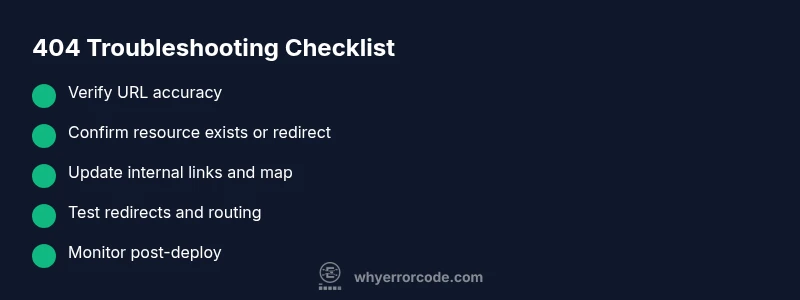
- Verify the URL, including protocol, domain, and path. 2) Confirm the resource exists or has a valid redirect. 3) If the resource moved, add a 301 redirect to the new URL. 4) Update internal links and site maps to reflect the current structure. 5) Validate server routing rules to ensure correct path resolution. 6) Monitor traffic to ensure the fix holds and no new 404s appear.
How to prevent 404s in ongoing development and deployment
Proactively prevent 404s by maintaining a robust redirection strategy, auditing links during content migrations, and keeping an up-to-date sitemap. Implement automated checks in CI/CD pipelines to catch broken links before deployment and monitor live traffic for 404 spikes. Use analytics to identify the most frequently hit 404s and prioritize those pages for repair. Transparent user-facing 404 pages with search and navigation reduce bounce and preserve trust.
Steps
Estimated time: 60-90 minutes
- 1
Reproduce the 404
Attempt to load the exact URL from multiple devices and networks. Record the exact URL, the user path, and the timestamp. This helps confirm whether the issue is isolated or widespread.
Tip: Capture a screenshot and note the response headers for later analysis. - 2
Check URL correctness
Ensure the URL matches the actual resource path. Look for common typos, incorrect case, or missing file extensions. If the URL is dynamic, verify query parameters are valid.
Tip: Test with and without trailing slashes to identify routing quirks. - 3
Verify resource existence
Confirm the target resource exists in the file system or CMS. If content was moved, locate the new location or determine if it was deleted.
Tip: If you must remove content, consider a controlled redirect flow instead of a hard delete. - 4
Implement redirects when needed
Set up a 301 redirect from the old URL to the new one if the resource moved. Ensure the redirect chain is short and accessible. Test the redirect by following the original link.
Tip: Avoid redirect loops; verify the final destination returns a 200. - 5
Update links and sitemaps
Fix any broken internal links, update the sitemap, and submit changes to search engines if applicable. This prevents future hits on stale URLs.
Tip: Use a crawler tool to verify all internal links after changes. - 6
Monitor and verify
After applying fixes, monitor traffic for the affected URLs and verify that 404s drop to zero or a minimal, acceptable level. Document lessons learned.
Tip: Set up alerts for sudden 404 spikes to catch regressions early.
Diagnosis: User reports 404 Not Found when accessing a resource
Possible Causes
- highBroken or moved resource (most common)
- mediumIncorrect URL or misspelling
- lowBroken internal links or routing issues
Fixes
- easyVerify the URL for typos and trailing slashes
- easyCheck if the resource exists or has a valid redirect
- mediumUpdate internal links and implement 301 redirects where appropriate
Frequently Asked Questions
What causes a 404 error?
A 404 error occurs when the server can’t find the requested resource. This can happen due to moved or deleted content, misspelled URLs, or broken internal links. It’s important to verify the resource path and redirect if necessary.
A 404 happens when the page can’t be found. Check the URL, confirm the resource exists, and set up a correct redirect if it moved.
Is a 404 always a broken link?
Not always. A 404 can result from content removal, URL errors, or routing changes. It can also happen due to issues in API endpoints or misconfigured rewrites.
404s can come from broken links or moved content; verify path and redirects to be sure.
What’s the difference between 404 and 410?
404 means the resource could not be found but may exist in the future. A 410 indicates the resource is gone permanently and will not return. Treat 410 links with explicit redirects.
404 says not found now, might return. 410 means it's gone for good.
Should I build a custom 404 page?
Yes. A well-designed 404 page helps users recover by offering navigation to popular sections, a search box, and a clear path to resolve the issue. Avoid exposing server details.
A custom 404 page keeps users engaged and guides them back to useful parts of the site.
How much can fixing 404s cost?
Costs vary by scope but fixes typically involve time for auditing links, implementing redirects, and updating content. For small sites, expenses are mostly labor; for large sites, tool-assisted crawlers and professional audits may be needed.
Costs depend on scope; many fixes are labor-based, with potential tool and audit costs for larger sites.
Watch Video
Top Takeaways
- Act quickly to restore navigation paths for users
- Prioritize fixing broken links and redirects
- Document fixes to prevent future 404s
- Use friendly 404 pages with guidance to continue browsing
- Monitor for recurring 404 spikes and act fast