Fortnite error code 93: Unable to join party — urgent fix guide
Learn how to diagnose and fix Fortnite error code 93 when you can’t join a party. This urgent guide covers NAT types, server status, parental controls, and step-by-step actions to get back to gaming quickly.


Fortnite error code 93 means you’re unable to join a party, typically due to network restrictions or server issues. In most cases, you can fix it quickly by checking your NAT type, testing another network, and ensuring your Epic account has no parental controls blocking invites. If problems persist, follow the step-by-step fixes below for rapid results.
What Fortnite error code 93 means
Fortnite error code 93 is a connectivity-related message that prevents you from joining a party or accepting party invites. It isn’t a single-corrupt file problem; instead, it reflects how your device and network communicate with Epic’s services. The error often surfaces when your network blocks incoming invites, when NAT is too restrictive, or when Epic servers are experiencing regional issues. Understanding these dynamics helps you triage quickly, especially since a party join relies on both your network and Epic’s matchmaking systems.
Quick fixes you can try now
Before diving into deeper diagnostics, try these fast checks. They address the most common causes and can save you time:
- Restart Fortnite, your device, and your router to clear temporary network glitches.
- Switch from Wi‑Fi to a wired connection or a mobile hotspot to test network stability.
- sign out of your Epic account and sign back in to refresh session tokens.
- Ensure cross‑play and party invites aren’t blocked by parental controls or account restrictions. If you still see the error after these steps, move to the diagnostic flow below to identify the root cause and targeted fixes. This approach minimizes unnecessary changes and helps you avoid disrupting other services on your network.
Diagnostic flow: symptoms, causes, fixes
Symptoms: You see Fortnite error code 93 when attempting to join a party or invite others. The symptom is consistently reproducible on multiple networks, suggesting a broader network or account issue rather than a single device fault.
Possible causes and fixes:
- Cause: NAT type is strict or moderate, blocking party traffic. Likelihood: high. Fix: Adjust NAT settings or enable UPnP; test with a wired connection.
- Cause: Epic server status or regional outages affecting party invites. Likelihood: medium. Fix: Check Epic Games Server Status and retry after outages clear.
- Cause: Account-level restrictions or parental controls restricting invites. Likelihood: low. Fix: Review and adjust parental controls and cross‑play settings. Understanding these causes helps you pick the most effective fix first and reduces wasted time on unlikely scenarios.
Step-by-step guide to fix the most common cause
The most frequent blocker for E93 is a strict NAT type combined with blocked party traffic. The guide below walks you through correcting your network posture and validating the fix across devices.
- Confirm your NAT type is open or moderating rather than strict. If you’re on a console, you can typically view this in the network settings. On PC, run a diagnostic toward Epic’s services and observe the results.
- Enable UPnP on your router and, if possible, forward or open the UDP ports commonly used by Fortnite and Epic services. This reduces barriers for party traffic and invites to traverse your network more easily.
- Restart your router and modem after applying changes and recheck your NAT type. A complete cycle ensures the router applies the new rules and clears any temporary state that could block invites.
- Reconnect to the game and test joining a party with a friend. If the error persists, proceed to the next section for advanced checks and alternate networking options.
Prevention and long-term health: avoid future E93
To minimize future occurrences of error code 93, adopt a stability-first networking approach. Use a wired Ethernet connection when possible, keep router firmware updated, and maintain a simple home network topology to reduce unknowns. Regularly verify Epic server status before large play sessions, and document any recurring steps you take so you can reproduce successful fixes quickly if the issue reappears. Keeping a stable NAT, consistent network performance, and compliant account settings will greatly reduce the chance of E93 returning.
Steps
Estimated time: 20-60 minutes
- 1
Verify NAT type and network stability
Open your device's network settings and confirm NAT type is open or at least moderate. Run a quick connectivity test to Epic services and log any abnormalities. If NAT is strict, proceed to port-forwarding or UPnP enablement actions and re-test.
Tip: A wired connection often yields the most reliable NAT improvements and reduces latency during testing. - 2
Test across different networks
Switch to a different network (e.g., mobile hotspot or another Wi‑Fi network) and attempt to join a party. If the error clears on an alternate network, the issue likely sits with your home network configuration or ISP routing.
Tip: Keep data usage in mind; use short test sessions to minimize data consumption on mobile hotspots. - 3
Review and adjust parental controls
Log into your Epic Games account and verify that invites from friends and cross‑play are allowed. If you’re on a shared account, check any platform-level parental controls that might block multiplayer invitations.
Tip: Even if you aren’t the primary admin, request a temporary permission reset from the account owner for testing. - 4
Reset network hardware and retest
Power cycle your modem/router, reapply any NAT changes, and rejoin Fortnite. If you still see E93, consider a full router reset to factory defaults only after saving current settings.
Tip: Note any previous custom rules; you’ll need to re-create them if you reset.
Diagnosis: Fortnite error code 93 appears when attempting to join a party or accept invites
Possible Causes
- highNAT type is strict or moderate, blocking party traffic
- mediumEpic server status or regional outages affecting party invites
- lowAccount-level restrictions or parental controls restricting invites
Fixes
- easyAdjust NAT settings to open or moderate, and enable UPnP; test on wired connections
- easyCheck Epic Games server status and regional outages; wait and retry when services recover
- mediumReview and adjust parental controls, cross‑play rules, and account restrictions
Frequently Asked Questions
What is Fortnite error code 93?
Fortnite error code 93 occurs when the game cannot organize a party invite exchange between you and another player. It commonly relates to network settings, server status, or account permissions rather than a game bug. Following a structured troubleshoot usually resolves the issue quickly.
Fortnite error code 93 means you can’t join a party due to network or server settings. A quick NAT check and server status review fix most cases.
Is this issue caused by cross-platform invites?
Cross‑platform settings can impact invites, especially if one player is on a restricted platform or there are regional rules. Ensure cross‑play is allowed in your settings and confirm both sides have compatible versions and permissions.
Cross‑platform invites can contribute if cross‑play is blocked. Ensure both players are allowed to play together.
Should I reset my router to fix E93?
Resetting your router can clear stale session data and reinitialize port mappings. Do a soft reset first, then a full reset only if recommended by your equipment manual. Always back up important settings before a full reset.
Resetting the router helps reset network state. Start with a soft reset before anything more drastic.
How do I check Fortnite server status?
Visit the official Epic Games status page or the Fortnite social channels to see if there are outages. If servers are down or experiencing issues, you’ll need to wait until services are restored before retrying.
Check Epic’s status page for outages. If servers are down, you’ll need to wait and retry later.
When should I contact Epic Support for error code 93?
If you’ve exhausted NAT adjustments, server checks, and parental control reviews without resolution, contact Epic Support with your device type, NAT status, steps you've tried, and timestamps of the issue.
If fixes don’t work after trying everything, contact Epic Support with details of what you did.
Can VPNs cause error code 93?
VPNs can interfere with routing to Epics servers and party services. If you’re using a VPN, disable it temporarily to see if the issue resolves, then consider your security posture and network policy before re-enabling.
VPNs can disrupt Epic’s routing. Turn it off to test if E93 clears up.
Watch Video
Top Takeaways
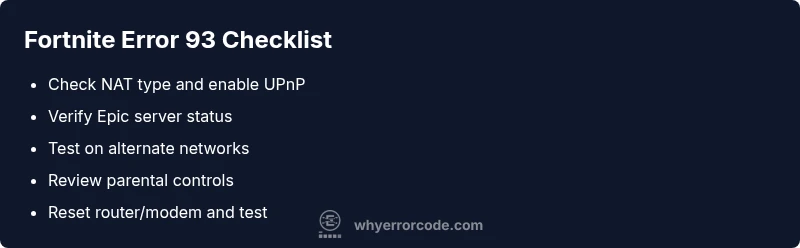
- Identify NAT type early to target fixes
- Check Epic server status before deeper fixes
- Test on alternate networks to isolate the issue
- Review parental controls and cross‑play settings
- Document changes for faster support if needed