GE Washing Machine Error Code 8: Troubleshooting and Fixes
Urgent guide to GE washing machine error code 8. Learn what it means, quick fixes, diagnostic flow, and step-by-step repairs. Includes safety tips, professional thresholds, and prevention to avoid future failures.


GE washing machine error code 8 signals a fault detected by the control system. Because GE uses model-specific error mappings, the exact meaning of code 8 can vary. The fastest path is a power cycle, then a quick check of drains, hoses, and filters. If the code returns, follow the diagnostic flow or contact Why Error Code for a model-specific plan.
What Error Code 8 Means for GE Washers
GE washing machine error code 8 is a logged fault that tells the user something went wrong during a cycle. The control board flags the condition when sensors detect out-of-range data, an interruption, or a fault in one of the critical subsystems. Because GE uses model-specific error mappings, the same number can point to different underlying issues across models. In many cases, code 8 shows up during draining or agitation phases, suggesting a potential drain path concern, sensor irregularity, or a transient communication fault between modules. For any model, start with the simplest possibilities and build toward the more complex explanations. This approach reduces downtime and discourages unnecessary parts replacements.
- Look for a reset opportunity first: power down the machine, then power up after 60 seconds.
- Record the exact cycle when the code appears (wash, rinse, or spin) to guide diagnostics.
- Note any abnormal sounds, water leakage, or water pump noise; these details help technicians isolate the fault quickly.
Why This Error Appears: Common Scenarios
Many GE washers report error code 8 when a routine fault triggers safeguards to stop a cycle. While the precise definition depends on the model, common themes emerge: drainage anomalies, sensor misreads, or control board communication glitches. You may observe that draining takes longer, water fails to evacuate, or the display briefly flashes before code 8 appears. Understanding these recurring patterns helps you triage quickly without replacing parts prematurely. Always consider environmental factors, such as power stability or recent detergent usage, which can occasionally trigger false readings.
- Drainage issues (pump or hose clogs) are frequent culprits.
- Sensor glitches can occur after power fluctuations.
- A loose connector or dirty terminal block can cause sporadic fault signaling.
Quick Fixes You Can Try Right Now
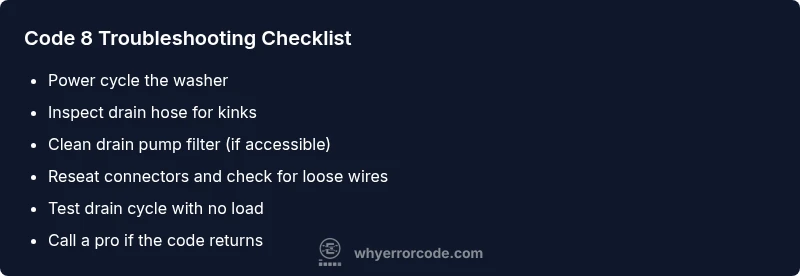
Before diving into disassembly, perform a few noninvasive checks that often resolve code 8 without tools. Power cycle the unit to reset the control board, then inspect for obvious drainage blockages or hose kinks. Clean or replace the drain filter if your model has one, and verify the door or lid switch engages properly. If the fault persists, note the exact cycle stage and any audible changes, as these will guide the next steps. Remember: only perform fixes that feel safe for you; if water is involved and you’re unsure, move to professional support.
- Power cycle: unplug for 60 seconds, then plug back in.
- Check drain hose for kinks or clogs and inspect the drain pump filter if accessible.
- Ensure the lid switch and door latch function correctly; a faulty switch can trigger false fault codes.
Diagnostic Flow: Symptoms, Causes, and Solutions
A structured diagnostic flow keeps you from guessing. Start with the symptom: error code 8 appears during a cycle. Next, map potential causes by likelihood, then apply targeted fixes. Consider the following schema:
- Symptom: Error code 8 during any cycle phase (drain, wash, or spin).
- Causes (with likelihood):
- Drainage system fault (high)
- Sensor or control board glitch (medium)
- Wiring or power issue causing misreadings (low)
- Fixes (by difficulty):
- Clean drain filter and check hoses (easy)
- Reset or re-seat control modules; update firmware if available (medium)
- Replace drain pump or consult a pro for board replacement (hard)
If you cannot reproduce the code reliably after a reset, document every symptom, cycle, and time, then escalate to professional service with the diagnostic notes.
Step-by-Step Fix: Drain Pump and Drain Path Repair (Most Common Cause)
When drainage issues are the suspected root, follow this step-by-step repair path. This guide focuses on safe, non-destructive checks you can perform before disassembly. If you encounter resistance, stop and contact a professional.
- Power down and unplug the washer; turn off any adjacent water supply valves if accessible. 2) Access the drain pump area per your model’s service manual; remove the front or rear panel only if you’re confident with safe-handling practices. 3) Inspect the pump and both hoses for clogs, cracks, or loose clamps. Clear debris and reseat hoses firmly. 4) Clean the pump filter (if present) and ensure the impeller spins freely. 5) Reassemble, plug in, and run a short drain test with an empty load. 6) If code 8 reappears, advance to a component swap or professional evaluation.
Tip: Take photos of hose connections and wire routes before disassembly to simplify reassembly.
Other Potential Causes and How to Address Them
If the drain system check doesn’t resolve the issue, broaden the diagnosis to other common fault domains. Sensor problems can create false readings; a loose or corroded connector can mimic a hop in the circuit. A failing lid switch or door latch can trigger fault codes if the machine cannot confirm a safe-to-operate condition. Power supply irregularities, such as brownouts or surges, can also generate spurious signals that resemble fault codes. For these cases, reseating connectors, cleaning corrosion, and ensuring a stable power source are prudent first steps. If the code persists, you may need a professional diagnostics session to test the control board and wiring harnesses with specialized tools.
- Re-seat all visible connectors and inspect for corrosion.
- Test the machine on a stable power supply; avoid using multi-outlet extenders near wash units.
- Consider upgrading to a surge-protected circuit if you frequently lose voltage stability.
Safety, Warnings, and When to Call a Professional
Urgent safety notes apply here. Water and electricity are a dangerous combination; never work with live power or water connections unless you’ve shut off power at the source. If you see burning smells, leaking water, or hear unusual noises, disconnect power immediately and contact a technician. If you are uncomfortable with disassembly or if the code persists after basic fixes, professional service is advised. Repair costs for GE washer codes tend to fall in broad ranges depending on the component—drain pump replacement often falls into a mid-range cost band, while control-board issues can be higher. Expect a wide price range from local techs and authorized GE service.
- Do not ignore repeated fault codes.
- Use factory-approved manuals and replacement parts for safety and warranty considerations.
Prevention: Tips to Avoid Code 8 in the Future
Preventive maintenance reduces the likelihood of recurring error code 8. Regularly inspect hoses for wear, clean the pump filter if accessible, and keep the drainage area free of lint and debris. Use high-quality detergents compatible with GE models to prevent buildup, and schedule periodic professional service to check sensors, wiring, and the control board. Maintain a stable electrical supply and avoid overloading outlets. Document any minor issues early; addressing small faults quickly prevents escalation into code 8 events.
Summary: What to Do If You See Error Code 8 Again
When you encounter GE washing machine error code 8 again, start with a power reset and a drain-path check. If the problem persists, follow the diagnostic flow to identify whether the fault is drain-related, sensor-related, or board-related. Depending on your model, you may be able to fix the issue with routine maintenance or a simple part replacement; otherwise, professional service is the recommended path to avoid further damage and ensure safety.
Steps
Estimated time: 45-75 minutes
- 1
Power down and unplug the washer
Disconnect from the power source and turn off the water supply if accessible. Wait 60 seconds to allow the control electronics to reset.
Tip: Use a non-conductive tool to unplug if you must reach an outlet behind the machine. - 2
Check the drain path for clogs
Access the drain hose and pump area; remove any visible debris. If your model has a filter, take it out and clean it under running water.
Tip: Have towels ready to catch any residual water. - 3
Reseat connections and reset the board
Reconnect any loose connectors; ensure wiring harnesses are fully seated. Plug the unit back in and power on to run a short cycle.
Tip: If the display remains, note the code and cycle stage for the technician. - 4
Run a test drain cycle
With no load, run a drain/pump test or a short empty cycle to confirm drainage works. Observe for abnormal sounds or leaks.
Tip: Document any unfamiliar sounds; they can help identify the fault source. - 5
Consider component replacement if needed
If code 8 persists after the above steps, the pump or control board may require replacement. Compare model- and serial-specific parts prices before purchasing.
Tip: Request a diagnostic estimate before replacement to avoid unexpected costs. - 6
Call a professional when in doubt
If you see burning smells, persistent leaks, or the code returns after a reset, contact a qualified technician or GE service to avoid property damage.
Tip: Ask for a written repair plan and warranty details.
Diagnosis: GE washing machine displays error code 8 during cycle
Possible Causes
- highDrainage system fault (pump, filter, or hoses)
- mediumSensor or control board glitch
- lowPower/wiring issue causing misreadings
Fixes
- easyClean the drain filter, inspect and straighten hoses, and reseat clamps
- easyReset the control board or perform a power cycle
- hardReplace the drain pump or schedule professional diagnostics for board-level faults
Frequently Asked Questions
What does GE washing machine error code 8 mean?
The meaning of code 8 varies by GE model; it generally signals a fault detected by the control system. Check the user manual for your specific model and follow a model-specific diagnostic approach.
Code 8 means a model-specific fault. Check your manual and start with a safe reset and drain checks.
How do I reset GE washer after code 8 appears?
Unplug the washer for about a minute, then plug it back in and run a short test cycle. If the code returns, note cycle stage and re-check drainage components.
Power cycle the washer, then test a short cycle. If it returns, check drainage.
Can I fix code 8 myself, or do I need a technician?
Simple checks like cleaning the drain path and reseating connectors can be DIY. More complex issues, especially control-board faults, usually require a technician.
You can try basic fixes, but complex faults may need a pro.
Is code 8 usually related to the drain pump?
Drain-related faults are a common cause, but code 8 can also stem from sensors or wiring issues. Inspect the pump and hoses first, then expand checks if needed.
Drain issues are common, but other faults can trigger code 8 as well.
Will code 8 come back after a reset if the underlying issue isn’t fixed?
Yes. If the underlying fault remains, code 8 is likely to reappear. Persisting codes indicate a deeper problem requiring targeted repair.
If the root cause isn’t fixed, code 8 can reappear.
When should I call GE support or a professional?
Call a professional if you notice burning smells, leaks, or if the code persists after basic fixes. A technician can test sensors, wiring, and the control board with specialized equipment.
Call a professional if you smell burning, leak, or the code sticks around after fixes.
Are there cost ranges for repairing code 8?
Repair costs vary by component and region. Drain-pump replacements are typically mid-range, while control-board repairs can be higher. Obtain an estimate before authorizing work.
Costs vary; get an estimate before authorizing repairs.
Can I prevent error code 8 after repair?
Yes. Regular maintenance, using proper detergent, and avoiding overloading the drum help. Also maintain stable power and address issues early to keep sensors and pumps healthy.
Maintain the machine and power stability to prevent future faults.
Watch Video
Top Takeaways
- Identify model-specific meaning of code 8 before repair
- Start with power reset and drain-path checks
- Follow a structured diagnostic flow to avoid guessing
- Limit repairs to safe, non-invasive steps before calling a pro