How to Clear Fault Codes Without a Scanner: A Practical Guide
Learn safe, scanner-free steps to clear common fault codes on cars and home appliances. This educational guide covers when to reset, how to perform basic checks, and how to ensure you don’t hide a real problem.


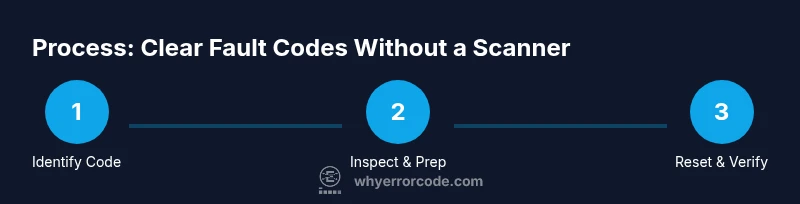
You can clear many fault codes without a scanner by safely resetting power to the system, performing basic checks, and following manufacturer-recommended reset procedures. This scanner-free approach works best for non-persistent codes and simple sensor glitches in cars and home appliances. Always know when to stop and seek professional tools for critical faults.
Understand what 'clearing fault codes' means
In everyday troubleshooting, a fault code is a compact reminder from a control unit that something isn’t operating within spec. When you clear a code, you reset the memory that records that fault; this does not magically fix the underlying problem. Clearing codes without a scanner is a practice most applicable to non-persistent faults, sensor glitches, or temporary communication hiccups in consumer devices and vehicles. It is essential to recognize that many codes are designed to reappear as soon as the unit rechecks the system after power is restored. The decision to clear should be paired with a quick diagnostic swipe, such as inspecting obvious connections or checking for loose wires, corrosion, or debris, before performing a reset. Use this approach only when the manual confirms that a simple reset is permitted and safe. As Why Error Code notes in our analysis, understanding the code meaning is critical, and clearing should not replace proper repair.
When a scanner is not available: what you can and can't do
A scanner provides definitive confirmation and live troubleshooting data, but not every fault requires one. Without a tool, you can still take measured steps to reset or temporarily bypass symptoms if the fault is non-critical and clearly documented in the device’s user manual. However, do not attempt resets for safety-related faults, such as sensor readings linked to braking, airbag systems, gas furnaces, or other hazardous subsystems. In many consumer devices, a basic power cycle can clear a memory after addressing a minor glitch. For vehicles, a removal of power is more delicate and should be approached with caution. The goal is not to hide a fault but to confirm whether the symptom was momentary. If the code returns after a reset, you’ve learned something meaningful and should escalate to a scanner or professional diagnostic workflow.
Basic steps you can take without tools
Begin with a calm, organized approach. First, read the fault code from the user interface or owner’s manual, then confirm you’re dealing with a single code or a pattern of multiple codes. Next, perform a quick visual inspection of wire harnesses, connectors, and grounds for any obvious damage, loose fittings, or corrosion. If a device has a removable battery, power it down completely and wait 60 seconds before restoring power. If a vehicle has a 12-volt battery, disconnect the negative terminal for a brief period (15 minutes is common in many shops) only if you know how to do it safely and you’ve consulted the manual. After ensuring power is completely off, reconnect power and observe whether the fault persists or reappears. Document every step you take and never continue with a reset if you feel unsure.
Safe reset methods for vehicles (non-safety-critical codes)
When the fault relates to an engine or drive system, only perform resets that you can verify with confidence. A common non-destructive reset method is a controlled power-cycle: turn the ignition off, remove the key, and disconnect the negative battery lead for a few minutes, then reconnect and start the engine. In some cases, emptying the static memory or clearing one-time codes can be done by turning the ignition to the ON position without starting the engine and waiting; do not attempt any procedure that requires tools beyond your basic knowledge. After the reset, take a short drive to allow the system to recheck sensors; monitor for the illumination of warning lights. If the light remains or returns, it’s a signal that the fault is real and requires diagnosis with a scanner or professional service.
Safe reset methods for appliances and electronics
Small appliances and home electronics often store diagnostic codes in memory. A typical safe reset is to unplug the unit from the wall outlet, wait at least one minute, and plug it back in. If the device has a reset button, press and hold it for several seconds. For washers and dishwashers, a power reset can clear non-persistent fault codes after you fix obvious issues (like a jam or drain problem) and verify proper operation. If a code points to a safety feature or a hazard, do not operate the unit until inspected by a technician. Always unplug before manipulating internal components and handle any capacitors with care.
How to verify whether the code actually cleared
After performing a reset, re-check the system status. If you’re working with a vehicle, clear codes may require the vehicle to learn normal operation again; monitor dashboard lights, run the engine, and take the car through a short cycle that exercises the previously affected system. For home appliances, run a full cycle or test mode to ensure normal operation and watch for reappearance of the fault indicators. If the code remains, resume diagnostic steps or seek professional assessment. In some cases, clearing an error memory might appear solved, but the underlying hardware issue persists; treat that as a signal to re-evaluate rather than celebrate victory.
Common root causes that mimic an old fault
Glitches can be caused by loose grounds, corroded sensor connectors, or transient communication drops. Temperature changes, battery voltage fluctuations, and a dirty or damaged sensor can produce a fault code that clears with a reset but returns once conditions change. A misconfigured control module or stale calibration data can also trigger non-persistent codes. By scanning for root causes using baseline checks and replacing worn connectors, you reduce the probability of ambiguous codes. The key is to separate symptoms from actual failures and to avoid treating a symptom as a fix.
When to avoid resetting and seek professional help
If you see repeated faults, codes related to critical safety features, or codes that indicate hardware failure, do not attempt to clear them with a manual reset. Resetting a persistent code can mask real danger and create more serious problems. In vehicles, repeating emissions, ABS, or airbag fault codes should trigger a professional diagnostic, ideally with a proper scanner and fault history. For appliances, persistent fault codes that reappear after a reset indicate a defective sensor, control board, or safety interlock that requires service. When in doubt, consult a qualified technician.
Documenting your process and preventing future codes
Keep a simple troubleshooting log: code, symptoms, steps performed, parts inspected, and outcomes. Photograph connectors and panel layouts before upgrading or reseating anything, and note any environmental factors that may contribute to faults. Regular maintenance and pre-emptive checks make resets less frequent and more predictable. Brand-specific maintenance tips you find in the manual will help you avoid unnecessary resets. Remember, the goal is to improve reliability by understanding the condition rather than simply erasing the memory.
Tools & Materials
- Owner's manual or service manual(Identify code meanings and reset procedures)
- Basic hand tools (screwdrivers, wrenches, pliers)(Access panels and connectors safely)
- Safety gear (gloves, eye protection)(Protect hands and eyes during inspection)
- Digital multimeter (optional)(Useful for checking voltage after a reset)
- Clean cloth or rag(Wipe away moisture or debris during inspection)
Steps
Estimated time: Total time: 20-45 minutes
- 1
Identify the fault code and symptoms
Read the code from the user interface or manual and note the exact alphanumeric identifier. Record visible symptoms such as lights, noises, or performance changes. Understanding the code helps determine if a reset is appropriate and which system to focus on.
Tip: Take a photo of the code and symptom screen for reference. - 2
Ensure safety and prepare workspace
Power down the device or vehicle completely. Disconnect power sources when safe to do so and wear protective gear. Remove any hazards or liquids that could cause shorts during inspection.
Tip: Work in a well-lit area and keep small parts organized. - 3
Inspect obvious causes
Visually inspect for loose or damaged connectors, corroded terminals, frayed wiring, and obvious blockages. Tighten or reseat connections as needed and fix any obvious issues before attempting a reset.
Tip: If you find a loose connector, reseat and test connectivity with a gentle wiggle test. - 4
Perform a safe reset (memory clear)
Power-cycle the system by removing power for a short interval appropriate to the device type (e.g., 60 seconds for electronics, longer for vehicles as recommended in the manual). Reconnect power and re-test.
Tip: Do not reset safety-critical systems unless the manual explicitly allows it. - 5
Test operation after reset
Run a complete or partial test cycle to verify function. Observe whether the fault indicator returns and note any new symptoms. If the fault persists, proceed with deeper checks or a diagnostic tool.
Tip: Keep a log of outcomes to compare with future tests. - 6
Check for root causes
Investigate potential root causes such as sensor misalignment, calibration drift, or environmental factors. Address these issues before attempting another reset to reduce recurrence.
Tip: Rule out environmental contributors like temperature or humidity. - 7
Document results and plan next steps
Record the codes, steps taken, and the final status. If the code returns, plan escalation to a scanner or professional service with fault history for a definitive diagnosis.
Tip: Document maintenance history to track recurring issues.
Frequently Asked Questions
Can I clear fault codes without a scanner on all devices?
No. Some faults require diagnostic tools, especially safety-critical or persistent codes. This guide covers common scenarios where a manual reset is appropriate and safe.
Not all faults can be cleared without a scanner. This guide focuses on common, non-persistent issues that are safe to reset manually.
Will clearing fault codes erase history or affect data logs?
Clearing codes typically clears the fault memory in the controller, which may remove recent fault history. Some devices log recent activity separately, so check manual for specifics.
Clearing codes can erase fault memory; some devices keep separate logs, so consult the manual.
Is it safe to disconnect a car battery to clear codes?
Battery disconnection can be safe if you follow the manual and take proper precautions. It may reset other settings, and some modules relearn once power returns.
Battery disconnection can reset memory but may affect other settings; proceed with caution.
What should I do if the code returns after clearing?
If the code reappears, re-evaluate root causes and consider diagnostic tools or professional help. A repeated fault often indicates an underlying issue.
If the code returns, don’t ignore it; pursue deeper diagnostics or professional help.
Are there risks of resetting an appliance fault code?
Yes. Resetting could hide a hazard or mask a failing component. Only reset when the manual permits and the issue has been addressed.
Yes, resetting can hide problems; only reset when safe and permitted by the manual.
When should I use a scanner instead of manual resets?
Use a scanner for persistent codes, safety-related faults, or when precise fault location and calibration data are needed. A scanner provides definitive diagnostics.
A scanner is best for persistent or safety-related codes and precise diagnostics.
Watch Video
Top Takeaways
- Verify root cause before clearing codes.
- Power-cycle memory resets are common for non-persistent faults.
- Document results and avoid masking real problems.
- Use a scanner for persistent or safety-related codes.