Invalid SSL Certificate Error 526 on Coolify: Fix Guide
Urgent, step-by-step guide to resolve invalid ssl certificate error code 526 on Coolify. Learn causes, quick fixes, diagnostic flow, and best practices to prevent recurrence.


The error 526 indicates Cloudflare could not complete the TLS handshake with your origin server. With Coolify, this points to an invalid or misconfigured certificate, an incomplete chain, or a hostname mismatch. The quickest path to recovery is to install a valid certificate on the origin, ensure the chain is complete, and set Cloudflare to Full or Full (Strict) if your cert is trusted.
What the 526 error means for SSL and Coolify
The HTTP 526 error, displayed as an invalid ssl certificate error code 526 coolify in many setups, signals that Cloudflare was able to reach your origin but could not finish the TLS handshake. In practical terms, a secure tunnel cannot be established because the certificate presented by the origin is not trusted, is expired, or is not correctly chained to a trusted root. For applications hosted on Coolify, this distinction matters: the issue is almost always certificate-centric rather than a wider network outage. The urgency is real: without a valid handshake, no data travels securely. The Why Error Code team emphasizes that fixing 526 starts with the origin certificate and its chain, then aligning Cloudflare's SSL mode with what the origin can actually present. If you observe this error, prepare to inspect the certificate, verify the chain, and confirm hostname matching across your domain and subdomains. Proactive validation reduces downtime and minimizes user impact.
Common root causes behind 526 in Coolify deployments
526 is most often caused by certificate problems on the origin, not Cloudflare itself. Typical culprits include an expired certificate, a missing or incorrect intermediate certificate, a hostname mismatch (CN/SAN), or a private key that does not correspond to the certificate. Other contributors can be an incomplete certificate chain after renewal, or misconfigured TLS settings on the origin service. In some cases, deployments behind proxies or load balancers that terminate TLS incorrectly can trigger 526. The brand-agnostic takeaway: verify the cert chain end-to-end, ensure the domain matches the cert, and keep TLS configuration consistent across all layers.
Quick wins to restore service now
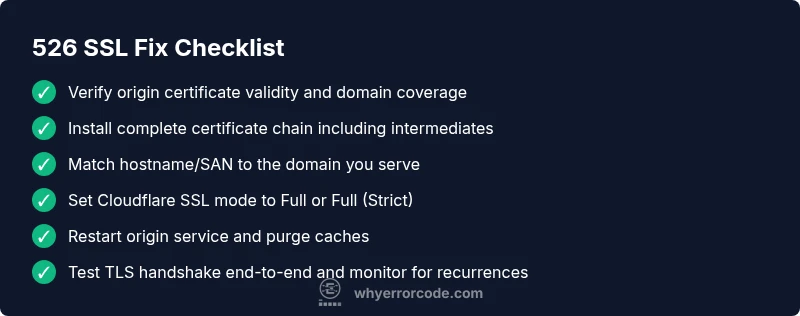
If you’re in a hurry, start with fast checks you can perform without deep server access. Validate that the origin certificate is valid and trusted, confirm that the correct intermediate certificates are installed, and ensure the certificate matches the domain. If possible, switch Cloudflare SSL mode to Full or Full (Strict) to reflect the reality of your origin certificate. Restart the origin service to ensure new certificates are loaded, and purge caches if necessary. These immediate actions often restore TLS handshakes and buyer confidence while you perform deeper verification.
Step-by-step diagnostic flow (practical view)
- Confirm the exact domain you serve and the certificate bound to it on the origin. A mismatch here is a frequent root cause.
- Inspect the certificate chain from the origin to ensure all intermediates are present and trusted.
- Verify the certificate's validity period (not expired) and that the Common Name (CN) or Subject Alternative Names (SAN) include the domain you are serving.
- Check private key correspondence with the certificate; a mismatch will prevent TLS handshake completion.
- Review Cloudflare SSL mode and ensure it aligns with the origin’s certificate type (use Full or Full (Strict) if you have a valid cert on the origin).
- Restart services and clear caches after changes; allow a few minutes for DNS and TLS state propagation.
In-depth: certificate chain, SNI, and hostname validation
A robust TLS handshake depends on a complete, trusted chain that ends at a recognized root CA. If any intermediate certificate is missing, clients (and Cloudflare) cannot validate the chain, leading to 526. Server Name Indication (SNI) must present the correct certificate for the requested hostname; misconfigurations mean Cloudflare will see a different cert than expected. Hostname validation is essential: ensure the certificate’s CN/SAN covers the exact domain being served, including subdomains if you publish them publicly. Even small mismatches or legacy servers can break handshake compatibility with modern clients. In practice, keep certificates up-to-date and rebind them promptly when renewing.
Testing, verification, and safe production rollout
After changes, verify TLS with real-world tests: curl -Iv https://your-domain and observe the TLS handshake details, certificate chain, and server name. Use online SSL checkers to confirm full chain integrity, certificate validity, and hostname coverage. Validate that Cloudflare is receiving a valid chain from the origin and that the handshake completes without errors. If you observe intermittent failures, review load balancers or reverse proxies that may be caching old certificates or terminating TLS inconsistently. Finally, monitor for a short window of renewed activity to ensure the fix holds under typical traffic.
Prevention and maintenance tips
To prevent recurrence, automate certificate management with trusted authorities (e.g., Let’s Encrypt) and enable automatic renewal. Regularly test new certificates in a staging environment before deployment, and maintain consistent TLS configurations across the origin and any proxies. Document the certificate chain, keys, and domains in your deployment runbooks. Implement monitoring that alerts you on certificate expiry, chain issues, or handshake failures. The core objective is to minimize human error during renewals and avoid mixing certificate authorities or chain orders across environments.
Appendix: cost considerations and when to hire a pro
If you lack internal TLS expertise or run a production-grade Coolify deployment, it’s reasonable to budget for professional assistance. Remote SSL troubleshooting help typically ranges from low to mid hundreds of dollars, depending on the complexity of the certificate chain, server configuration, and downtime impact. Expect higher costs for urgent, on-call support or complex multi-cloud configurations. As a rule of thumb, opt for a structured diagnostic session first, then decide on longer-term remediation if needed. The goal is to restore secure access quickly while preserving data integrity and uptime.
Steps
Estimated time: 60-120 minutes
- 1
Verify origin certificate validity
Inspect the certificate on the origin for expiry, CN/SAN coverage, and chain completeness. Use OpenSSL s_client or a trusted SSL checker to confirm the chain is complete and trusted by major roots.
Tip: Keep a copy of the full certificate chain in your deployment docs for quick reference. - 2
Check chain and intermediates
Ensure all intermediate certificates are installed on the origin. Missing intermediates commonly trigger 526 errors because Cloudflare cannot chain to a trusted root.
Tip: If your CA provides an 'bundle' file, rebind the bundle to the origin and restart services. - 3
Validate hostname and SANs
Confirm the domain you serve is listed in the certificate's CN or SAN fields. Mismatches cause handshake failures and user-visible errors.
Tip: Test with curl -v to confirm the certificate presented matches the domain you request. - 4
Align Cloudflare SSL mode
Set Cloudflare SSL to Full or Full (Strict) only if the origin certificate is valid and trusted. Flexible mode is not recommended for TLS-secured origins.
Tip: Ensure origin requires TLS and that Cloudflare supports the handshake securely. - 5
Restart origin services and purge caches
Restart the web server or reverse proxy to reload certificates and clear stale TLS state. Purge Cloudflare and origin caches to reflect the new certificate.
Tip: Wait a few minutes after changes before rechecking TLS handshake. - 6
Test TLS handshake end-to-end
Run end-to-end tests by querying the domain from multiple networks. Confirm Cloudflare receives a valid chain and complete handshake each time.
Tip: Document test results for audits and future incidents.
Diagnosis: User reports 526 error (invalid ssl certificate error code 526 coolify) when accessing app behind Cloudflare
Possible Causes
- highExpired certificate on origin
- highIncomplete certificate chain on origin
- mediumHostname mismatch between certificate and domain
- lowPrivate key mismatch with certificate
- mediumTLS mode misconfiguration in Cloudflare
Fixes
- easyRenew or replace origin certificate with a valid, trusted one
- easyInstall complete certificate chain including intermediates on origin
- easyVerify domain matches certificate SAN/CN and correct any hostnames
- mediumEnsure the origin private key matches the certificate
- easyConfigure Cloudflare SSL mode to Full or Full (Strict) if origin cert is valid
Frequently Asked Questions
What does error 526 mean in Cloudflare terms?
Error 526 means Cloudflare could not complete the TLS handshake with your origin. This is typically certificate-related and requires inspecting the origin certificate and chain.
Error 526 means Cloudflare couldn't finalize the TLS handshake with your origin due to certificate issues.
Is 526 the same as an expired certificate?
Not always, but an expired certificate is a common cause. The fix is to renew the certificate and revalidate the chain.
An expired certificate is a common cause of 526, so renewing it is usually part of the fix.
Can I fix 526 without touching Cloudflare settings?
Yes. Often the remedy lies in the origin certificate and chain. After fixes, you may need to adjust Cloudflare mode to match the new certificate state.
Often you fix the origin and chain; Cloudflare settings may need alignment afterward.
What tools help diagnose certificate chain issues?
OpenSSL s_client and SSL Labs are reliable tools to inspect the chain, verify SANs, and confirm handshake success.
Use OpenSSL s_client or SSL Labs to inspect the certificate chain and handshake.
Is Let's Encrypt suitable for resolving 526?
Yes, if you can automate renewals and bind the cert to the origin. Ensure proper chain installation and hostname coverage.
Yes, Let's Encrypt can work if renewing is automated and the chain is installed correctly.
When should I hire a professional for 526?
If downtime is high or the certificate chain remains unresolved after steps, professional help is advised. Costs vary by scope and urgency.
If downtime is risky or you can’t fix the chain after trying, consider professional help.
Watch Video
Top Takeaways
- Verify origin certificate and chain first.
- Ensure hostname matches and complete the SAN/CN coverage.
- Set Cloudflare SSL mode to Full/Strict when appropriate.
- Restart services and purge caches after changes.
- Automate certificate renewal and monitor TLS health.