What Is SSL Handshake Failed Error Code 525?
Discover what error code 525 means, its top causes, urgent fixes, and a practical step-by-step plan to restore TLS handshake between Cloudflare and your origin server.


Error 525 means Cloudflare could not complete the TLS handshake with your origin server, blocking secure connections. It answers the question: what is ssl handshake failed error code 525? The failure is usually due to certificate problems, a TLS/cipher mismatch, or a redirect loop. Quick fixes include validating the origin certificate, setting Cloudflare to Full or Strict mode, and ensuring compatible TLS versions.
What the 525 Error Means for Your Site
Error 525 is Cloudflare’s SSL handshake failure indicator: visitors are blocked before a secure connection is established. In plain terms, what is ssl handshake failed error code 525? It means Cloudflare could not complete the TLS handshake with your origin server, so no HTTPS session can be established. The handshake is the cryptographic negotiation that creates a trusted channel between client and server; if that negotiation fails, the browser cannot load the site, and Cloudflare shows the 525 error. According to Why Error Code, the root cause is almost always on the origin side—certificate problems, misconfigured TLS settings, or a redirect loop that torques the handshake in the wrong direction. Browsers will see a security warning or a generic outage page, but the underlying issue is a failed negotiation, not a simple DNS error. This matters because the fix is not about changing Cloudflare rules alone; you must ensure the origin can present a valid certificate and accept modern TLS connections. Start by validating that the origin certificate matches your domain, is not expired, and is trusted by browsers. If you overlook certificate problems, you’ll chase symptoms rather than the real fault.
Why Cloudflare Reports an SSL Handshake Failed (Error 525)
Cloudflare sits between users and your origin and negotiates TLS on every request. If the TLS handshake cannot complete, Cloudflare returns 525. The handshake involves several steps: client hello, server hello, certificate exchange, and key agreement. If the origin presents an invalid certificate, uses deprecated or unsupported ciphers, or refuses connections from Cloudflare’s IPs, the handshake stalls and fails. The result is a hard block: no content is delivered, and the user gets the 525 banner. Urgently, this means you should not assume it’s a simple DNS issue or a temporary outage. Why Error Code’s team notes that TLS configuration, including protocol versions and cipher suites, is a frequent culprit, and even small misalignments—such as a certificate chain missing an intermediate certificate—can trigger the failure. In many cases, toggling Cloudflare SSL mode (Full or Strict) and correcting the origin’s certificate chain resolves the problem quickly. If you’re using Flexible TLS or misconfiguring redirects, you’ll likely see repeated 525s until the TLS handshake can proceed without interference.
Common Causes of Error 525
- High: Origin certificate invalid or expired, or the chain is incomplete or mismatched with the domain. This is the most frequent trigger for 525.
- High: TLS protocol version or cipher suite mismatch between Cloudflare and the origin. If the origin supports only outdated ciphers while Cloudflare requires modern ones, the handshake will fail.
- High: Misconfigured server that refuses TLS connections from Cloudflare IPs or blocks TLS handshakes due to firewall rules.
- Medium: HTTPS redirects loops or conflicting redirect rules between the origin and Cloudflare that prevent a clean TLS handshake.
- Medium: SNI not properly configured on the origin, causing Cloudflare to present a certificate that the origin doesn’t recognize.
- Low: Changes in Cloudflare’s SSL settings without corresponding origin adjustments can temporarily trigger 525 until synchronization completes.
Quick Fixes You Can Try Now
- Validate that the origin certificate is valid, properly chained, and matches the domain. Reissue if necessary and install intermediates.
- Set Cloudflare SSL mode to Full or Strict (not Flexible) to ensure a secure end-to-end TLS path.
- Verify TLS versions and cipher suites supported by both Cloudflare and the origin; update the origin’s configuration to support at least TLS 1.2 or higher and modern ciphers.
- Check for HTTPS redirects that might create a loop or force non-TLS paths during handshake; remove conflicting rules.
- Ensure Cloudflare IP ranges are allowed by the origin firewall and WAF; temporarily whitelist Cloudflare if needed for testing.
- Use diagnostic tools (OpenSSL s_client, curl -v) to observe where the handshake fails and capture certificate details. If issues persist, contact your hosting provider for certificate and TLS review.
In-Depth Troubleshooting: How to Diagnose and Verify
A thorough check begins with a reproducible test path. Start by confirming DNS resolves to Cloudflare and that the origin is reachable on the TLS port (443). Inspect the origin certificate chain and ensure the root and intermediate certificates are trusted by clients. Then verify TLS configuration with tools like OpenSSL: openssl s_client -connect yourdomain:443 -servername yourdomain. Look for certificate errors, handshake messages, and supported cipher suites. Cross-check the TLS version negotiation with Cloudflare’s current settings. If you discover a misconfigured certificate chain, incorrect SNI handling, or outdated ciphers, fix these on the origin and re-test. Finally, re-check Cloudflare’s SSL mode, page rules (especially HTTPS redirect rules), and firewall settings to ensure nothing reintroduces a handshake failure.
Safety, Costs, and When to Call a Professional
Dealing with SSL/TLS misconfigurations can be technically demanding. If you’re unsure about certificate chain issues, server TLS settings, or firewall rules, it may be wise to enlist professional support. Cost ranges for professional TLS and certificate fixes vary widely based on scope and vendor, from minimal self-service costs to several hundred dollars for professional setup or certificate reissues. Some fixes are free if you handle them in-house, while others require hosting support or a cloud service provider, which can incur ongoing charges. Always document changes and keep backups before adjusting TLS configurations or certificates. If downtime persists after all standard fixes, seek vendor support or a security-focused consultant to audit TLS architecture and Cloudflare integration.
Steps
Estimated time: 1-2 hours
- 1
Verify DNS and Cloudflare status
Confirm that the domain resolves to Cloudflare and that the DNS records (A/AAAA) point to the correct IPs. Ensure the Cloudflare proxy is enabled (orange cloud) for the domain you are testing.
Tip: Use dig or nslookup from multiple networks to confirm DNS propagation. - 2
Check origin certificate validity
Examine the certificate presented by the origin during TLS handshake. Confirm it’s valid, not expired, and matches the domain. Verify the certificate chain includes all intermediates.
Tip: View the certificate with openssl x509 -in cert.pem -text -noout to inspect the subject and validity. - 3
Review TLS settings on origin
Ensure the origin supports TLS 1.2 or higher and uses a modern cipher suite. Disable old protocols that Cloudflare no longer supports.
Tip: Check server configs (nginx/apache) for ssl_protocols and ssl_ciphers directives. - 4
Verify SNI and host header handling
Make sure the origin is configured to accept TLS requests for the correct server name and that SNI is enabled.
Tip: If you’re using a multi-host certificate, confirm the correct host is bound in the certificate. - 5
Inspect redirects and HSTS
Look for redirect loops that may force HTTP or non-TLS paths, which can interfere with TLS handshakes. Review HSTS settings.
Tip: Temporarily disable conflicting redirects to isolate the issue. - 6
Test with TLS tooling
Run openssl s_client -connect domain:443 -servername domain to observe handshake details and certificate chain in real time.
Tip: Capture the handshake output; look for 'Certificate chain' or 'Verify return: ok'. - 7
Adjust Cloudflare SSL mode
Switch between Flexible, Full, and Strict to identify which setting matches your origin’s TLS configuration.
Tip: Prefer Full or Strict when possible, but only after origin TLS is confirmed valid. - 8
Whitelisting and firewall checks
Ensure Cloudflare IPs are allowed through any firewall or WAF on the origin. Test again after applying changes.
Tip: Document firewall rule changes and revert if they cause unintended exposure. - 9
Re-test and monitor
After applying fixes, clear caches and re-test from multiple networks. Monitor for recurrences and capture logs if issues persist.
Tip: Enable Cloudflare’s analytics to watch for TLS negotiation events.
Diagnosis: Cloudflare shows Error 525: SSL handshake failed when visiting the site.
Possible Causes
- highOrigin certificate invalid, expired, or misconfigured
- highTLS version or cipher suite mismatch between Cloudflare and origin
- mediumRedirect loops or conflicting HTTPS rules on origin
- mediumFirewall or WAF blocking Cloudflare IPs
Fixes
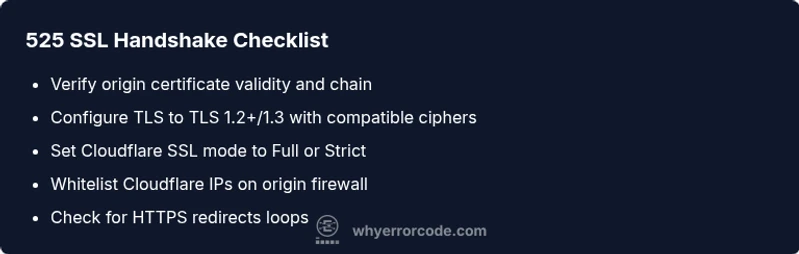
- easyVerify origin certificate validity and chain; reissue if needed
- easyConfigure TLS to modern versions (TLS 1.2/1.3) and compatible ciphers
- easySet Cloudflare SSL mode to Full or Strict and disable Flexible mode
- easyWhitelist Cloudflare IPs in origin firewall/WAF and test again
- mediumCheck and fix redirect rules to avoid loops
Frequently Asked Questions
What does 525 mean in Cloudflare?
Error 525 means Cloudflare could not complete the TLS handshake with the origin server, blocking secure connections. This typically points to origin-side certificate or TLS configuration problems. Work through certificate validity, TLS setup, and redirect rules to resolve it.
525 means Cloudflare couldn't complete the TLS handshake with your origin, blocking secure connections. Check your certificate, TLS settings, and redirects to fix it.
What causes SSL handshake failed error 525?
Common causes include an invalid or expired origin certificate, a TLS version or cipher mismatch between Cloudflare and the origin, and misconfigured redirects or firewall rules that block Cloudflare.
525 is usually caused by certificate problems, TLS/cipher mismatches, or blocking redirects and firewalls.
Can certificate expiration trigger 525?
Yes. An expired or invalid certificate on the origin can prevent TLS handshakes, resulting in Error 525. Renew or replace the certificate, then re-test the handshake.
Absolutely. An expired certificate on the origin commonly triggers 525; renew and validate the chain.
Should I change Cloudflare’s SSL mode to fix 525?
Switching to Full or Strict mode can resolve 525 if the origin has a valid certificate. Do not use Flexible mode in production, as it undermines end-to-end security.
Yes, using Full or Strict helps, but Flexible should be avoided in production.
When should I contact my hosting provider?
If you cannot identify certificate or TLS misconfig on the origin, contact your hosting provider or TLS administrator for a certificate chain and server TLS review. They can diagnose server-side issues more quickly.
If you’re stuck after checking certs and TLS, reach out to your hosting provider for a server TLS review.
Can Cloudflare cause 525 by itself?
Cloudflare configurations can contribute if you enable incompatible settings, e.g., an aggressive Redirect Rule or mismatched SSL mode. Typically, the root cause remains the origin TLS setup.
Cloudflare misconfigurations can contribute but the root is usually origin TLS.
Watch Video
Top Takeaways
- Verify origin certificate validity and chain.
- Use Full or Strict SSL mode with Cloudflare.
- Ensure TLS versions and ciphers are current.
- Test with TLS tools to pinpoint handshake failure.
- When in doubt, involve hosting or security professionals.