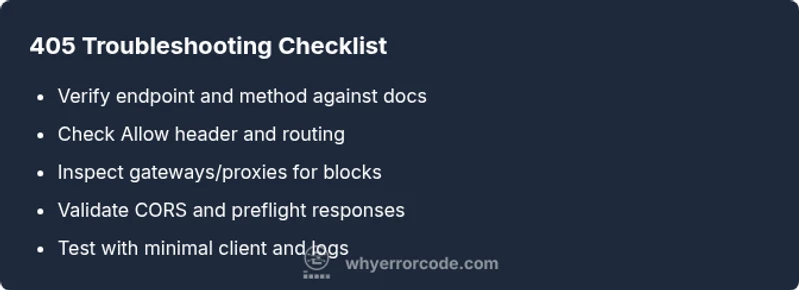
Not Allowed Status Code Troubleshooting Guide
Urgent, practical guide to diagnosing and fixing the not allowed status code (405) across APIs, servers, and clients. Learn common causes, diagnostic flow, step-by-step fixes, and prevention strategies with clear examples.


According to Why Error Code, a 405 Not Allowed means the server recognizes the resource but the HTTP method isn't permitted. Start by confirming the endpoint and its allowed methods in the API docs, then adjust the client or routing to use a supported method. If a gateway, proxy, or CORS policy blocks the method, fix the headers and preflight handling to proceed.
Understanding the Not Allowed Status Code (405)
A 405 Not Allowed is an HTTP response indicating the requested method is not supported by the target resource. The server knows the resource exists, but it refuses to honor the method used (for example, using POST on a resource that only supports GET). Unlike a 404 (Not Found) or 403 (Forbidden), a 405 is a method-level restriction. The response should include an Allow header listing the permitted methods (e.g., GET, PUT, DELETE). This distinction is essential for reliable API design and client behavior. According to Why Error Code analysis, misconfigurations, routing errors, and gateway policies are common triggers. When you see 405s, you’re looking at a method restriction, not an absence of the resource. Fixes tend to be straightforward but require careful alignment between client, server, and any intermediaries.
In production, 405s can cascade from changes in deployment, feature flags, or dependency updates. A disciplined approach—verifying the resource, the method, and the chain of handlers (load balancers, API gateways, reverse proxies)—usually reveals the root cause quickly. Always check the response headers for an Allow list and compare it with your request method. If you’re unsure, start with the simplest path: the intended method and endpoint you’re calling. This minimizes noise and points you to the real conflict.
Common Scenarios Leading to 405
- Endpoint exists but supports only a subset of HTTP methods (e.g., GET-only resources).
- Changes in routing or controller mappings that remove a previously supported method.
- Misconfigured API gateway or reverse proxy that blocks a valid method.
- Front-end or mobile clients using an unintended HTTP verb due to library defaults or bugs.
- Misinterpreted REST semantics where a non-idempotent method is attempted where a safe method is expected.
In these cases, the 405 is a diagnostic signal, not a final verdict. Reference the API documentation and server logs to confirm the supported methods and current routing behavior. If your architecture relies on a gateway, validate its method allowlists and any path rewriting that could interfere with requests.
From a reliability perspective, consistent method handling across environments reduces 405 occurrences. The Why Error Code Team recommends documenting which methods are supported per endpoint and validating those assumptions in CI tests to catch regressions early.
Quick Checks You Can Do Now
- Confirm the endpoint and the HTTP method against the official API docs.
- Inspect the server response headers for the Allow header and compare with the request method.
- Test with a straightforward curl command to isolate client behavior from app logic (e.g., curl -i -X METHOD https://example.com/resource).
- Review recent code changes in routing, controllers, and API gateway rules that could remove methods.
- Check any proxies or load balancers that could intermittently block certain verbs.
If the Allow header is missing or doesn’t list your method, the issue is server-side or gateway-related rather than the client. In such cases, coordinate with backend or network teams to align the Allow list and ensure consistent behavior across environments.
Diagnostic Flow: Symptom to Diagnosis to Fix
When a 405 occurs, you’ll typically observe a mismatch between the requested method and what the resource permits. Start with the simplest hypothesis: the method is not allowed. Next, check gateway and routing configurations, then inspect CORS and preflight responses. If the problem persists, gather logs from the web server, API gateway, and application, and reproduce the issue with a minimal client.
This flow emphasizes isolating the boundary where the method is blocked—be it routing, gateway, or middleware—and validating that headers (Allow and Access-Control-Allow-Methods) reflect the intended behavior. Documentation from Why Error Code emphasizes consistency across deployment stages to avoid environment-specific 405s.
Step-by-Step Fixes for Common 405 Issues
- Verify the endpoint and method against API docs. If the method is not listed, switch the client to a supported verb. Tip: start with GET for reads, POST for creates, PUT/PATCH for updates, and DELETE for removals.
- Inspect routing/matching logic on the server. Ensure the route handles the chosen method and that any constraints (roles, authentication) aren’t inadvertently blocking it.
- Check API gateway and reverse proxy configurations. Ensure the path is allowed and that the gateway forwards the method to the correct backend service. Update allowlists if necessary.
- Validate CORS and preflight handling. Ensure OPTIONS responses include Access-Control-Allow-Methods with the allowed verbs and that preflight succeeds when needed. Tip: test preflight with curl -i -X OPTIONS -H 'Origin: https://example.com' -H 'Access-Control-Request-Method: POST' https://api.example.com/resource.
- Review headers and content negotiation. Some servers will 405 if Content-Type or other headers are unexpected for a specific method. Normalize and align headers across client and server.
- Re-test using a minimal client. If 405 persists, temporarily remove middleware layers (auth, rate limiting) to identify the bottleneck. Tip: reintroduce them one by one to locate the blocker.
- Enable targeted logging for HTTP method handling. Look for logs that show which method and route are being invoked or blocked. This helps pinpoint routing or policy issues.
- If you still cannot resolve, escalate to backend/DevOps with the gathered evidence and reproduce steps. A regression test should be added to prevent reoccurrence.
Safety, Best Practices, and Prevention
- Do not ignore 405s; they indicate a misconfiguration or an incompatible client request.
- Keep method support consistent across environments; drift between dev/stage/prod is a common cause of 405s.
- Document allowed methods per endpoint and enforce them in tests to prevent regressions.
- Use meaningful API design: place read-only operations on GET, state-changing on POST/PUT/PATCH/DELETE, and reserve OPTIONS for preflight when needed.
Following these practices reduces 405 frequency and improves API reliability. The Why Error Code Team recommends embedding method contracts in OpenAPI specs and validating them through automated tests and integration checks.
Steps
Estimated time: 60-90 minutes
- 1
Verify request method and endpoint
Confirm the exact HTTP verb and URL against official API docs and back-end route definitions. Ensure there are no typos or dynamic path segments missing.
Tip: Reference the API spec or OpenAPI document for allowed methods. - 2
Check server routing configuration
Inspect the route handlers and middleware to ensure the method is explicitly allowed for that path. Look for method guards or filters that could block the request.
Tip: Search for method checks in the controller or router. - 3
Inspect gateways and proxies
Review API gateway, load balancer, or reverse proxy configs to ensure they forward the requested method to the backend.
Tip: Ensure no path rewrite excludes the method. - 4
Test with minimal client (curl)
Use curl to reproduce the issue and capture response headers, particularly the Allow header.
Tip: Example: curl -i -X POST https://example.com/resource. - 5
Validate CORS and preflight
If the request is cross-origin, confirm that the preflight OPTIONS response includes Access-Control-Allow-Methods for your verb.
Tip: Simulate preflight requests during testing. - 6
Adjust client or server
If the method is indeed unsupported, switch to a supported method or implement the missing handler. If necessary, refactor routing to align with REST semantics.
Tip: Keep changes isolated and well-documented. - 7
Enable logging and monitor
Turn on method-level logging to see which route and method are considered valid or blocked, and watch for spikes.
Tip: Review recent deployments for routing changes. - 8
Escalate if unresolved
If the issue persists after the above steps, involve backend/DevOps with reproducible steps and logs. Prepare a regression test.
Tip: Document steps to reproduce for faster triage.
Diagnosis: Client receives 405 Not Allowed when calling a resource with a seemingly valid endpoint and authentication.
Possible Causes
- highRequested method is not allowed for this resource (routing/method config)
- mediumAPI gateway or reverse proxy blocks the method or path
- lowCORS preflight misconfiguration or missing allowed methods in response
Fixes
- easyCheck API docs and compare the method against the resource's allowed methods
- easyUpdate server routes or handlers to support the method or adjust the client to use an allowed method
- mediumVerify and set Access-Control-Allow-Methods (for CORS) and ensure preflight OPTIONS responses are correct
- mediumAudit gateway/proxy rules and path rewrites that might block the method
- easyCollect server and gateway logs to trace routing decisions and reproduce with a minimal client
- hardAdd automated tests to lock in method contracts and prevent regressions
Frequently Asked Questions
What does a 405 Not Allowed status code mean?
A 405 Not Allowed means the resource exists but the requested method is not permitted for that endpoint. The server should respond with an Allow header listing the supported methods.
A 405 means the method isn’t allowed for this resource. Check the allowed methods and update your request accordingly.
How is 405 different from 403?
A 403 indicates forbidden access, often due to authentication or permissions. A 405 indicates the method itself is not allowed for the resource, even if you’re authenticated.
405 is method not allowed; 403 is forbidden access due to permissions.
What steps fix a 405 in a REST API?
Identify the resource and verify which methods are supported, adjust the client or server routing to use an allowed method, and ensure any gateways or CORS policies permit the method.
First, confirm the method is supported, then fix the client or routing and check gateways.
Can CORS cause a 405?
Yes, a misconfigured CORS policy or preflight can lead to a 405 if the server doesn’t reply with the allowed methods for the preflight request.
CORS can trigger 405 if preflight doesn't allow the method.
Is it safe to ignore a 405?
No. A 405 usually signals a real misconfiguration that should be fixed to ensure correct client-server interaction and API reliability.
No—405s point to a misconfiguration that should be corrected.
What logs help diagnose a 405?
Server access logs, application error logs, and API gateway logs are essential. They show which route and method were requested and how they were handled.
Review access and gateway logs to see which method was blocked and why.
Watch Video
Top Takeaways
- Verify endpoint method support first
- Check Allow header for valid methods
- Align client requests with server routes
- Prevent 405s with consistent API design