html error code 405 — Urgent Troubleshooting Guide
Urgent guide to html error code 405 (Method Not Allowed): meaning, common scenarios, diagnostics, and a step-by-step fix plan to restore functionality fast while avoiding common pitfalls.


html error code 405 (Method Not Allowed) means the HTTP method you used isn’t allowed for the target resource. The server is actively rejecting the request because the endpoint is configured to accept a different method (e.g., GET vs POST). According to Why Error Code, this is typically a routing or configuration mismatch, not a security breach. Fixes involve aligning the client method with server expectations and updating server or gateway rules as needed.
What html error code 405 really means
html error code 405, commonly shown as Method Not Allowed, signals that the HTTP method you used to access a URL is not permitted for that resource. The server is telling you to use a different method for the same endpoint. For developers and IT pros, this usually means there’s a gap between what the client is attempting (GET, POST, PUT, DELETE, etc.) and what the server is configured to allow. The urgency of resolving 405 errors is high when you’re dealing with APIs, form submissions, or authenticated endpoints where the method expectation is strict. Why Error Code emphasizes that this isn’t an automatic security risk; it’s a misalignment in routing, middleware, or server configuration that must be corrected promptly. In many stacks you’ll see an Allow header listing permitted methods, and the browser or client may display a generic error page or a terse message like “405 Method Not Allowed.” If the resource actually supports a different method, this is a quick signal to review endpoint definitions and client logic.
tip:
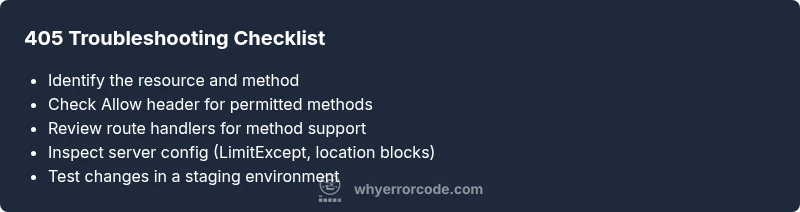
Steps
Estimated time: 45-60 minutes
- 1
Reproduce with a safe client
Capture the exact request you’re sending, including the URL, method, headers, and payload. Use a simple curl or a trusted API client to reproduce the error; this minimizes variables.
Tip: Keep a minimal reproducer to isolate whether the issue is client-side or server-side. - 2
Check the endpoint’s allowed methods
Review API documentation or route definitions to confirm which HTTP methods are supported at that URL. If documentation is unavailable, inspect the server or framework route declarations.
Tip: Look for any method guards or decorators that might reject common methods like OPTIONS, TRACE, or PATCH. - 3
Inspect server and gateway configuration
Review your web server (e.g., Nginx, Apache) and any API gateway/proxy settings to ensure the requested method isn’t globally blocked for that path. Check for location blocks, limit_except directives, or policy rules.
Tip: A small configuration tweak can unlock the correct method without touching business logic. - 4
Validate route handlers and middleware
Ensure the route handler actually implements logic for the requested method. Look for conditional branches that might bypass or throw 405 when the method isn’t matched.
Tip: Add explicit error logs for unsupported methods to speed future debugging. - 5
Test with multiple methods and environments
Test the same endpoint in a staging environment and with different methods to confirm the issue is method-specific and not environment-based.
Tip: Use a consistent test harness and capture response headers (Allow, Vary) for clues. - 6
Implement a fix and monitor
Apply the corrected method or server rule, deploy, and monitor logs for recurrence. Validate with end-to-end tests and user feedback.
Tip: Ensure rollback plans exist in case the fix introduces new edge cases.
Diagnosis: API call or web request returns 405 Method Not Allowed
Possible Causes
- highClient uses an HTTP method not supported by the endpoint (e.g., GET on a POST-only route)
- highServer or API gateway is configured to disallow the requested method for that path
- mediumRouter or route handler is missing support for the method on that resource
Fixes
- easyVerify the endpoint’s allowed methods in the API/docs, then align client requests to an allowed method
- hardUpdate server routing/config (e.g., Nginx/Apache, API gateway) to include the requested method for the path
- mediumCheck middlewares, proxies, or CORS settings that may reject the method before it reaches the application logic
Frequently Asked Questions
What does 405 Method Not Allowed mean for my API client?
It means the HTTP method used by your client isn’t permitted for the target resource. Check the endpoint’s supported methods and adjust the client request accordingly.
405 means your client is using a method the server doesn’t allow for that resource; verify the endpoint’s supported methods and update your request.
Is 405 the same as 403 or 404?
No. 403 is Forbidden (authenticated but not allowed), 404 is Not Found, and 405 indicates the method itself is not allowed for the resource. It’s a method-level issue, not just missing content.
403 is Forbidden, 404 is Not Found, and 405 means the HTTP method isn’t allowed for the resource.
Can CORS cause a 405?
CORS can influence how requests are handled, especially OPTIONS preflight. If the server disallows the preflight or the actual method, you may see 405 responses.
CORS can lead to 405 if preflight requests aren’t allowed, so check your server’s CORS policy.
What steps should I take before contacting support?
Reproduce the issue with a minimal client, verify endpoint docs, review server/router config, and check for recent changes that might affect HTTP methods.
Try the basics—reproduce, review docs, and inspect config—before reaching out for help.
Are 405 errors always due to server misconfiguration?
Mostly, but client mistakes or outdated docs can also cause 405s. Validate both sides and verify there isn’t a gateway or caching layer altering methods.
Usually server or routing issues, but client or doc mismatches can also trigger 405s.
When should I involve a professional?
If the error persists after checking the obvious causes, or you’re modifying critical infrastructure, it’s wise to consult a senior developer or a DevOps professional.
If it keeps happening after you’ve checked configs and endpoints, get professional help.
Watch Video
Top Takeaways
- Confirm allowed methods with endpoint docs
- Align client method with server expectations
- Check routing and proxy permissions
- Test thoroughly across environments
- Consult logs for precise failure points