How to Fix QuickBooks Error Code 403 Forbidden Now
Urgent guide to diagnosing and fixing QuickBooks error code 403 forbidden. Learn the causes, step-by-step fixes, and prevention tips to restore access quickly and securely.


According to Why Error Code, QuickBooks error code 403 forbidden means the application is blocked from accessing a resource due to permissions or authentication issues. The fastest fixes are refreshing credentials, checking user permissions, and verifying network access. If the problem persists, review API scopes, reauthorize apps, and contact admin support. This guide shows step-by-step fixes and safety tips to resolve it quickly. The Why Error Code team found that many 403 issues stem from token scopes.
What QuickBooks Error Code 403 Forbidden Means
QuickBooks error code 403 forbidden is not just a generic denial message; it indicates that the application has authenticated, but the server is actively refusing to fulfill the request due to a permissions or access policy. In practice, this often points to authorization issues, token or API scope misconfigurations, IP allowlist blocks, or session tokens that are no longer valid. For developers and IT pros, the first thing to check is whether the requesting user account has the necessary roles and permissions to access the targeted resource. In QuickBooks and related API ecosystems, a 403 can arise from insufficient OAuth scopes, revoked tokens, or changes in access policies. While a 401 unauthorized error signals missing credentials, 403 signals valid credentials with insufficient rights. Quick remediation begins with confirming permissions, refreshing tokens, and ensuring the environment (production vs sandbox) is correctly configured.
In the broader context of error codes, 403 falls under the broader family of access-control issues. The root causes are typically configuration-related rather than a bug in the application. For teams monitoring security, it’s critical to audit who has access, what scopes are granted, and when tokens expire. By understanding the distinction between authentication (who you are) and authorization (what you can access), you can rapidly narrow down the culprit and apply a targeted fix.
Understanding Access Control and QuickBooks API Permissions
Access control is the gatekeeper in API interactions. In QuickBooks, ensuring the right OAuth scopes are granted is essential. If scopes don’t cover the requested resource, you’ll see a 403. Likewise, if a connected app’s credentials were rotated or revoked, access will be blocked until reauthorization occurs. Review the authorization flow for the connected app, confirm the scopes align with the intended API calls, and verify that the tenant or company file being accessed has the right privileges. Consider also whether any policy changes at the administrator level could be blocking the operation—these policies often affect multiple users and services, not just a single integration.
Symptoms and Common Scenarios to Diagnose Quickly
Typical symptoms include: a clearly labeled 403 Forbidden message, logged API calls showing insufficient permissions, and intermittent failures when accessing specific endpoints (e.g., payroll, invoices, or reports). Common scenarios involve token expiry, revoked permissions after a policy change, mismatched environments (sandbox vs production), or IP-based access restrictions. If a user can access some endpoints but not others, focus on scope mismatches and per-resource permissions. In corporate networks, VPNs or proxies can also interfere with token validation and callback URLs, triggering 403s even when credentials are correct.
Quick Fixes You Can Try Right Now
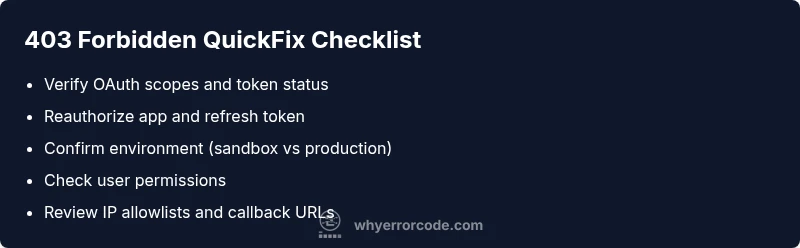
Before diving into a full diagnosis, try these quick fixes that often address 403 Forbidden in QuickBooks:
- Refresh or reauthenticate the connected app to renew OAuth tokens.
- Verify the user's role and permissions to ensure they can access the resource.
- Confirm the API scopes match the calls you are making and regrant scopes if needed.
- Ensure you are hitting the correct environment (production vs sandbox) and that the account in use has access to that environment.
- Temporarily disable VPNs or firewalls that might be interfering with token validation or callback URLs, then retry. If these steps don’t resolve the issue, proceed to the step-by-step reauthorization and permission verification process described below.
Step-by-Step Fix: Reauthorize and Confirm Permissions
- Identify the exact API endpoints being called and the resource they target (e.g., payroll, invoices).
- Check the OAuth token status for the connected app – is the token expired or revoked?
- Reauthorize the app in the QuickBooks Developer Console or within the app’s OAuth flow, ensuring all required scopes are granted.
- Confirm the integration is pointing to the correct QuickBooks company file and environment.
- If using a multi-user environment, verify per-user permissions and roles are sufficient for the requested resource.
- Test the API call again in a clean session (incognito or a fresh token) to verify the fix.
- If issues persist, capture the raw API response headers for troubleshooting and involve admin support for policy review.
Other Causes and How to Address Them
Beyond token scopes, 403 errors can be caused by misconfigured IP allowlists, recent policy changes by the administrator, or changes in the application’s integration settings. Some organizations restrict access by IP range or require whitelisting of callback URLs. Verify that the IPs you’re using are approved and that any LB/Proxy layers aren’t altering requests. If a recent software update altered endpoint permissions, review the release notes for any breaking changes and adjust your integration accordingly.
Additionally, environment mismatches (sandbox vs production) are a frequent, overlooked cause. Ensure your credentials apply to the environment you intend to access. If you’re using a test tenant, confirm that you’re not accidentally trying to access production resources.
Best Practices to Prevent 403 Forbidden in QuickBooks
- Maintain up-to-date OAuth tokens and refresh automatically before expiry.
- Regularly audit user permissions and align them with the principle of least privilege.
- Use explicit, documented API scopes and verify them during deployment.
- Keep a record of all app integrations and their access policies, updating them when personnel or policies change.
- Implement robust error handling that distinguishes between 401 and 403 errors to respond with the correct remediation steps.
- Plan for periodic access reviews and token reauthorization to reduce surprises during peak workloads.
Steps
Estimated time: 30-60 minutes
- 1
Verify user permissions
Check the user’s role and ensure it includes access to the targeted resource. If necessary, temporarily elevate privileges for testing, then revert once resolved.
Tip: Use a test user to confirm permissions without impacting live data. - 2
Check OAuth tokens
Inspect whether the access token is expired or revoked. If so, initiate a reauthorization flow to obtain a fresh token.
Tip: Log the token expiry time to avoid future surprises. - 3
Confirm API scopes
Ensure the requested API scopes match the required endpoints. Update scopes and reauthorize if gaps are found.
Tip: Keep a minimal set of scopes necessary for operation. - 4
Validate environment
Make sure you are calling the correct QuickBooks environment (production vs sandbox) and the resource exists there.
Tip: Avoid mixing environments in development and production. - 5
Test with minimal payload
Retry the request with the smallest possible payload to verify if the issue is scope-related or data-specific.
Tip: If the minimal call succeeds, the problem is likely with the payload permissions. - 6
Escalate if unresolved
If steps above fail, capture full HTTP response, logs, and contact admin or support for policy review.
Tip: Provide reproduction steps and token details (without exposing credentials).
Diagnosis: QuickBooks API shows 403 Forbidden when accessing payroll data
Possible Causes
- highInsufficient OAuth scopes for the requested resource
- mediumExpired or revoked access token
- lowWrong environment (sandbox vs production) or misrouted API calls
Fixes
- easyReauthorize the connected app and re-grant required scopes
- easyRefresh the OAuth token and validate token status
- easyDouble-check environment and resource path, then retry
- mediumReview admin policies or IP allowlists that may block access
Frequently Asked Questions
What does QuickBooks error code 403 forbidden mean?
403 forbidden means the server understood your request but refuses to authorize it due to permission or policy restrictions. Check OAuth scopes, token status, and environment to resolve it.
QuickBooks 403 means you’re authenticated but not authorized for that action; check scopes, token, and environment.
How do I fix a 403 error in QuickBooks Online?
Start by refreshing credentials, reauthorizing the connected app, and validating the required scopes. If issues persist, verify environment and admin policies with your IT team.
Refresh credentials, reauthorize, and check scopes and environment. If still stuck, contact your IT admin.
Is 403 the same as 401 in QuickBooks integrations?
No. A 401 means missing or invalid authentication. A 403 means authentication succeeded but access is denied due to permissions or policy.
401 is missing credentials; 403 means you’re authenticated but not allowed to access the resource.
Can a VPN cause QuickBooks 403 errors?
Yes. VPNs or proxies can affect token validation or callback URLs, leading to 403s. Disable VPNs temporarily to test, then re-check access.
A VPN can trigger 403 by messing with how tokens are validated. Try without the VPN to test.
When should I contact support for a 403 error?
If token refresh and permission checks don’t resolve the issue, contact admin or vendor support with error logs, environment details, and reproduction steps.
If fixes fail, reach out with logs and steps to reproduce the issue.
Watch Video
Top Takeaways
- Audit permissions and tokens first
- Match scopes to the requested resources
- Verify environment consistency to avoid 403s
- Reauthorize and refresh tokens promptly
- Escalate with full logs if needed