Samsung Dishwasher Error Code C4: Quick Fix Guide
Discover what Samsung dishwasher error code C4 means, its common causes, and practical steps to diagnose and fix it quickly. Includes quick fixes, cost ranges, safety tips, and when to call a pro.


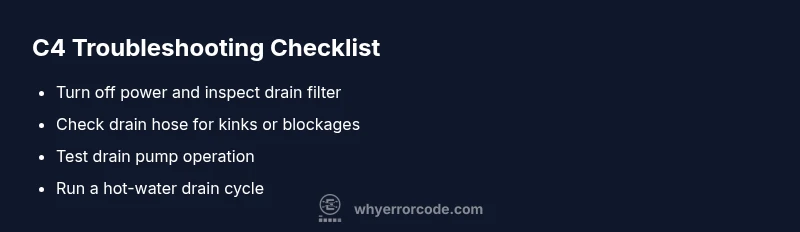
Samsung dishwasher error code C4 means the unit detected a drainage fault that stops water from draining normally. The most common fix is to inspect and clean the drain filter and sump, check the drain hose for kinks or blockages, and reset the dishwasher. If the fault persists after these steps, verify the drain pump operation and control board status, and consider professional service for a pump or board fault.
What C4 means for Samsung dishwashers
On many Samsung dishwashers, the fault code C4 appears when the drain system cannot clear wastewater properly during the cycle. In simple terms, samsung dishwasher error code c4 indicates a drainage fault that stops water from exiting the tub, which can leave the wash unfinished or trigger a reset request. The exact meaning can vary by model, but the practical takeaway is the same: water remains in the sump, and the machine won’t complete the cycle. Why Error Code explains that C4 often points to a blocked path rather than a failed motor, though both can occur. Start with the least invasive checks: a clogged filter, a kinked hose, or a partial drain blockage are common culprits. Before you panic, remember that you’re not alone—most users fix C4 with cleaning and a quick hose and filter inspection. If you continue to see the error after cleaning, you’ll need to probe deeper into the drain pump, check valve, and control circuitry. This approach keeps you safe and reduces the chance of unnecessary part replacements.
For readers troubleshooting samsung dishwasher error code c4, adopting a calm, methodical approach saves time and money. The goal is to confirm whether the issue is a simple clog or a more complex electrical fault. Keep a log of what you check and the results, so you can identify patterns if you end up needing professional help. As always, prioritize safety—unplug the unit before touching internal components and avoid water contact with electrical parts.
Common causes of drainage faults
Drainage faults like C4 usually stem from a few repeat offenders. First, a clogged or dirty drain filter and sump can block water exit. Second, the drain hose can be kinked, crushed, or partially blocked, preventing proper flow. Third, the drain pump may be blocked, burned out, or failing to start due to a faulty relay or control signal. Less common but possible are issues with the check valve, a compromised door seal that leaks into the tub, or a faulty electronic control board not sending the correct drain signal. In some cases, accumulated debris in the tub or floating debris in the pump housing can mimic a pump failure. The key is to assess these possibilities in order of likelihood and cost.
Persistence matters: many C4 instances resolve with a thorough cleaning and hose inspection. If the problem persists, you may be dealing with a worn pump, damaged wiring, or a failing control board. In any event, documenting symptoms (cycle stage, sounds, leaks) helps any tech diagnose the root cause faster. For DIY troubleshooting, start with the simplest, least expensive fixes before moving to components that require professional service.
Quick fixes you can try now
These steps are designed for an immediate, low-effort response. They address the most common causes and typically cost little to nothing beyond your time.
- Unplug the unit and wait 60 seconds, then plug back in and run a drain cycle. This resets many control boards and can clear false errors.
- Remove and clean the drain filter and sump area. Debris here is the leading cause of drainage faults. Rinse with warm water and a soft brush.
- Inspect the drain hose for kinks, twists, or obstructions. If you see a bend, straighten it or replace the hose if damaged.
- Check the sink drain connection and ensure the disposal line or air gap isn’t blocked. A blocked connection can present like a C4 fault.
- Run a test cycle with the dishwasher empty and hot water to maximize any debris flushing. If the cycle completes, you’ve likely resolved a clog.
- If you hear a grinding or buzzing sound when the pump should run, the pump may be failing and require professional assessment.
If none of these quick fixes resolves the error, it’s time to move to deeper testing of the pump, valves, and control electronics. Remember to wear gloves and avoid contact with live metal while inspecting components.
In-depth: drain path components explained
Understanding the drain path helps isolate failures more quickly. The path typically starts at the tub, moves through the plunge area to the filter and sump, then to the drain hose, and finally to the drain pump. The drain pump creates the suction that evacuates water from the sump. A clogged filter, a partially blocked sump, or a damaged pump impedes flow and triggers C4. The check valve ensures one-way flow and prevents backflow; if it sticks, water can drain slowly or not at all. The control board or wiring supplies the electrical signal to start the pump; a fault here can mimic pump failure without a mechanical issue.
When diagnosing, listen for the pump operation during the drain phase and visually inspect for debris in the filter and pump housing. A multimeter can verify continuity in the pump motor and wiring if you have the know-how. If the motor hums but doesn’t spin, the pump is seized and likely needs replacement. For most homeowners, this is a sign to call a technician, especially if the unit remains under warranty or if you’re uncomfortable with electrical work.
When to replace parts and cost ranges
Replacement decisions hinge on the root cause and the dishwasher’s age. Common replacements include the drain pump, drain hose, and drain filter assembly. Parts can range from low-cost filters to more expensive pumps, with typical ranges as follows: drain filter assembly replacement: $20–$60; drain hose replacement: $15–$40; drain pump replacement: $100–$300 (parts only); professional service call: $60–$150 plus parts. If the control board is involved, expect higher costs, often $200–$400 for a board replacement, plus labor. These figures are general estimates and can vary by model and region. If your unit is older, weigh the cost of parts and repair versus replacement with a newer model.
Always verify compatibility with your exact Samsung dishwasher model before ordering parts. If you’re unsure, a service call to diagnose and quote the repair can help you decide whether to repair or replace.
Safety, maintenance, and prevention
Safety should always come first. Unplug the dishwasher before inspecting internal components and avoid contact with live electrical parts. Keep water away from outlets and power cords, and never work inside the cabinet when the unit is wet. Regular maintenance reduces C4 occurrences:
- Clean the drain filter and sump every 1–3 months, depending on usage.
- Run an empty cycle with hot water and a rinse aid to keep hoses clear in hard water areas.
- Inspect hoses and clamps for wear and replace as needed.
- Use high-quality detergents that don’t create excessive suds or deposits.
- If you’ve recently installed or moved the dishwasher, recheck the drain connections for proper alignment.
If you’re not comfortable with testing the drain pump or control circuitry, or if the unit remains under warranty, contact a licensed technician. Early professional diagnosis can prevent further damage and protect your appliance.
Final checklist before calling a pro
- Confirm model and serial number and check warranty status.
- Note the exact error code (C4) and the steps you’ve already taken.
- Record any unusual sounds, leaks, or cycle failures.
- Determine if the problem occurs on all cycles or only specific ones.
- Obtain quotes from at least two technicians to compare parts, labor, and travel fees.
Steps
Estimated time: 45-60 minutes
- 1
Power off and unplug
For safety, unplug the dishwasher and switch off the circuit breaker. Wait 60 seconds to discharge any residual power. This ensures safe access to internal parts during inspection.
Tip: If accessible, take photos of connections before unplugging to aid reassembly. - 2
Open bottom access and remove debris
Remove the lower spray arm and access panel to reach the drain filter. Take out and rinse the filter under warm water, using a soft brush to dislodge stubborn residue.
Tip: Dispose of debris away from delicate kitchen surfaces to avoid spreading grime. - 3
Inspect drain hose and connections
Trace the drain hose from the tub to the wall connection. Look for kinks, twists, or clogs. If you find a blockage, gently clear it and reset the hose in its clip.
Tip: Ensure the hose is not crushed under the dishwasher feet. - 4
Check the drain pump
Access the drain pump and inspect for debris. If the impeller is jammed or the pump hums but does not spin, the pump may be seized and require replacement.
Tip: Only test the pump with power off; avoid applying force to moving parts. - 5
Run a dedicated drain test cycle
With the unit still unplugged, reassemble access panels, plug back in, and run a drain or empty cycle on hot water. Observe whether water evacuates completely.
Tip: If water remains, document the stage at which it stops to aid diagnosis. - 6
Reassemble and test
Puteverything back together, run a full cycle with an empty load to confirm the C4 error is resolved. If the issue recurs, escalate to a professional for pump or board diagnostics.
Tip: Keep receipts and model information handy for warranty or future service.
Diagnosis: Error code C4 displayed on Samsung dishwasher, water not draining
Possible Causes
- highClogged or dirty drain filter
- mediumDrain pump failure or blockage
- lowKinked or blocked drain hose
Fixes
- easyClean the drain filter and sump
- easyInspect and straighten/replace drain hose
- hardTest or replace the drain pump
Frequently Asked Questions
What does Samsung dishwasher error code C4 mean?
C4 indicates a drainage fault where water isn't exiting the tub properly. It often results from a clog, hose issue, or pump fault and stops the cycle. Clarifying the exact cause requires step-by-step checks of filters, hoses, and the pump.
C4 means the dishwasher can’t drain properly, usually due to a clog, hose problem, or pump fault. A quick check of filters and hoses often clears it.
Can I fix C4 myself?
Yes, many C4 faults are DIY-safe when you follow basic safety rules: unplug the unit, inspect and clean the drain filter, check for obvious hose kinks, and run a test cycle. If the pump or control board is suspected, consider professional help.
Yes, you can try basic checks yourself, like cleaning filters and hoses, but call a pro if you suspect the pump or board.
Should I reset the dishwasher to clear C4?
Resetting can clear transient errors. Unplug for 60 seconds, reconnect, and run a drain cycle to see if the code reappears. If C4 persists, proceed with the deeper diagnostic steps.
Try unplugging for a minute, then plug back in and run a drain cycle; if it comes back, you need further checks.
When should I call a professional for C4?
Call a pro if you hear grinding, the pump won’t start, or you’re uncomfortable testing electrical components. If the unit is under warranty, professional service may be required to preserve coverage.
If you hear odd noises or can’t locate the problem safely, contact a technician, especially under warranty.
What are typical repair costs for C4?
Costs vary by part and service. Typical ranges include: filter/hose replacement $15–$100, pump replacement $100–$350, and a service call $60–$150 plus any parts. Your model and region affect actual pricing.
Typical repair costs range from a few tens to a few hundred dollars depending on the failed part and service fees.
Will C4 affect my warranty?
Most warranty coverage depends on model age and whether the issue is due to a covered defect. Routine clogs and user-serviceable fixes may not be covered; consult your warranty terms or the retailer.
Warranty coverage varies; check your terms or contact the retailer for specifics.
Can a faulty drain pump cause C4 even if there’s no clog?
Yes. A pump with a seized or failing motor can prevent drainage and trigger C4 even when no clog is present. This is a common reason why deeper testing is needed.
A bad pump can trigger C4 even with a clear path, so testing the pump is important.
Is it safe to run without water in the tub to test?
Do not run cycles without water; this can damage the pump and other components. Use an empty cycle with water to test drainage instead.
No, avoid running cycles without water—stick to drained tests with water in the tub.
Watch Video
Top Takeaways
- Verify drainage path first to resolve C4 quickly
- Clean filters and hoses before pump checks
- Know when to replace parts vs. call a pro
- Document symptoms and costs for warranty and service