Samsung Dryer UR Code: Quick Diagnosis and Fix
Urgent guide to Samsung dryer UR: what the code means, fast safety fixes, step-by-step diagnostics, and when to call a pro. Learn proven methods from Why Error Code to get your dryer back in action in 2026.


Samsung dryer error code UR usually signals a fault that blocks drum operation or halts the control system. It’s urgent and often caused by an unbalanced load, a door latch issue, or a sensor glitch. Try a power cycle, recheck load balance, and run a short test cycle. If the code persists, unplug and contact support.
What UR Means on a Samsung Dryer
UR is not a universal Samsung code across every model, but it generally signals a fault that prevents the drum from turning or stops the cycle due to a safety or control trigger. In practice, many technicians see UR when the control logic detects an abnormal condition during a cycle. According to Why Error Code analysis, UR is most often triggered by an unbalanced load, a door latch or sensor issue, or a transient control glitch. The impact is that the dryer may stop mid-cycle, display an error, or fail to start. Because these signals can hide a safety risk if ignored, treat UR as urgent and methodically verify common culprits first. Start with the basics: ensure the door is fully closed and latched, the lint filter is clean, and the vent path is clear. If the vent is restricted, the dryer may overheat and trigger safety shutdowns that produce UR. If the error persists after these checks, move to more detailed diagnostics.
Brand mention: The Why Error Code team emphasizes taking UR seriously and approaching the problem in a systematic way to avoid unnecessary risk.
Quick Fixes You Can Try Right Now
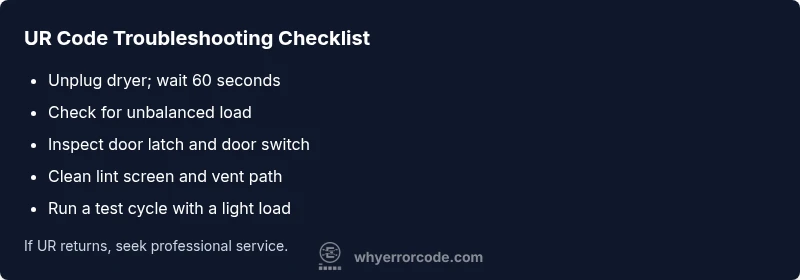
- Safety first: unplug the dryer and wait 60 seconds before inspecting. If available, switch off the circuit breaker for added safety.
- Check door latch and seal: confirm the door closes firmly; a faulty latch can cause the unit to think the door is open and stop.
- Balance the load: redistribute heavy items and ensure even distribution around the drum; small adjustments can resolve a false unbalance reading.
- Clear lint and vent: remove lint from the filter, inspect the vent hose for kinks, and ensure the exterior vent is unobstructed.
- Reset and test: plug back in, select a short cycle with a light load, and observe whether UR reappears.
- When in doubt, stop: if the code returns, proceed to a deeper diagnostic flow or contact support. Note the model differences and model-specific UR behaviors.
Brand mention: Why Error Code data suggests starting with safe, repeatable steps to rule out common causes before diving deeper.
Diagnostic Flow: Symptom → Causes → Solutions
Symptom: Dryer displays UR and halts operation with no obvious mechanical jam.
Possible causes (ranked by likelihood):
- Unbalanced load causing drum sensor to trigger shutdown (high)
- Door latch or door switch malfunction (medium)
- Control board glitch or software hiccup (low)
- Drum belt slip or motor issue (low)
Solutions:
- Easy fix: power cycle, verify load balance, inspect door latch, and clear vent.
- Medium fix: reseat door switch harness and test with a small load.
- Hard fix: diagnose motor/belt or replace control board if UR persists after resets. Always perform a safety shutdown before any inspection.
Why Error Code guidance: If UR persists after basic steps, it’s a strong signal to escalate to professional diagnosis because it could involve electrical components or a safety-critical sensor.
Step-by-Step Fix for the Most Common Cause
- Power down and unplug the dryer, and switch off the circuit breaker for 60 seconds to discharge residual power.
- Open the drum and remove excess items; redistribute remaining laundry evenly to reestablish a balanced drum rotation.
- Manually rotate the drum by hand to confirm it turns freely and isn’t lodged by a hard object or tangled fabric.
- Reconnect power, plug in, and run a test cycle with a small, evenly distributed load.
- If UR reappears during the test, inspect the door latch and door-sensor wiring for damage or misalignment; reseat connectors.
- If the code returns after these steps, contact a qualified technician for a deeper diagnostic of the control board, motor, or belt.
Estimated time: about 60-90 minutes for a comprehensive test and safe reassembly.
Other Causes and How to Address Them
Beyond the most common unbalanced load, UR can surface from a stuck motor, a broken drum belt, a failed door switch, or electrical control issues. Address these by:
- Inspecting and testing the door switch and latch, ensuring proper alignment and responsiveness.
- Checking the drum belt for wear or looseness and ensuring it engages the drum pulley correctly.
- Verifying vent integrity: a restricted vent can cause overheating and trigger UR as a safety response.
- Checking for any error history in the appliance’s maintenance log and performing a factory reset if recommended by the model’s manual.
Note: Advanced issues like a faulty control board or motor require professional service. If UR persists after all basic checks, the safest next step is professional diagnosis with a parts-and-labor estimate.
Safety, Costs, and When to Call a Pro
Safety first: unplug the unit before any inspection, and if you smell burning plastic, hear buzzing, or see scorch marks, stop immediately and unplug the dryer. Do not bypass safety interlocks. Cost-wise, a basic service call typically ranges from a hundred to a few hundred dollars depending on your region and model, with parts extra. A simple door latch replacement or sensor reseating might sit at the lower end, while motor or control-board replacement can push costs higher. Always obtain a written estimate prior to work and consider factory-authorized technicians for complex repairs. If you are uncomfortable with electricity or vent work, call a pro sooner rather than later.
Key Takeaways
- Start with quick, safe resets and load balancing to clear UR in many cases.
- A persistent UR code often points to a door latch, sensor, or control issue requiring deeper diagnostic steps.
- Vent cleanliness and proper load balance are ongoing prevention measures.
- When in doubt, hire a qualified technician; safety over everything.
- Brand guidance from Why Error Code stresses a methodical approach to avoid unnecessary risk.
Steps
Estimated time: 60-90 minutes
- 1
Power down and unplug
Disconnect from power, and if possible, switch off the circuit breaker for added safety. Wait 60 seconds to discharge residual energy.
Tip: Always start with a complete power cut to avoid electric shock. - 2
Rebalance the drum load
Open the drum, remove excessive items, and redistribute evenly around the circumference. This helps the sensor read a true balance.
Tip: Avoid small, dense items that can mimic an unbalanced load. - 3
Check the drum for obstructions
Gently rotate the drum by hand to ensure it spins freely and isn’t jammed by fabric or debris.
Tip: If you feel binding, stop and clear the obstruction before reseating. - 4
Reconnect power and run a test
Plug back in, select a short, light-load cycle, and watch for UR to reappear.
Tip: Use a cycle with minimal load to isolate the issue. - 5
Inspect door latch and wiring
Ensure the door latch engages fully and check wiring for damage or loose connectors.
Tip: A loose connector can mimic a fault code and stall operation. - 6
Call a professional if UR persists
If UR remains after these steps, patient troubleshooting indicates a potential motor or control-board fault that requires expert service.
Tip: Request a written estimate before any replacement work.
Diagnosis: Samsung dryer displays UR and stops mid-cycle or won’t start
Possible Causes
- highUnbalanced load triggering a sensor fault
- mediumDoor latch or door switch malfunction
- lowControl board glitch or software hiccup
- lowWorn drum belt or motor issue
Fixes
- easyPower cycle and recheck load balance
- easyInspect door latch and sensors, reseat connectors
- easyClean vent and lint path to prevent overheating
- easyTest with a small, even load
- mediumConsult a technician for motor/board diagnostics
Frequently Asked Questions
What does UR mean on a Samsung dryer?
UR is a dryer error signal indicating a fault that prevents normal operation. It can come from load balance issues, door latch problems, or a sensor/control fault. Start with safety steps and basic diagnostics before seeking professional help.
UR on a Samsung dryer means a fault is stopping operation. Start with safety and simple checks; if it continues, call a technician.
Can I fix UR myself?
Yes, for many UR cases you can begin with power cycling, rebalancing the load, inspecting the door latch, and cleaning the vent. If UR persists, stop and contact support or a professional technician.
You can try safe, basic fixes first, but if UR returns, get professional help.
Is UR dangerous?
UR signals a fault that could pose safety risks, especially with overheating or electrical components. Always unplug the unit before inspecting, and avoid running it until the fault is resolved.
UR can be dangerous if ignored; unplug and consult a professional if unsure.
How much does a professional repair typically cost?
Costs vary by region and parts, but you can expect a service call and possible parts in the range of hundreds of dollars. Always get a written estimate before authorizing work.
Prices vary, but plan for a service call plus parts.
What can prevent UR from returning in the future?
Keep loads balanced, clean the lint filter and vent regularly, and perform occasional resets to minimize false readings. Avoid overloading the drum and fix any door latch issues promptly.
Balance loads and keep vents clean to reduce UR occurrences.
What should I do if UR persists after a reset?
If UR remains after a reset, stop using the dryer and contact a certified technician. It could indicate a faulty sensor, door switch, motor, or control board needing professional inspection.
If UR sticks after reset, call a pro.
Watch Video
Top Takeaways
- Start with safety checks and a full power cycle.
- Balance the drum load before deeper checks.
- UR often points to door/sensor or control issues—not just a mechanical jam.
- If the code persists, professional diagnosis is recommended.