Samsung Dryer Overheating Error Code: Troubleshooting Guide
Urgent, practical troubleshooting for the Samsung dryer overheating error code. Learn causes, safety steps, DIY checks, and when to call a technician to prevent fires and protect fabrics.


Samsung dryer overheating is typically caused by restricted airflow or a failing thermal switch. Start by unplugging the unit and cleaning the lint trap and vent hose. If the issue persists, inspect the exterior vent cap and then test the dryer with the door open to check for unusual heat buildup. If problems continue, stop using the dryer and call a technician.
Understanding the Samsung dryer overheating error code
When a Samsung dryer shows an overheating warning, it often indicates heat is building faster than the unit can safely exhaust. The Samsung dryer overheating error code is usually a signal that heat is accumulating inside the drum and cabinet due to airflow restrictions or a failing safety device. In most models, the root cause is airflow-related, though a faulty thermostat or thermal fuse can mimic the same symptom. Safety should come first: unplug the dryer and avoid running it again until you’ve identified the culprit. The underlying pattern across brands is straightforward—heat needs an escape route, and without proper venting, temperatures surge, potentially damaging textiles and the machine. Recognizing whether you’re dealing with airflow issues vs. component failures helps you choose the correct next step and minimizes risk to people and property.
Why Error Code emphasizes containment: start with the simplest checks (airflow path) before moving to electrical components. This approach reduces the chance of a repeat overheating event and saves time by narrowing the scope of potential causes.
Common causes of overheating in Samsung dryers
Several factors contribute to overheating in Samsung dryers. The most frequent is restricted airflow caused by lint buildup in the lint screen, lint trap housing, or the exhaust duct. A blocked vent cap or exterior vent can also trap hot air. Secondary causes include a faulty cycling thermostat or thermal fuse, which may fail closed and keep heat circulating. Overloading the drum or drying bulky items like towels can trap heat and reduce air movement. Finally, a kinked or crushed vent hose, incorrect duct sizing, or poor installation can severely limit airflow. While some causes require professional service, many overheating events are preventable with regular maintenance and mindful use.
Common-sense maintenance, like cleaning after every few loads and ensuring a clear vent path, dramatically reduces risk. Why Error Code’s guidance focuses on airflow first because airflow problems are the most frequent and easiest to remediate.
Safety considerations and when to stop using the dryer
An overheating condition can ignite textile fibers or melt components. If you notice burning smells, smoke, loud popping noises, or the drum feels unusually hot to the touch, stop the cycle immediately, unplug the unit, and power down the home's electrical supply if safe to do so. Do not attempt to run the dryer again until you verify airflow and thermal components. For ongoing odors or signs of a problem, contact a Samsung service professional promptly. Why Error Code's team emphasizes that fire risk is real, and timely action reduces damage and safety risk. If the unit has repeatedly overheated, do not reset the appliance; improper resets can hide dangerous faults and escalate damage.
Document any unusual signs and prioritize safety over convenience. If your home has smoke detectors or a built-in surge protector, ensure those devices are functioning during any troubleshooting.
Safe preliminary checks you can perform before calling a pro
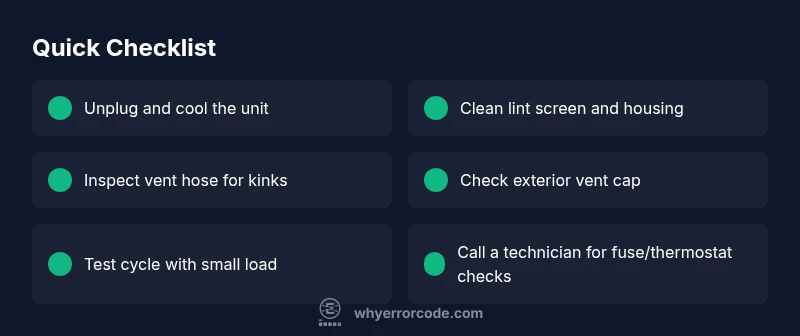
Start with safe, non-invasive checks. Unplug the dryer and allow it to cool for at least 15 minutes. Inspect and clean the lint screen and housing. Check the vent hose for kinks, holes, or crushing, and ensure the exterior vent is clear of debris. Remove any items that block the vent path and verify there is free airflow from the dryer to the outdoors. If you have a thermal fuse access panel and feel comfortable, check for signs of a blown fuse and replace only if you are qualified; otherwise, skip to professional service. Regularly cleaning the lint trap after every load is one of the simplest prevention steps. The goal is to restore effortless air movement and stop heat from accumulating in the cabinet.
Always discharge power before touching internal components, and wear gloves if you handle sharp edges.
What to monitor during a test run and when to escalate
After you complete the basic checks, plug the dryer back in and run a short cycle with a small, dry load. Monitor the exterior vent and the drum area for heat buildup. If the exhaust still becomes excessively hot or the code reappears, stop the test and schedule service. Document any observed faults (strange noises, inconsistent heat, error codes) to share with the technician. Throughout the process, prioritize your safety and avoid opening the cabinet while the unit is hot. If you’re unsure about any step, pause and contact a qualified technician to avoid personal injury or equipment damage.
Interpreting error codes and using the Samsung diagnostic menu
Samsung dryers often display a fault code that points to the general area of concern (thermals, airflow, or sensor). Consult the user manual or Samsung's official support page for your model to map codes to potential causes. If your model includes a self-ddiagnostics or service mode, use it only as instructed in the manual, since entering service screens without training can mislead you or void warranties. Capture the exact code, the cycle you were running, and any preceding symptoms. This information helps a technician reproduce the issue and confirms whether a fault is intermittent or persistent.
When to replace components vs. scheduling service
Some overheating sources are mechanical failures (faulty thermostat, faulty thermal fuse, motor overheating) that require replacement parts and professional service. A recurring overheating code, despite cleaning and airflow fixes, often indicates a defective safety switch or sensor circuit. In such cases, temporarily reducing heat settings or skipping high-heat cycles while awaiting parts can reduce risk, but do not rely on this as a long-term solution. A qualified technician should perform any wiring checks, fuse replacements, or thermistor tests to ensure safe operation.
Steps
Estimated time: 45-90 minutes
- 1
Unplug and cool the dryer
Disconnect the power to the unit and wait at least 15 minutes for it to cool. This reduces burn risk and stabilizes internal temperatures before inspection.
Tip: Never work on a live appliance; confirm power is off at both the plug and outlet. - 2
Inspect the lint screen and housing
Remove the lint screen and clean the screen, lint trap housing, and surrounding area. A clogged path is the most frequent overheating cause.
Tip: Use a damp cloth to remove fine lint that may have accumulated beneath the screen. - 3
Check vent hose for kinks
Inspect the vent hose for kinks, holes, or crushing. Replace damaged sections and ensure secure, straight connections to minimize resistance.
Tip: Avoid using PVC or non-heat-resistant hoses; use metal or approved flexible ducts. - 4
Inspect exterior vent and cap
Go outside to verify the vent cap is clear of leaves, lint, or pests. Clear any blockage and test airflow by starting a brief cycle with the vent open.
Tip: Do not run with the exterior vent blocked; it can cause heat buildup inside the dryer. - 5
Test safety components (thermostat/thermal fuse)
If you’re trained, test the cycling thermostat and thermal fuse. Replace only with same-spec parts, or call a pro if you’re unsure.
Tip: Electrical parts testing should follow the manufacturer’s service manual. - 6
Run a short test cycle and observe
Plug the unit back in and run a small load on medium heat. Monitor for heat buildup over 10-15 minutes and listen for abnormal noises.
Tip: If heat spikes again, stop the test and contact a technician immediately.
Diagnosis: Dryer overheats during multiple cycles with or without a code on display
Possible Causes
- highRestricted airflow due to lint buildup in lint screen, internal housing, or exhaust duct
- highBlocked exterior vent cap or outdoor vent
- mediumFaulty cycling thermostat or blown thermal fuse
- lowOverloading or drying bulky fabrics that impede air movement
- mediumKinked or crushed vent hose or improper duct sizing
Fixes
- easyClean lint screen, lint trap housing, and exhaust duct; clear any debris in the vent path
- easyInspect exterior vent cap for blockages and remove obstructions to restore airflow
- easyCheck for kinks in vent hose and straighten; ensure duct connections are secure and properly sealed
- hardTest or replace faulty cycling thermostat or blown thermal fuse; this should be performed by a qualified technician
- mediumSchedule professional service if there is continued overheating after airflow fixes
Frequently Asked Questions
What should I do first if my Samsung dryer overheats?
Unplug the dryer and allow it to cool. Then inspect and clean the lint screen, inspect the vent, and ensure the exterior vent is unobstructed. If the issue persists, stop using the unit and seek professional help.
First, unplug the dryer and let it cool. Then clean the lint screen and vent, check the outdoor vent, and call a technician if the problem remains.
Are lint traps and ducts the main culprits for overheating?
Yes. Lint buildup in the trap and ducts is the most common cause of restricted airflow, which leads to overheating. Regular cleaning dramatically reduces risk.
Lint buildup is usually the main culprit. Clean the lint trap and ducts regularly to prevent overheating.
Can I reset the dryer to clear the overheating code?
Resetting may reset the display, but it does not fix the underlying heat source. It’s best to address airflow or sensor issues and only reset as a diagnostic step after inspecting the vent path.
A reset won’t fix a heat issue. Address airflow or sensor problems first, then reset only as a diagnostic step if advised.
Could a faulty thermostat cause the dryer to overheat?
Yes. A failing cycling thermostat or blown thermal fuse can allow heat to accumulate. This requires testing by a qualified technician and part replacement if needed.
A faulty thermostat can cause overheating. It needs professional testing and possible replacement.
When should I replace components vs. call a pro?
If airflow fixes don’t resolve the overheating, or you suspect a defective safety switch or sensor, schedule professional service. Replacing parts without proper testing can be dangerous.
If airflow fixes don’t work, call a pro for safety-tested replacements.
Watch Video
Top Takeaways
- Prioritize airflow checks before touching electrical components
- Unplug and cool before inspecting any parts
- Clear lint buildup and vent blockages to restore safety and efficiency
- If overheating recurs, don’t rely on resets—consult a technician
- Document symptoms to aid diagnosis and prevention