Update Error Code 412: Quick Diagnosis and Fixes
Urgent guide to understanding update error code 412 (Precondition Failed), diagnosing causes, and applying fast, safe fixes for developers and IT pros.


When you see update error code 412, it means the server rejected the request because a precondition was not met. This usually involves conditional headers like If-Match or If-None-Match whose values no longer reflect the current resource state. The quickest fix is to refresh the resource to get a new ETag and retry with updated headers.
What update error code 412 really signals
update error code 412 is not just a random hiccup; it signals that the server requires certain conditions to be true before it will process your request, and those conditions aren’t met. Most commonly this involves conditional headers such as If-Match or If-None-Match. If the resource has changed since your last fetch, the server will reject the request with 412 to prevent accidental overwrites. This is a guardrail for data integrity, but it also means your client and server state are out of sync and need reconciliation. In practical terms, you’ll want to re-fetch the latest version of the resource to obtain a fresh ETag, then retry the operation with the updated header values. For teams, this is a signal to implement more robust state management and clearer cache invalidation practices. The goal is to minimize the window where the precondition can fail and to handle 412 gracefully when it does occur.
What update error code 412 really signals
update error code 412 indicates the server requires the resource precondition to be true before updating, and the request’s conditions aren’t met. This often happens when a client caches a stale version of the resource and then attempts to update using an out-of-date ETag. The correction is to synchronize state: fetch the latest resource, update the precondition header accordingly, and retry. When coding, incorporate automatic retries with fresh ETags and clear error handling to prevent repeated 412 responses during high-traffic periods. Why this matters: it protects data integrity but can frustrate clients if not handled cleanly.
What update error code 412 really signals
While the message is technical, the behavior is predictable: the server sees a mismatch between what the client thinks is current and what actually is. This is why you’ll often see 412 during concurrent edits or after a cache purge. A disciplined approach—reloading the resource, extracting the new ETag, and reissuing the request with current state—reduces churn and avoids data conflicts. In fast-moving APIs, you may implement a fallback path that retries once with updated conditions, then reports a controlled error to the user or downstream system.
What update error code 412 really signals
From a practical standpoint, 412 means: you attempted to update a resource under a precondition that no longer holds. The fix is not to bypass checks but to refresh state and re-attempt with the correct preconditions. This protects your data and keeps user actions reliable, especially in collaborative environments or systems with aggressive caching. The takeaway: treat 412 as a signal to re-sync state and retry with current metadata, not as a failure to push changes.
Steps
Estimated time: 30-60 minutes
- 1
Reproduce with fresh data
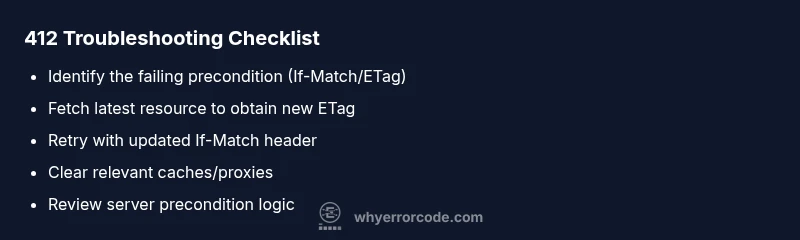
Perform a clean fetch of the resource to ensure you’re using the latest state and ETag. Document the original 412, then compare preconditions against the latest metadata.
Tip: Use a test environment or feature flag to avoid affecting production data. - 2
Refresh the precondition header
Retrieve the current ETag by performing a GET. Update your request header to If-Match: <new ETag> before retrying the update.
Tip: If the resource is versioned, consider also validating If-Unmodified-Since if used. - 3
Retry the operation
Send the update request again with the fresh ETag. Monitor the response and confirm whether the operation succeeds or returns a more actionable error.
Tip: Limit retries to avoid race conditions in high-concurrency environments. - 4
Check caches and proxies
Clear or bypass any intermediary caches that could serve stale resource data or headers. Ensure end-to-end freshness for the updated request.
Tip: Implement cache-control headers to reduce stale content. - 5
Review server-side preconditions
If 412 persists, inspect server logic that evaluates If-Match/If-None-Match. Look for edge-case handling, race conditions, or missing fallbacks.
Tip: Run targeted unit/integration tests simulating concurrent updates.
Diagnosis: Client receives HTTP 412 Precondition Failed when attempting to update a resource with If-Match/ETag headers
Possible Causes
- highOutdated ETag due to concurrent update
- highResource state changed by another process with no client refresh
- mediumCache/proxy serving stale headers
- lowIncorrect or missing precondition headers on the client
- lowServer-side bug in precondition handling
Fixes
- easyFetch the latest resource to obtain a new ETag, then retry with updated If-Match
- easyClear caches/proxies that may be serving stale ETags or headers
- mediumVerify client logic to always use the current ETag after a read or write
- hardReview server-side precondition handling and patch if a logic bug exists
Frequently Asked Questions
What does HTTP 412 Precondition Failed mean in practice?
HTTP 412 means your request included a precondition that the server requires, such as If-Match, which wasn’t met because the resource has changed since you last retrieved it. It’s a safety mechanism to avoid overwriting concurrent updates.
HTTP 412 means your update relied on outdated state; refresh first, then retry with the new state.
What causes update error code 412 on an API?
The most common causes are outdated ETags due to concurrent updates, stale caches, or missing precondition headers. Less common are server-side bugs in precondition checks.
ETag mismatches or stale caches usually cause 412 on APIs.
How can I fix a 412 error quickly?
Fetch the latest resource to obtain a new ETag, then retry the update with If-Match set to that ETag. Clear any caches that might be serving stale data if the error persists.
Refresh the resource to get a new ETag, then retry with updated headers.
Is 412 the same as 409 or 400?
No. 400 is a bad request, 409 is a conflict, and 412 is specifically a precondition failure where conditional headers aren’t satisfied.
412 means preconditions failed, not just a generic bad request.
Can caching cause a 412 even after I refresh the ETag?
Yes, aggressive intermediary caches can still serve stale responses. In that case, bypass or purge caches and enforce non-cached responses for sensitive operations.
If caches keep returning 412 after refresh, purge them and retry.
When should I involve a professional?
If 412 errors persist after multiple guarded retries and cache purges, or if server-side precondition logic seems faulty, escalate to a backend engineer or DevOps professional.
If repeated, get a backend engineer involved.
Watch Video
Top Takeaways
- Treat 412 as a sync issue, not a broken API.
- Always fetch a fresh ETag before reattempting updates.
- Check caches and proxies that could serve stale data.
- If problems persist, review server precondition logic and add robust tests.