Washing Machine Error Codes: How to Troubleshoot and Fix
Learn to diagnose and fix common washing machine error codes with a structured, safety-first approach. This guide from Why Error Code covers symptoms, causes, quick checks, and fixes to get your machine running again.


Most washing machine error codes come from drainage, door latch, or sensor faults. Start with a power check, reset cycle, and inspect hoses and filters. If the code persists, review the user manual or contact a service technician. This guide, from Why Error Code, breaks down symptoms, causes, and proven fixes.
Understanding Washing Machine Error Codes
Error codes are built-in messages that appear on the display when a fault is detected. They help you narrow down the problem without opening the machine. While the exact format and numeric codes vary by brand, the underlying patterns are consistent: codes indicate a subsystem fault (water intake, drainage, door lock, motor, or sensor). When a washing machine gives error code, start by noting the code, blinking pattern, and whether it appears at the start or mid-cycle. This information is crucial for accurate diagnosis. Remember: codes are best used as a map, not a final diagnosis, and safety should always come first. In this guide, we’ll map common categories to actionable steps and explain how to interpret them in plain language. According to Why Error Code, understanding these codes is the first step toward a fast, safe fix. Keeping a small notepad handy to jot down codes will save time when you search manuals or call support.
Common Error Code Families and What They Indicate
Error codes cluster into a few broad families that repeat across brands. This makes digital troubleshooting much easier, even if the exact code letters differ. The most frequent families include drainage and pump faults, water intake and temperature problems, door interlock or lid switch faults, sensor or control-board issues, and unbalance or overfill alerts. By recognizing the family, you can prioritize checks and avoid unnecessary disassembly. For example, a drain-pump family code usually means the unit can’t evacuate water at the end of a cycle, often due to a blocked filter or kinked hose. A door-lock family code typically points to a latch or switch problem that prevents the drum from locking safely. As you map codes to families, you’ll save time and reduce the risk of electrical hazards.
Immediate Checks You Can Perform Right Now
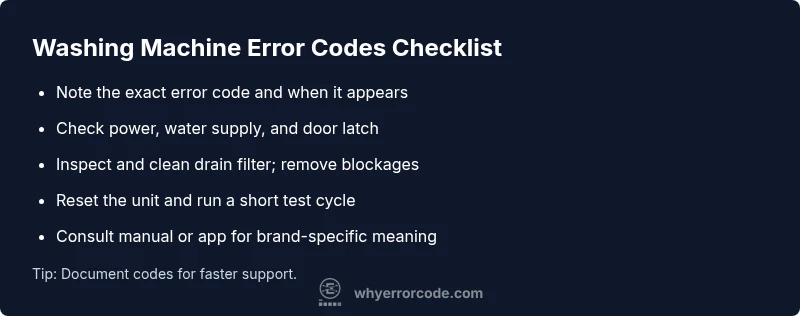
If you see an error code, there are several quick checks you can perform without specialized tools. First, unplug the machine and wait 60 seconds before plugging it back in to reset the control board. Check the power outlet and circuit breaker to ensure the unit is getting clean power. Inspect water supply taps and hoses for kinks or leaks, and confirm that the door or lid closes firmly. Locate and clean the drain filter or pump filter if accessible; remove lint, hair, and coins that could impede drainage. Finally, check for visible blockages in the drain hose and anywhere the drain pump exhaust leads. Always keep hands dry and avoid touching any exposed wiring while the machine is plugged in.
When Basic Checks Don’t Clear the Code: Next Steps
Sometimes the error code is caused by a fault that requires more than cleaning or resetting. If basic checks don’t clear the code, move to a diagnostic approach: note the exact code, its blinking pattern, and the cycle stage when it appears. Try a controlled test run with no laundry to isolate the issue from load-related balance problems. If the code persists after a clean drain and reseating the lid, the fault may be in the sensor, wiring, or control board. In these cases, it’s safer to consult the manual for your model and consider professional service. A technician can use a multimeter and model-specific diagnostics to pinpoint the root cause and prevent further damage. Remember: electrical components can be dangerous, and attempting repairs beyond basic cleaning can void warranties if performed incorrectly.
Reading the Manual and Using Brand Apps for Codes
Your model’s user manual is the most accurate source for interpreting codes. Many manufacturers also offer smartphone apps that display live diagnostics, error codes, and guided fixes. When consulting manuals or apps, record the exact code (and any blinking sequence), your model number, and the cycle you were running. In cases where codes are brand-specific (for example, “E1” or “F11” variations), the app or manual will provide the precise meaning and recommended action tailored to your device. If you don’t have the manual, try the manufacturer’s official website or trusted troubleshooting resources that align with your model’s branding. This part of the process is where accurate data drives a fast fix and prevents unnecessary parts ordering.
Safety, Maintenance, and Prevention
Prevention is the best remedy for error-code headaches. Regularly clean filters and lint screens, inspect hoses for wear, and ensure the drain is clear of obstructions. Run a monthly cleaning cycle to prevent buildup that can trigger drain or sensor faults. When wiring or electronics are involved, avoid opening the front panel; loss of safety interlocks or exposed live components can cause injury. Replace worn hoses or damaged clamps promptly to avoid leaks. Finally, keep the machine level to prevent unbalanced loads that can trip fault codes related to motor or sensor subsystems. By integrating simple maintenance into your routine, you reduce the frequency of error codes and extend the life of your appliance.
Steps
Estimated time: 30-45 minutes
- 1
Power off and unplug
Disconnect the machine from the electrical supply. Wait 60 seconds to allow the control board to reset. Reconnect and test with no laundry to check if the code returns.
Tip: Take a photo of the code for reference when you search for a fix. - 2
Verify power and outlet health
Test the outlet with another device. If the outlet is fine, check the circuit breaker for trips and reset if needed. Avoid using extension cords for critical appliances.
Tip: If the outlet feels warm, stop and investigate the circuit with a pro. - 3
Inspect water supply and hoses
Ensure taps are fully open, hoses are straight with no kinks, and that water is reaching the dispenser or drum as designed. Reconnect hoses firmly if loose.
Tip: Replace damaged hoses to prevent future leaks. - 4
Clean the drain pump and filter
Locate the filter access (often bottom front). Remove the filter and clean out lint, coins, hair, and debris. Reinsert and run a quick drain test.
Tip: Keep a tray underneath to catch any residual water. - 5
Run a test cycle
With no load, run a short cycle to determine if the code reappears. If it does, note the exact code and cycle stage.
Tip: If the code repeats, proceed to professional service with the code in hand. - 6
Decide on next steps
If the code is unresolved after basic checks, consider service under warranty or a professional diagnostic visit. Do not open the control board yourself.
Tip: Document all steps taken and codes observed for the technician.
Diagnosis: Washing machine displays an error code during a cycle.
Possible Causes
- highPower or grounding issue
- highClogged drain pump or filter
- mediumDoor interlock or lid switch fault
- lowWater supply problem or sensor fault
Fixes
- easyCheck outlet, circuit breaker, and power cord for damage; reset power by unplugging and replugging after 60 seconds
- easyClean drain filter and visible hoses; remove any lint or debris blocking flow
- easyInspect door interlock and latch; reseat door and ensure proper closure
- hardIf the code remains after basics, consult model-specific manual or professional service; avoid DIY control-board work
Frequently Asked Questions
What should I do first when a washing machine shows an error code?
Note the exact code and stage of the cycle. Unplug the machine, check power and water supply, then perform basic drain and filter checks before attempting a reset.
First, note the code, unplug the machine, and check power and water supply. Then try basic drain and filter checks before resetting.
Can I repair error codes myself?
Some fixes are straightforward, like cleaning filters or hoses. More complex errors involving sensors or boards should be handled by a professional.
Some fixes you can do yourself, but sensors or boards require a technician.
How long should I wait afterI reset the machine?
After unplugging, wait about 60 seconds before reconnecting and retesting. If the code returns, proceed with deeper checks or professional help.
Wait about a minute after unplugging, then test again. If it comes back, call for help.
When should I call a technician?
If the code persists after all basic checks, or if you smell burning, hear unusual noises, or see visible damage, call a professional.
If the code stays after basic checks or you notice burning smells or noises, call a technician.
Do different brands display codes differently?
Yes. Codes and terminology vary by manufacturer. Always consult your specific model manual or brand app for accurate meanings.
Codes vary by brand, so check your model manual or brand app for exact meanings.
Watch Video
Top Takeaways
- Identify the code family to focus fixes
- Start with power, water, and drain checks
- Document codes before calling support
- Escalate to a professional if basic steps fail
- Prevent future codes with regular maintenance