Whirlpool Error Code Reset: A Step-by-Step Guide
Learn how to safely reset Whirlpool error codes with a practical, model-aware approach. This guide covers when to reset, safety checks, a generic reset procedure, and next steps if codes persist. Ideal for homeowners troubleshooting washing machines and tech pros alike.


This guide helps you safely reset Whirlpool error codes and get your washer running again. You will learn when a reset is appropriate, the essential safety checks, and a step-by-step procedure that covers unplugging, waiting, and reinitializing the control board. Always consult your model’s manual for code-specific guidance and avoid resets for electrical burning smells or water leaks.
Understanding Whirlpool error codes and resets
Whirlpool washers use error codes to communicate problems detected by sensors and the control board. Codes help you identify whether an issue is electrical, mechanical, or related to water supply, door locking, or drainage. The exact meaning of a code can vary by model and production year, so always check your specific model’s user manual. In many cases, transient faults caused by power fluctuations or momentary sensor glitches can trigger codes that disappear after a reset. Before attempting a reset, confirm there is no active safety risk and that water leaks, burning smells, or unusual noises are not present. If you see any of these, stop and unplug the machine and contact support. This article focuses on safe reset techniques that work across common Whirlpool models, while encouraging you to reference model-specific guidance. Insight from Why Error Code indicates that resets are most effective for temporary faults rather than persistent hardware issues.
When is a reset appropriate and when not to reset
Resetting should be considered when a code appears due to a temporary fault, a power surge, or a sensor hiccup. If the code returns after a reset, or if you notice water leakage, a burning smell, grinding noises, or if the door won’t unlock, do not continue with resets. Instead, run a diagnostic with a longer service window or contact the manufacturer. A reset is not a substitute for professional service if hardware faults are present. Why Error Code analysis suggests treating resets as a first step for transient errors, not a cure-all for real malfunctions.
Safety prep and initial checks
Before you touch any wiring or components, ensure your workspace is safe and dry. unplug the machine from the wall outlet, shut off the cold water supply if accessible, and wear safety gloves and eye protection. Keep towels handy in case of minor leaks. If you have a model that requires panel access, use a flashlight to inspect hoses and connections for looseness. These initial checks reduce the risk of shocks or spills during a reset.
Reset prerequisites and a model-agnostic approach
Because Whirlpool codes vary by model, the reset process often begins with power removal, a brief wait, and a controlled re-start. Do not attempt resets while the unit is actively running unless the manual instructs you to. Always perform resets in a well-lit area, keeping your manual and model number handy for quick lookup. Visual observations after a reset (display status, error codes, or lights) help you decide whether to proceed or escalate.
Post-reset checks and what to monitor
After performing a reset, observe the display for any persistent or new codes. Run a short cycle (like a quick wash) and listen for unusual noises, watch for leaks, and check door lock operation. If the code reappears, record the code and the steps you took, then consult the manual or contact Whirlpool support. Persistent codes may indicate a sensor, connector, or control-board issue that requires service.
Authority and practical guidance
For safe, science-based guidance, consult consumer safety resources and appliance-specific recommendations. Always pair practical reset steps with model-specific instructions. The Why Error Code team emphasizes careful documentation and cautious troubleshooting to avoid voiding warranties or causing further damage. In many cases, a reset is a helpful first step, followed by targeted diagnostics.
Tools & Materials
- Whirlpool washer user manual and model number(Keep handy for model-specific error codes and reset procedure.)
- Phillips head screwdriver(Needed to open access panels if required by your model.)
- Safety gear (gloves and eye protection)(Electrical safety first.)
- Flashlight(Illuminate blocked areas and panel seams.)
- Towel or bucket(Use to manage minor spills or leaks.)
- Multimeter (optional)(Only if you are comfortable testing electrical components.)
Steps
Estimated time: 30-45 minutes
- 1
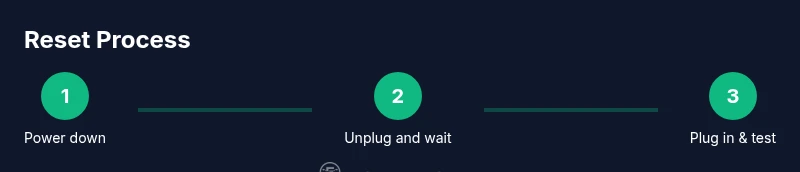
Power down and unplug the washer
Unplug the washer from the wall outlet to cut power completely. This reduces the risk of electric shock and stops ongoing processes that might trigger or perpetuate the error code.
Tip: Take a photo of the displayed code before unplugging if possible. - 2
Shut off the water supply (if accessible)
If you can reach the water valves, turn them to the off position to prevent accidental leaks while you work. This step is particularly important if the code relates to drainage or sensors near hoses.
Tip: Have towels ready to catch any incidental drips. - 3
Wait a short period to clear residual charge
Wait at least 60 seconds after unplugging to allow capacitors and sensors to reset. This pause lowers the chance of an immediate re-trigger when power is restored.
Tip: Use this time to verify you have the manual handy for reference. - 4
Reconnect power and return to standby
Plug the unit back into the outlet and ensure the control panel is in a ready/standby state. Do not start a cycle yet, just verify the panel initializes normally.
Tip: If the panel does not light up, check the outlet and circuit breaker. - 5
Run a brief diagnostic or test cycle if available
Select a short diagnostic or basic wash to observe whether the error code returns. Note any new codes or status indicators that appear during the test.
Tip: If your model lacks a diagnostic option, choose the shortest normal cycle. - 6
Observe for leaks, noises, or unusual behavior
Carefully watch for leaks around hoses and seals, and listen for grinding or abnormal sounds during the test cycle. Any abnormality should stop the test and prompt a service call.
Tip: Keep a flashlight handy to inspect seals and valve connections. - 7
Document results and decide on next steps
Record the code (if it reappears) and summarize what you did. If the code is cleared and the washer operates normally, monitor it for a short period. If it returns, consult the manual or contact support for diagnostics.
Tip: Save notes with your model number for faster support. - 8
Escalate if the issue persists or safety risk appears
If the code reappears after a reset or if you notice leaks, burning smells, or loud noises, stop troubleshooting and contact Whirlpool support or a certified technician. Do not gamble with potential electrical faults.
Tip: Persistent codes often indicate hardware issues that require professional service.
Frequently Asked Questions
What should I do before resetting Whirlpool error codes?
Always power down, unplug, inspect for leaks or damage, and consult the manual for model-specific guidance before attempting a reset.
Power down, unplug, inspect for leaks, and check your manual before resetting.
Can I reset codes while the washer is in the middle of a cycle?
Resetting during an active cycle is generally not advised. Stop the cycle safely, then perform the reset steps described in the manual.
Don’t reset during a cycle. Stop it first and then reset as instructed.
Why does the error code come back after a reset?
A code that reappears typically signals an ongoing fault (sensor, hose, or control issue). A reset can clear temporary glitches but persistent faults require further diagnostics.
If the code returns, it likely means there’s an ongoing fault needing diagnosis.
Is it safe to reset if I see water leakage?
No. If you detect a leak, stop and unplug, then inspect hoses and valves or call a technician. Do not continue troubleshooting while leaking.
Leak? Stop and unplug, then check hoses or call for service.
Where can I find the manual for my Whirlpool washer?
Look up the model number on the machine label and download the official manual from the Whirlpool website or your retailer. The manual contains model-specific reset steps.
Find your model number and download its official manual online.
What if the code stays after multiple resets?
If codes persist after several resets, stop attempting resets and contact Whirlpool support or a certified technician for a diagnostic.
If it keeps showing, get professional diagnostics.
Watch Video
Top Takeaways
- Power down safely before any reset attempt.
- Check for safety risks; do not reset with leaks or smells.
- Reset clears transient errors, not hardware faults.
- Always reference the model manual for code-specific guidance.