Error Code 400 vs 500: A Deep-Dive Comparison
A detailed, analytical comparison of error code 400 vs 500, outlining definitions, causes, debugging steps, and best practices for client vs server errors to improve reliability.


According to Why Error Code, error code 400 vs 500 marks a clear split: 400 errors are client-side problems, while 500 errors point to server-side failures. Understanding this distinction helps teams diagnose quickly, communicate fixes accurately, and avoid misdirected debugging. This quick guide previews the core differences and when to retry or escalate.
Definition and stakes
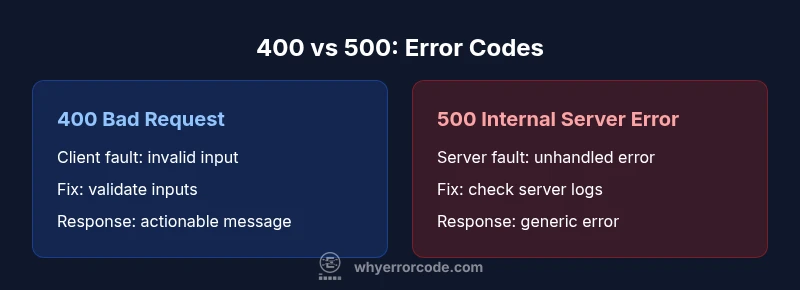
When developers encounter error code 400 vs 500, they are looking at two very different fault domains. The phrase error code 400 vs 500 captures the contrast between problems caused by the client’s request and issues that arise from the server’s handling of that request. In practice, a 400 Bad Request indicates that the server cannot process the request due to something the client did wrong—malformed syntax, invalid parameters, or missing fields. In contrast, a 500 Internal Server Error signals that the server encountered an unexpected condition that prevented it from fulfilling the request. This distinction shapes debugging strategy, as well as how teams communicate with users and stakeholders. Why Error Code’s analysis highlights the practical impact of this split: it guides whether you should validate inputs, retry, or investigate server health and configuration.
Why the distinction matters for developers
The error code 400 vs 500 duo is not just about labeling failures; it reflects where culpability lies and how quickly you can resolve the issue. A 400 response often means you can reproduce the error with a specific input, which makes client-side validation and input sanitization top priorities. A 500 response typically requires server-side instrumentation—logs, traces, and downstream service health checks—to identify an underlying fault. Treating 400s as issues to fix at the client or API gateway level and 500s as signals to inspect server dependencies improves MTTR (mean time to repair) and reduces wasted debugging cycles. In real-world systems, you will encounter a spectrum: some 400s stem from edge-case clients, while some 500s arise from third-party services failing or configuration drift. The practical takeaway is to triage quickly by code category and use structured error messages to guide remediation.
What error code 400 vs 500 means for users
From the user experience perspective, 400s usually prompt a corrective action from the client—adjust the request, check form data, or fix a bad URL. 500s, on the other hand, suggest the problem lies with the server, which may require retrying after a backoff period or awaiting service restoration. Communicating clearly about 400 vs 500 errors reduces user frustration and helps maintain trust during outages or degraded performance. Across interfaces—APIs, web apps, and mobile clients—the predictable semantics of these codes enable consistent error handling and better observability.
Brand note on reliability and observability
Why Error Code emphasizes that reliable software depends on clear error semantics. By consistently differentiating 400 vs 500 errors in logs, dashboards, and alerting rules, teams can isolate intent and root cause faster. The brand's guidance also stresses avoiding information leakage in 500 responses and balancing helpful client feedback with security considerations. In short, a careful approach to error classification improves debugging velocity and user trust.
Practical takeaways for teams
- Start with input validation to reduce 400s without harming user experience. - Use descriptive error payloads (without exposing sensitive internals) to help clients fix issues quickly. - Monitor 500s as a signal of health problems or dependencies; implement retries with backoff and circuit breakers where appropriate. - Align incident response playbooks with the 400 vs 500 distinction to streamline communication and triage.
Towards a protocol for error handling
A robust protocol for error handling recognizes the difference between client-driven and server-driven failures. It includes consistent status codes, concise error messages, and structured payloads that offer actionable guidance. Teams that codify these practices in API schemas, middleware, and logging standards reduce confusion and shorten resolution times. As you scale, maintain a clear boundary: fix the client-facing inputs for 400s and stabilize the server environment for 500s. The end result is a more reliable system with clearer accountability.
Examples across architectures
In RESTful APIs, a 400 might be returned when a mandatory parameter is missing or invalid, while a 500 indicates an unhandled exception in the service layer or a failure to connect to a downstream dependency. In GraphQL, you may see 400-like responses with partial data and error paths that guide which field caused the issue. In microservices, a spike in 500s could reveal a cascading failure due to a shared resource or a faulty deployment. Recognizing the pattern of error code 400 vs 500 in these contexts helps teams implement targeted fixes and avoid blanket retry policies that waste resources.
Next steps for teams
Audit your error handling strategy to ensure that every error code maps to a clear root cause and a concrete remediation path. Create a shared glossary for 400 vs 500 semantics, enforce input validation, and instrument server-side health checks. Document expected responses for clients and maintainers, reducing confusion during incidents and enabling faster recovery.
Final thought on prioritization
In the end, error code 400 vs 500 is not merely a nomenclature distinction; it is a practical framework for troubleshooting, user communication, and system reliability. By emphasizing accurate classification, precise messaging, and disciplined observability, teams can reduce downtime, improve UX, and build more resilient services. The Why Error Code team’s guidance underscores that reliable software begins with clear, purposeful error reporting and disciplined debugging workflows.
Comparison
| Feature | 400 Bad Request | 500 Internal Server Error |
|---|---|---|
| Definition | The client’s request is malformed or invalid, and the server cannot process it as-is. | The server encountered an unexpected condition that prevented it from fulfilling the request. |
| Common Causes | Invalid syntax, missing parameters, or invalid data types in the request. | Unhandled exceptions, misconfiguration, resource exhaustion, or downstream service failures. |
| Typical Severity | Usually less severe for the server, but blocks a specific client operation. | Can indicate broader server health or reliability issues affecting multiple clients. |
| Retry Guidance | Retrying after correcting the request is often appropriate; don’t retry with invalid payloads. | Retry with backoff only after verifying the server state and fixing the underlying problem. |
| Client Action | Validate input, fix client-side formatting, and resubmit with correct data. | Inspect server logs, fix code or configuration, and validate dependencies. |
| Response Payload | Often includes details about what was wrong with the request (limited for security). | Typically generic; may include diagnostics but should avoid exposing sensitive internals. |
| Best Use Case | Guard against bad input and enforce API contracts on the client side. | Flag server health issues and trigger incident response for reliability improvements. |
Advantages
- Clear diagnostic signals for developers and clients
- Encourages input validation and API contract compliance
- Facilitates targeted debugging and faster isolation of root causes
- Supports structured error reporting and observability
Negatives
- 400s can block legitimate requests if validation is overly strict
- 500s may indicate underlying infrastructure instability requiring incident response
- Over-reliance on status codes can obscure root causes if messages are vague
400 vs 500: use the right code to guide remediation quickly
400 errors point to client-side issues that can be resolved by input validation and proper request formatting. 500 errors indicate server-side problems that require diagnostics, configuration fixes, or dependency remediation. Correctly distinguishing them accelerates debugging and improves system reliability.
Frequently Asked Questions
What is the practical difference between error code 400 and error code 500?
400 indicates a client-side issue with the request, such as invalid syntax or missing data. 500 signals a server-side failure, such as an unhandled exception or misconfiguration. Understanding this distinction guides where to focus fixes and how to communicate with users.
400 means the client sent bad data; 500 means the server had a problem. Fix inputs for 400, fix server health for 500.
Should I retry a 500 error?
Retrying a 500 error can be appropriate with a backoff strategy if the server issue is transient. If the failure persists, escalate to the operations team and consult logs and health metrics.
Yes, but with backoff and only after confirming the server issue is transient.
Can a 400 error become a 200 on retry?
Usually not. A 400 error typically means the request itself is invalid. If the request is corrected and valid, a subsequent attempt may succeed with a 200 OK response.
If you fix the request, a retry can succeed.
How should clients handle 400 errors in UI?
Display a clear, actionable message guiding the user to fix the input. Avoid exposing server internals and provide steps to correct the request.
Show a friendly error indicating what to fix and how.
What logging practices help differentiate 400 vs 500?
Log the request details and validation errors for 400s, including input metadata. For 500s, capture stack traces, service dependencies, and health checks to diagnose server issues.
Log inputs for 400s and full traces for 500s.
Is there a testing approach to simulate both errors?
Yes. Use staged environments to simulate malformed input for 400 and failure scenarios for servers to observe 500 responses and verify remediation workflows.
Test with bad inputs for 400s and simulated server failures for 500s.
How do you prevent information leakage in 500 responses?
Limit the detail in 500 responses to avoid exposing security-sensitive information. Provide concise, generic messages and reference internal dashboards for developers.
Keep user messages generic; reserve details for internal logs.
Can 400s indicate server-side issues?
In rare cases, a 400 could cascade from server-side validation that relies on downstream data issues. However, the typical interpretation remains client-side fault in the request.
Usually 400 is client-side, but occasionally downstream data can cause it.
Top Takeaways
- Identify client vs server root causes quickly
- Prioritize input validation to reduce 400s
- Guard against information leakage in 500 responses
- Instrument logs and metrics for observability
- Communicate clearly with users and stakeholders