JSON error code 400: Quick Diagnosis and Fixes
An urgent, practical guide to json error code 400 for developers. Learn the meaning, common causes, and fast fixes to diagnose and repair bad JSON requests to APIs.


json error code 400 indicates a bad request made to a JSON API, usually caused by malformed syntax, invalid parameters, or incorrect content-type headers. When you see 400 with JSON, the issue is on the client side: validate syntax, verify payload against the API schema, and confirm headers before retrying safely.
What json error code 400 Really Means in HTTP and JSON APIs
json error code 400 is one of the most common HTTP responses developers encounter when working with JSON APIs. It signals a bad request: the server cannot or will not process the request due to something that is perceived to be a client error. When you see 400 in the context of JSON payloads, the issue almost always involves the request body or headers rather than a server fault. In the context of APIs that accept JSON, a 400 indicates that your client sent data that the server could not parse, validate, or apply according to the API contract. The consequence is that no resource is created or modified, and you typically receive a short, machine-readable error message. Treat this as a red flag that your input data, encoding, or headers do not meet the API’s expectations. Rapidly resolving 400s requires precise validation, clear logging, and alignment with the API specification. In short: json error code 400 means bad client input; fix your payload, content-type, and schema match, and reattempt the request with a clean, well-formed JSON body.
Why a 400 Happens: Common Causes in JSON Requests
There are several frequent triggers for json error code 400 in modern web services. The most common is malformed JSON syntax, such as missing brackets, stray commas, or incorrect string escaping. Even a single typo can cause the server to reject the payload. Another top cause is mismatched data types or missing required fields that the API’s JSON schema expects. If the server expects an object with specific fields, sending an array or a different structure can produce 400, especially when strict schema validation is enabled. Content-Type mismatches also lead to 400s; sending application/json while the payload is URL-encoded or vice versa tells the server to treat the body as invalid. Authentication and authorization mistakes can surface as 400s when the API uses token-based checks on the payload rather than headers alone. Finally, overly large payloads or incorrect encoding (like invalid UTF-8) can trip a 400 response. Understanding these causes helps you instrument precise tests to reproduce and fix the error quickly.
How to Reproduce a 400 in Your JSON API
To reproduce json error code 400, start by crafting a minimal failing request that mirrors a real client call. Enable strict logging to capture request headers, body, and any response hints. Use a JSON linter to verify syntax before sending. Test with a well-formed payload that matches the API schema; then gradually remove fields or alter types to see when 400 is returned. Try varying content-type headers and using curl or Postman to compare responses. Validate that the endpoint, method, and URL path exactly match the API contract. If the API produces a 400 with a particular field in the error response, inspect the error payload for hints about the invalid value. Reproducing the failure consistently helps isolate whether the issue is payload formatting, schema mismatch, or header configuration.
Quick Fixes You Can Try Right Now
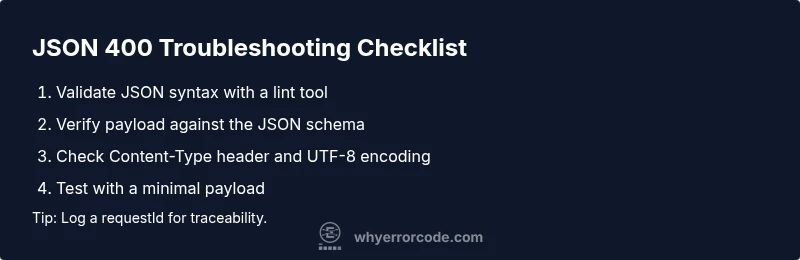
- Validate JSON syntax with a lint tool or parser before sending.
- Ensure the Content-Type header is application/json and the encoding is valid UTF-8.
- Confirm the JSON payload matches the API schema (required fields, types, and nesting).
- Remove trailing commas, check for unescaped characters in strings, and validate the request URL and method.
- Use a minimal, known-good payload and gradually reintroduce fields to isolate the offending piece.
Diagnostic Flow: Symptom → Causes → Fixes
A 400 usually starts with a symptom like: the API returns 400 for a POST to /users with a JSON body. The top causes are: 1) Malformed JSON syntax (high likelihood), 2) Payload not matching the JSON schema (medium), 3) Incorrect Content-Type or encoding (low). The fixes flow from quick validations to targeted corrections: validate JSON syntax, validate against the schema, verify headers, and test incrementally with a minimal payload to confirm the fix.
Step-By-Step Fix: From Syntax to Schema
- Reproduce the failure with a controlled test case.
- Validate JSON syntax using a lint tool or online validator.
- Compare the payload against the API’s JSON schema; ensure all required fields exist and types are correct.
- Check the Content-Type header and encoding; ensure the body is UTF-8 and not URL-encoded by mistake.
- Remove optional fields to see if a specific field triggers the 400; re-add them one by one.
- Test with curl or Postman using a known-good example from the docs.
- Review API docs for any recent changes to the contract or field semantics.
- If the error persists, capture a detailed request/response log and escalate to the API provider with an exact reproduction.
Other Causes and When to Escalate
If all client-side checks fail, consider server-side factors such as a recent API schema change or a hidden validation rule. In these cases, escalate to the API maintainers or the backend team with a precise reproduction across environments. If you’re integrating multiple services, validate end-to-end data flow to ensure no intermediate service is mutating the payload in a way that breaks the schema.
Tips & Warnings
- Always log a unique requestId for correlation across systems. - Do not ignore 400s; they signal inputs that break data integrity. - Safety: Do not retry with the same problematic payload without fixes, as repeated 400s can flood logs and clog systems. - When in doubt, revert to a known-good payload documented in the API specs. - If you’re in production, implement a jittered backoff strategy to avoid burst retries after fixes.
Best Practices to Prevent Future json error code 400s
Adopt a strict validation policy both client-side and server-side. Maintain an authoritative JSON schema and keep it synchronized with API docs. Use automated tests that validate payloads against the schema and run JSON schema validators as part of your CI pipeline. Enforce content-type correctness and consistent encoding. Document common pitfalls in the API guide and provide concrete examples for typical payloads. Consider returning richer 400 responses with a detailed error object that pinpoints the exact field and reason for failure. Finally, cultivate a culture of observability so you can detect, diagnose, and roll back changes quickly when 400s spike.
When to Seek Help and How Costs May Vary
If you cannot reproduce the issue locally or the API’s behavior changes between environments, seek help from your team or the API provider. Prepare a reproducible test case, exact error payload, and environment details. Costs for external help vary by region and engagement type, and specific ranges are not provided here. The key is to obtain a fast, deterministic fix path and ensure the API contract is clearly documented to prevent future 400s.
Steps
Estimated time: 45-60 minutes
- 1
Reproduce the Issue
Capture the failing request with a repeatable test case and confirm the 400 occurs consistently across multiple attempts.
Tip: Use a controlled test harness or Postman runner to ensure consistency. - 2
Validate JSON Syntax
Run the payload through a JSON validator and fix any syntax errors such as missing brackets, quotes, or stray commas.
Tip: A single misplaced character can cause the entire payload to fail. - 3
Check API Schema Alignment
Cross-check the payload against the API’s JSON schema: required fields, data types, and nesting. Adjust as needed.
Tip: Refer to the official docs for required field lists and examples. - 4
Verify Content-Type and Encoding
Ensure the header is exactly Content-Type: application/json and that the payload is UTF-8 encoded.
Tip: Avoid sending URL-encoded bodies with a JSON header. - 5
Test with Minimal Payload
Remove optional fields to create a minimal valid payload; gradually reintroduce fields to identify the offender.
Tip: Start with the smallest working example from the docs. - 6
Use Repro Across Environments
Test the same request in dev, staging, and production to rule out environment-specific issues.
Tip: Environment parity helps isolate root causes. - 7
Review Server Logs
Collect server-side error messages and request IDs; correlate them with client logs for precise diagnosis.
Tip: Request IDs streamline tracing across services. - 8
Escalate if Persisting
If the issue remains unresolved after reproducibility checks, escalate to the API provider with a detailed report.
Tip: Include exact payload, headers, and error responses.
Diagnosis: Client receives 400 Bad Request when posting JSON to API
Possible Causes
- highMalformed JSON syntax
- mediumPayload does not match JSON schema
- lowIncorrect Content-Type header
Fixes
- easyValidate JSON with a lint tool or parser
- mediumCompare payload against API schema and ensure required fields/types
- easyVerify Content-Type header and encoding
Frequently Asked Questions
What does json error code 400 mean?
400 indicates a bad request due to client-side input. It usually stems from malformed JSON, schema mismatches, or incorrect headers. Fix the input and retry.
A 400 means the request is bad on the client side; correct the payload, schema, or headers and try again.
What are the most common causes for 400 in JSON requests?
Malformed JSON syntax, payloads that don’t match the API's schema, and wrong Content-Type headers are the top triggers. Missing required fields and invalid data types also commonly cause 400s.
Most 400s come from syntax errors, schema mismatches, or incorrect headers.
How can I quickly test a fix for a 400 error?
Use a known-good payload from the API docs, validate with a JSON linter, and test with curl or Postman to confirm the fix across environments.
Test with a clean payload, validate syntax, and verify with a client tool like curl or Postman.
Is 400 the same as 422 Unprocessable Entity?
No. 400 is a generic bad request. 422 means the request was well-formed but semantically invalid for the API's rules.
400 is a generic bad request; 422 means the data is recognized but invalid for processing.
When should I contact the API provider?
If you cannot reproduce the issue locally or the API docs seem inconsistent, open a ticket with a detailed reproduction and logs.
If you’re stuck after local checks, reach out with the exact payload and error details.
Can incorrect headers cause a 400?
Yes. Missing or incorrect Content-Type or Authorization headers can trigger 400 responses.
Yes, wrong headers often lead to 400, so double-check Content-Type and auth headers.
Watch Video
Top Takeaways
- Validate JSON syntax first
- Match payload to API schema exactly
- Check Content-Type and encoding
- Log request IDs for traceability