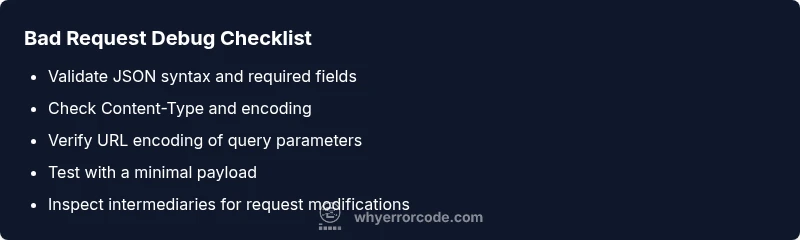
Bad Request Error Code: Quick Fixes and Diagnostics
Urgent guide to understanding the bad request error code (HTTP 400), its top causes, and practical, step-by-step fixes to get your API or form submissions flowing again.


Bad request error code means the server cannot process the request due to client-side errors, typically HTTP 400. It signals invalid syntax, missing parameters, or malformed data. The quick fix is to validate the request against the API or form schema, correct URL encoding, set the proper Content-Type, and ensure authentication tokens and headers are correct. If issues persist, check server logs for exact failing field.
What the bad request error code means
A bad request error code indicates that the server cannot or will not process the request due to something that is perceived as a client error. In HTTP terms, this is usually a 400 status code, not a server fault. The distinction matters: while a 500-series error points to server-side faults, a 400-level code signals that the request itself is malformed, missing required data, or uses invalid syntax. The practical consequence for developers and IT pros is that your client must fix the payload and retry.
Common examples of a bad request error code include invalid JSON in the body, a missing required parameter, an overlong query string, mismatched Content-Type headers, or an authentication token that was omitted or malformed. Another frequent culprit is URL encoding problems, such as spaces or special characters not properly percent-encoded. When you see this error on API calls, verify the exact field reported by the server (often included in the response body) and reproduce the call with a minimal payload to confirm the fault lies with the client request rather than the server configuration. In 2026, the best practice is to implement thorough input validation on the client side and to standardize error messages so that you can quickly locate the failing field.
true
Steps
Estimated time: 30-45 minutes
- 1
Reproduce with a minimal payload
Start by stripping the request down to the smallest valid example. This helps confirm whether the issue lies with complex data or a basic syntax error.
Tip: If the minimal payload works, gradually add fields to identify the culprit. - 2
Validate JSON and required fields
Run the payload through a JSON validator and cross-check every required field against the API docs. Look for type mismatches or missing keys.
Tip: Pay attention to null vs missing values; some APIs reject explicit nulls. - 3
Check Content-Type and encoding
Verify that the Content-Type header matches the body format (e.g., application/json for JSON) and that the payload is encoded correctly.
Tip: Use a tool like curl or Postman to compare requests with and without the header. - 4
Inspect URL and query strings
Ensure URLs are properly encoded; spaces, plus signs, and other characters must be percent-encoded.
Tip: Prefer keeping query strings short and moving large data to the body when possible. - 5
Review intermediaries and logs
Look at proxies, load balancers, or WAFs that might modify or reject requests before they reach the server.
Tip: Enable verbose logging on the client and server to catch altered requests.
Diagnosis: HTTP 400 Bad Request appears when submitting a form or API request.
Possible Causes
- highMalformed JSON in the request body
- highMissing or invalid required parameters
- mediumIncorrect Content-Type or encoding
- mediumURL encoding issues or stray characters
- lowProxies or intermediaries altering the request
Fixes
- easyValidate JSON with a schema or linter and resubmit
- easyDouble-check required fields and data types against the API spec
- easyEnsure Content-Type matches payload (e.g., application/json)
- easyRe-encode URL parameters and remove stray characters
- easyTest with a minimal, reproducible payload
Frequently Asked Questions
What is a bad request error code?
A bad request error code usually means the server cannot understand the request due to client-side mistakes. It’s often caused by malformed payloads or missing parameters. Fix the syntax, validate data, and retry.
A 400 error means the request is invalid on the client side. Check syntax and required fields, then retry.
How can I tell if the issue is on the client or server?
If the payload and headers are correct and the error persists, examine client logs and input validation. Server-side issues are less common for 400s but can occur if the server misinterprets a valid request.
Start with your request data and headers; if they’re correct, the server may be misconfiguring the request handling.
Is HTTP 400 the same as 404 or 500?
No. 400 indicates a bad request from the client; 404 means the resource isn’t found; 500 indicates a server error. Each requires different debugging approaches.
400 is client-side, 404 is missing resource, 500 is server fault.
When should I involve a professional?
If you’re unable to reproduce the issue with a minimal payload, or if production data or security concerns are involved, consult a senior developer or network specialist.
If debugging stalls or security risks appear, get professional help.
Can proxies cause a bad request error code?
Yes, proxies or load balancers can modify requests and trigger a 400 if the result doesn’t match server expectations. Check intermediary configurations and logs.
Yes, intermediaries can cause 400 errors by altering requests.
Watch Video
Top Takeaways
- Validate inputs before sending requests
- Check encoding and headers for accuracy
- Use minimal payloads to isolate errors
- Consult logs and API docs when debugging