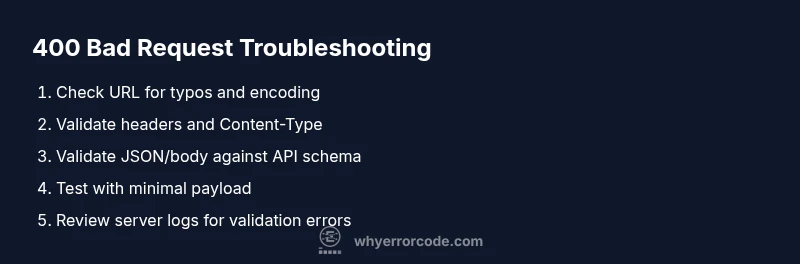
HTTP 400 Bad Request Troubleshooting
A comprehensive, urgent guide to diagnosing and fixing http error code 400. Learn the common causes, diagnostic flow, and step-by-step fixes to restore forms, APIs, and web requests quickly.


HTTP error code 400, Bad Request, means the server cannot process the request due to client input or formatting. Common fixes include verifying the URL, headers, and payload, encoding parameters correctly, and ensuring the request aligns with the API contract. Start with quick checks: reload, clear cache, and retry with corrected input.
What HTTP 400 Really Means
HTTP 400 Bad Request is part of the 4xx family, signaling that the client’s request cannot be understood by the server due to malformed syntax or invalid parameters. In plain terms, the server is telling you that something in the request itself is wrong, not that the server is broken. This distinction matters: a 400 usually indicates a problem on the client side such as a malformed URL, incorrect query string encoding, invalid JSON, or missing required fields. According to Why Error Code, the most reliable way to approach these errors is to verify input early and ensure strict adherence to the API or server contract. If you’re debugging a browser form, start by inspecting the URL, method, and payload. When dealing with an API, compare the actual request with the documented contract and look for deviations in parameter names, required fields, or data types. The goal is to identify the smallest valid revision that produces a successful response, rather than a broad sweep of fixes.
In this article, we dissect http error code 400 step by step, focusing on practical checks you can perform in minutes. You’ll learn how to differentiate between URL-level, header-level, and body-level issues, and how to validate input against contract specifications to prevent future 400s. Expect a mix of quick wins and deeper validation strategies that apply to browsers, mobile apps, and server-side APIs. This guidance reflects the urgency of minimizing user impact while preserving data integrity, and it aligns with the HowTo approach used by developers and IT pros troubleshooting error codes like http error code 400.
Steps
Estimated time: 15-25 minutes
- 1
Verify the request URL and method
Check that the HTTP method matches the API specification and that the URL path is correct. Look for stray characters, unescaped spaces, or missing slashes that could invalidate the request. Ensure query parameters are properly encoded and not accidentally duplicated.
Tip: Use a network proxy or browser dev tools to inspect the exact request line. - 2
Inspect headers and content type
Confirm that the Content-Type header matches the payload format (e.g., application/json). If the server expects a specific charset or encoding, ensure it is included. Remove any unsupported or conflicting headers that could trigger a Bad Request.
Tip: Temporarily remove optional headers to isolate the issue. - 3
Validate the payload against the API contract
If sending JSON, validate syntax and data types. Ensure required fields are present and named exactly as defined by the API. Check for extra fields or invalid values that could be rejected by schema validation.
Tip: Use schema validation tools or a test harness to verify payloads quickly. - 4
Test with minimal, known-good input
Submit a simple, minimal request that is guaranteed to be valid according to the API docs. If this succeeds, reintroduce fields one by one to identify the exact cause of the 400.
Tip: Document each change to track what fixes the issue. - 5
Check server-side validation and logs
If you control the server, review validation logic and error messages returned in the response. Look for clues in server logs about which field or condition caused the rejection.
Tip: Enable verbose logging temporarily, but redact sensitive data. - 6
Replicate across environments
Test the same request in development, staging, and production to determine if the issue is environment-specific (e.g., config differences or feature flags).
Tip: Use consistent test data across environments to compare results. - 7
Implement client-side validation and proper error messaging
Add validation before sending requests to catch common mistakes. Provide clear, actionable error messages to users and clients so 400s are minimized.
Tip: Keep client-side validation in sync with server-side schema changes. - 8
Escalate when unresolved
If the 400 persists after all checks, contact the API owner or backend team with exact request details and timestamps to expedite diagnosis.
Tip: Share sanitized request traces to avoid back-and-forth.
Diagnosis: User reports HTTP 400 Bad Request when submitting a form or API call.
Possible Causes
- highMalformed or missing query parameters in the URL
- mediumInvalid or missing JSON/body payload not matching API contract
- lowIncorrect or missing headers (e.g., Content-Type), or encoding issues
Fixes
- easyValidate and re-encode URL and query parameters; ensure required fields are present
- easyValidate the request body against the API schema and correct any mismatches
- easyVerify headers (especially Content-Type) and ensure proper encoding for special characters
Frequently Asked Questions
What does HTTP 400 Bad Request mean?
HTTP 400 indicates the request could not be understood due to invalid syntax or missing/incorrect parameters. It is a client-side error, not a server fault. The fix is to correct input and align with the API contract.
HTTP 400 means your request is malformed. Check the URL, headers, and body, then fix the input to match the API spec.
How is 400 different from 401 or 403?
A 400 is about malformed input, while 401 means missing or invalid authentication and 403 means the server refuses access despite authentication. They describe different failure modes and require distinct fixes.
A 400 is wrong input, 401 means not authenticated, and 403 means access is denied even with authentication.
Can a 400 be caused by server-side issues?
Mostly 400s are client-side, but misconfigured servers or gateways can produce 400 responses if they incorrectly parse requests. Always verify the request first, then check server validation logic.
Usually it’s from the client, but server misconfig could also trigger it.
What steps fix a 400 when using APIs?
Validate the endpoint, method, headers, and payload against the API docs. Use minimal payloads, correct encoding, and clear error messages to guide fixes.
Check the API contract, then fix input and encoding.
Does payload size affect a 400?
Yes, overly large or malformed payloads can trigger 400 responses. Ensure payloads meet size and schema requirements.
Yes—too big or malformed payloads can cause a 400.
Can browser extensions cause 400 errors?
Extensions can modify requests and headers, potentially producing 400 responses. Disable extensions to test and isolate the issue.
Extensions might alter requests; try disabling them to test.
Watch Video
Top Takeaways
- Validate input early to prevent 400s.
- Differentiate between URL, header, and body issues.
- Match payloads to API contracts precisely.
- Use server logs to pinpoint root causes and prevent recurrence.