Fix error code 267 Roblox: Urgent Troubleshooting Guide
Urgent guide to fix Roblox error code 267. Learn quick checks, step-by-step repairs, and when to contact support to restore access fast. Includes server status, network tips, and prevention in 2026.


Error code 267 Roblox indicates you were kicked from the game by the server. This usually happens during a server reset, moderation action, or a poor network connection. The quickest way to regain access is to check Roblox's server status, restart your device and router, and attempt to rejoin. If the issue persists, try a different game or contact support for assistance.
What Error Code 267 Means in Roblox
According to Why Error Code, error code 267 is commonly presented when you are forcibly kicked from a game by the server rather than being blocked at login. It signals a session termination initiated by the host or by Roblox's server-side checks. In practice, 267 usually points to temporary server issues, a moderation action affecting your session, or a network hiccup that caused you to disconnect. Understanding this distinction helps you choose the right troubleshooting path: start with the network and client side, then verify server status, and only escalate to support if the problem persists across multiple games and devices. This guide uses the term 267 as a server-side disconnect indicator and will guide you through fast, repeatable steps to regain access in 2026.
Quick Fixes You Should Try First
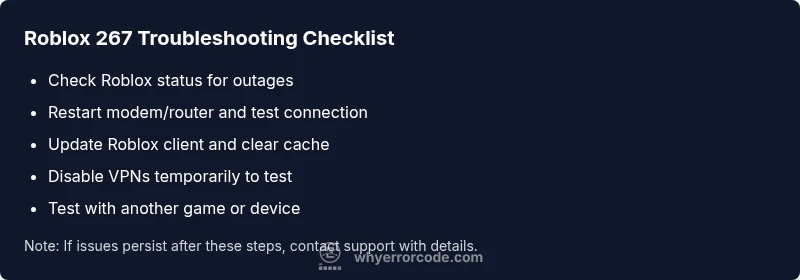
- Check Roblox status page and Roblox server health to see if outages or maintenance are active in your region.
- Reboot your device and router to refresh your network session.
- Try a different Roblox game or a private server to determine if the issue is game-specific.
- Clear Roblox cache or reinstall the client if cached data or corrupted files are suspected.
- If you use a VPN or proxy, temporarily disable it to verify whether it’s contributing to the disconnect.
Step-by-Step Fix: Network and Client Checks
- Verify the Roblox server status and any regional incidents before diving deeper.
- Test your internet speed and stability; aim for a steady connection with low latency.
- Power cycle your modem and router: unplug, wait 60 seconds, plug back in, and allow to re-sync.
- Update the Roblox client to the latest version and clear cache if you’re on PC or mobile.
- Try another device or browser to rule out device-specific issues.
- Attempt to rejoin a game after confirming status and connectivity.
- If the problem persists, proceed to more advanced steps or contact support with details.
Common Causes and How They Relate to 267
The 267 code often signals a server-side kick or disconnect, but local factors can trigger the symptom. Common causes include temporary server maintenance or outages, a moderator or anti-cheat action in a game, unstable home network, router or firewall blocking Roblox traffic, and outdated game/client versions. By separating server-side from client-side issues, you can apply the right fix first—start with status checks and a clean network slate, then verify client integrity.
When to Escalate: Roblox Support and Moderation
If 267 recurs across multiple games and devices, it’s time to involve Roblox Support or the game admin. Gather details such as the exact time of occurrence, the game name, device and OS, and any error text seen along with screenshots if possible. Roblox Support can review server-side logs and moderation actions if applicable. In persistent cases, you may need a formal review or escalation to verify there are no account restrictions affecting sessions.
Preventive Measures for Future Sessions
Proactive steps reduce the odds of a 267 disruption. Keep the Roblox client updated, monitor server status regularly, and maintain a stable home network with a wired connection if available. Avoid lengthy VPN use during gaming and limit firewall rules that block Roblox traffic. Regularly clearing cache and performing periodic reboots of network gear can also help keep sessions clean. Remember, consistent connectivity is your best defense against server kicks.
How to Validate Fixed Status: Quick Recheck Routine
After applying fixes, perform a controlled rejoin test: pick a known stable public server in a popular game, monitor for 2-3 minutes, then attempt another server. If you can stay connected across multiple servers, the fix is likely effective. Document the steps you took and any changes in your setup to reproduce or avoid issues in the future. If instability returns, revisit the diagnostic flow to catch a less obvious cause.
Advanced Troubleshooting Paths for Power Users
For users comfortable with deeper diagnostics, examine your router’s port forwarding for Roblox, check for congested wireless channels, and temporarily disable security software that may block Roblox traffic. Inspect your computer’s network adapter settings for abnormal MTU values or DNS issues, and try configuring a reliable public DNS (e.g., 8.8.8.8). If you rely on parental controls or enterprise networks, confirm these policies permit Roblox traffic uninterruptedly.
Quick Test After Fix: Verifying Reconnection
Run a quick test by joining a few matches in quick succession to ensure the server isn’t rejecting you again. If you encounter an isolated 267 spike, log the time and steps you took, as it could be an intermittent server-side condition. If the issue remains, escalate with evidence to support channels and consider using a different region or server as a temporary workaround while a root cause is identified.
Steps
Estimated time: 20-35 minutes
- 1
Check Roblox server status
Visit the Roblox status page and social channels to confirm if outages or regional incidents are in progress. If there is an ongoing incident, wait for updates and avoid troubleshooting on that phase.
Tip: Bookmark the status page and enable notifications if available. - 2
Power cycle network devices
Turn off and unplug your modem and router for at least 60 seconds. Plug them back in and allow them to re-sync. Then retest Roblox to see if the connection has stabilized.
Tip: A short cycle often clears temporary routing issues. - 3
Test with a different game or device
Join another Roblox game or try a different device/browser to determine if the issue is game-specific or device-related. If other games work, focus on the impacted title.
Tip: Document which games fail to help support diagnose patterns. - 4
Update and clear cache
Ensure your Roblox client is on the latest version. Clear cached data or reinstall the app if necessary to remove corrupted files that block joins.
Tip: Back up local progress if needed and preserve saved credentials. - 5
Check for VPNs or firewall interference
Temporarily disable VPNs or proxies and ensure your firewall allows Roblox traffic. Re-enable security after testing to avoid exposure.
Tip: If VPN is required, try a different server location. - 6
Reach out to support if persistent
If 267 persists across games and devices, contact Roblox support or the game’s admin with details like time, game name, device, and steps taken.
Tip: Provide exact timestamps to speed up investigation.
Diagnosis: Roblox error code 267 appears, and you are kicked from a game
Possible Causes
- highServer kick or shutdown by Roblox or game server
- highNetwork instability or unstable connection
- lowAccount restrictions or moderation flags
Fixes
- easyCheck the Roblox status page to confirm server health
- easyRestart modem/router and test the connection
- mediumUpdate Roblox client and clear cache or reinstall if needed
- hardContact game admin or Roblox support if the issue persists across games
Frequently Asked Questions
What does error code 267 mean in Roblox?
Error 267 generally means you were kicked from a game by the server. It can result from server maintenance, a moderation action, or network issues. Use the diagnostic flow to isolate the cause and apply the fixes.
Roblox error 267 means you were kicked by the server. Start with status checks and network resets, then test across games.
Is 267 a ban or punishment?
267 is typically a disconnect from the game session rather than a permanent ban. It may reflect a server action or a transient network problem. If it happens repeatedly, verify account status and contact support if needed.
267 is usually a disconnect, not a permanent ban. Recheck status and network, and contact support if it keeps happening.
Will rebooting fix Roblox error 267?
Rebooting your device and router resolves many transient connectivity issues that contribute to 267. If the problem persists after a reboot, test with a different game or device to narrow down the cause.
Rebooting often fixes 267. If it persists, try another game to rule out game-specific issues.
Should I reinstall Roblox for 267?
Reinstalling or clearing the cache can fix corrupted files that block joins. Do this only after basic checks and server status have shown no outages.
Reinstall Roblox if basic checks don’t fix 267; it helps remove corrupted files.
Can Roblox Support help with 267?
Yes. If the same error occurs across multiple games or devices, contact Roblox Support with time stamps, game names, and device information for a server-side review.
Yes—support can investigate server-side causes and moderation actions if needed.
Watch Video
Top Takeaways
- Check Roblox status before troubleshooting
- Restart network hardware to refresh connections
- Test across games/devices to localize the issue
- Escalate with logs when fixes fail