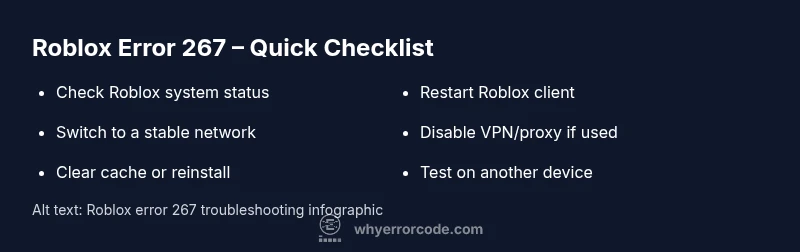
What happens if you get error code 267 on Roblox? Immediate fixes and prevention
Urgent guide to what error code 267 on Roblox means, how to fix it quickly, and ways to prevent it from reoccurring. Learn quick checks, step-by-step repairs, and when to contact Roblox Support.


Error code 267 in Roblox usually means you were kicked from a game by the server. It can be caused by a temporary server issue, moderation action, or a client-side connectivity problem. Quick fixes include rejoining, checking your internet, restarting the Roblox client, and temporarily disabling VPNs or proxies while troubleshooting.
What happens if you get error code 267 on roblox
In Roblox, error code 267 means you were kicked from the game by the server. This is a session-level interruption, not necessarily a permanent ban. According to Why Error Code, the kick can stem from server-side decisions or temporary connectivity hiccups rather than a fault on your end. The server may disconnect players during maintenance, after anti-cheat checks, or if the game owner enforces a rule in a crowded lobby. Because Roblox runs on many shards across regions, a 267 can appear even in normal gameplay. The key takeaway: treat 267 as a momentary disconnect and focus on rejoining, validating your connection, and ruling out client-side issues as you troubleshoot.
Why it happens: server-side vs. client-side factors
Error 267 is often a server-side decision, but it can also be triggered by client-side conditions that look like a server kick to your Roblox client. Common server-side reasons include
- Game maintenance, restarts, or forced disconnections by the host
- Anti-cheat detections or enforcement actions by the game creator
- Temporary regional server issues or routing problems
On the client side, connectivity problems (unstable Wi‑Fi, VPNs, proxies, or firewall rules) can look like a server kick to your device. If you see 267 repeatedly, it’s wise to test both angles: server status and your local connection.
How this impacts your session and progression
When 267 occurs, you lose access to the current session immediately. Any progress in that game round is typically lost unless the game has autosave or resume features. Rejoining can often restore normal play, but if the same error recurs on multiple games, you’re looking at a broader connectivity or account-related issue. Understanding the difference between a one-off kick and a persistent block is crucial for choosing the right fix path.
Practical takeaway for urgent troubleshooting
- Don’t panic if you’re kicked once; try rejoining shortly after and test another game.
- If the error persists across many games, start with your network and Roblox client health checks.
According to Why Error Code, persistent 267 occurrences over several sessions should prompt a deeper check into your network environment and potential account restrictions. This helps distinguish a temporary server hiccup from a broader access issue.
Steps
Estimated time: 15-30 minutes
- 1
Close Roblox and verify network status
Exit the Roblox client completely and check your internet connection. Open a browser and confirm you can reach a few websites quickly. If the network is slow or unstable, fix the connection first (restart router, switch networks if possible).
Tip: A quick speed test can reveal if your bandwidth is the bottleneck. - 2
Reopen Roblox and attempt a different server
Launch Roblox again and join a different server or game. If you can connect to another session without 267, the issue is likely per-server rather than your connection. If the same error repeats, move to the next steps.
Tip: Prefer servers with lower ping to your region. - 3
Disable VPNs or proxies and retry
If you’re using a VPN or proxy, disable it and try joining again. VPNs can route traffic through problematic paths that Roblox may block. Re-test after disabling to see if 267 still appears.
Tip: Some corporate networks force proxies; switch to a personal network if possible. - 4
Check firewall/antivirus settings
Ensure Roblox, RobloxLauncher.exe, and RobloxPlayer.exe are allowed through your firewall. Some security software may block Roblox's network traffic intermittently, causing disconnects consistent with 267.
Tip: Temporarily disable security software to test connectivity, then re-enable with exceptions added. - 5
Clear cache or reinstall the Roblox client
On Windows, clear the Roblox cache or reinstall the client entirely if 267 persists after basic checks. This resolves corrupted cache data that can surface as disconnect errors.
Tip: Back up any local saves if applicable before reinstalling. - 6
Review account status and game permissions
If you suspect a moderation action or regional block, review your Roblox email for notices and verify that your account hasn’t been limited. Check parental controls or account restrictions if applicable.
Tip: If you’re part of a family account, verify with the account owner about any restrictions. - 7
Test on another device or network
If possible, try logging in from a different device or a different network (mobile hotspot, another home network). If 267 disappears on another setup, the original network or device is the likely culprit.
Tip: This helps isolate whether the issue is device-specific. - 8
Contact Roblox Support if needed
If the error persists after all steps on multiple networks and devices, contact Roblox Support with a concise report including your username, recent activity, and timestamps.
Tip: Provide your log timestamps and affected game names to speed up diagnosis.
Diagnosis: Error code 267 appears when trying to join Roblox games
Possible Causes
- highServer kicked you from the game (common)
- mediumYour network connection or firewall blocks Roblox traffic
- lowAccount restrictions or regional blocks
Fixes
- easyRejoin the same game or try a different server/game
- easyCheck your internet connection, disable VPNs, and ensure Roblox can access the network
- mediumClear Roblox cache and reinstall the client if issues persist
Frequently Asked Questions
What does Roblox error 267 mean?
Error 267 means you were kicked from a Roblox game by the server. It is usually not a permanent ban and can result from maintenance, anti-cheat actions, or network issues. Rejoining and checking your connection often resolves it.
Error 267 means you were kicked from the game by the server. Try rejoining and checking your connection.
Can a VPN cause error 267?
Yes. VPNs or proxies can route traffic in ways Roblox blocks or misroutes game traffic, triggering 267. Disable VPNs temporarily to test if the error clears.
A VPN can cause it; try disabling it to test.
Is error 267 a ban?
Not necessarily. 267 typically indicates a session kick from a server, not a formal ban on your account. Rejoining after a short wait is often enough, unless a server-wide restriction applies.
It's usually not a ban, just a kick from the server.
What should I do if 267 happens on multiple games?
If 267 occurs across several games, focus on your network and device health: check your router, test another network, and ensure Roblox has full firewall access. If it persists, consider contacting Roblox Support.
If it happens on many games, check your network and contact support if needed.
How long does 267 usually last?
Duration varies. It can be a few minutes during a server restart or longer if there’s a broader outage. Check Roblox status pages and try again later if the issue seems widespread.
It can last a few minutes or longer during outages; check status and retry later.
When should I contact Roblox Support?
Contact support if 267 persists across multiple games and devices after you’ve done standard troubleshooting, or if you receive account-restriction notices. Provide your username and timestamps to speed up the process.
Contact support if the problem continues after troubleshooting.
Watch Video
Top Takeaways
- Identify if 267 is server-side or client-side first
- Follow a quick rejoin and network-check sequence
- Disable VPNs and verify firewall rules
- Reinstall Roblox if cache corruption is suspected
- Contact Roblox Support for persistent, unexplained issues