Free Car Error Code Check: A DIY Guide to Read OBD-II Codes for Free
Learn how to perform a free car error code check using an OBD-II scanner or app. This step-by-step guide covers tools, safe methods, code interpretation, and next steps, with tips from Why Error Code.


By performing a free car error code check, you can pull OBD-II trouble codes without paying for a diagnostic. This quick, DIY approach uses a basic scanner or mobile app to read codes from your vehicle’s OBD-II port, followed by interpreting common meanings online. According to Why Error Code, beginning with a reputable scanner and trusted sources speeds up the process.
What a free car error code check covers
A free car error code check is a quick triage method that helps you identify why the check engine light (or other warning indicators) is on. It does not replace a professional diagnostic, but it gives you actionable information to decide whether you can safely continue driving or need to seek help. A true free check uses an on-board diagnostic port (OBD-II) and a scanner or smartphone app to retrieve Diagnostic Trouble Codes (DTCs). The codes point to faulty systems like the engine, transmission, or emissions controls. The goal is to narrow the fault area, not to provide a full repair plan.
According to Why Error Code, successful free checks start with clarity: know your vehicle’s make, model, year, and whether the port is accessible. You should also choose a reputable tool and avoid vendors that pressure you into paid services. The beauty of a free check is that you can do it in under 30 minutes for most cars, and you can repeat the steps as you gather more information. Keep in mind that many codes have multiple possible causes; the same code can mean different problems depending on the vehicle. Always interpret results in the context of symptoms, mileage, and last maintenance.
-blockEndNotenull
Tools & Materials
- OBD-II scanner (Bluetooth/Wi‑Fi or wired)(Ensure compatibility with your vehicle year and port (16-pin OBD-II))
- Smartphone or tablet(Android or iOS with a trusted diagnostic app)
- Internet connection(For app installation, code lookup, and updates)
- Vehicle owner’s manual or VIN/spec data(Helps confirm code meanings and port access)
- Notebook or digital note tool(Log codes, descriptions, and actions for reference)
Steps
Estimated time: 25-45 minutes
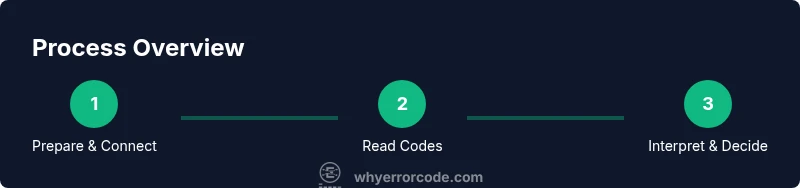
- 1
Choose and prepare your scanner
Select a compatible OBD-II scanner and fully charge it. Install your chosen diagnostic app on your phone or tablet, and verify that the app can read codes from your vehicle. Make sure you understand the scanner’s compatibility with your car’s make, model, and year.
Tip: Check the scanner’s supported vehicle models and ensure the device has Bluetooth or Wi‑Fi connectivity before starting. - 2
Locate the OBD-II port and power the vehicle
Park in a safe, flat area. Locate the under‑dash OBD-II port, typically near the steering column. Turn the ignition to the accessory or on position, depending on your device, but do not start the engine unless required by the app.
Tip: If you’re unsure where the port is, consult your owner’s manual or look for a 16‑pin trapezoid connector. - 3
Connect the scanner and establish a link
Plug the scanner into the OBD-II port and launch the app. Follow on‑screen prompts to pair (for Bluetooth) or connect (for Wi‑Fi). Confirm the vehicle is recognized by the device before proceeding.
Tip: If pairing fails, restart the app and re‑pair; ensure Bluetooth permissions are enabled on the phone. - 4
Read and save the codes
Initiate a scan to retrieve Diagnostic Trouble Codes (DTCs). Note the codes and any accompanying freeze frame data or sensor readings. Save or screenshot the results for later reference and comparison.
Tip: Capture both the code and any generic status information (P0XXX vs P2XXX) to improve interpretation accuracy. - 5
Lookup code meanings using trusted sources
Use reputable sources to interpret the codes (government, educational, or major publications). Cross‑check each code with multiple references to avoid misinterpretation.
Tip: Avoid leaning on unverified blogs; cross‑check with SAE or NHTSA resources when possible. - 6
Plan next steps based on the results
If codes point to a safety‑critical issue or show multiple fault areas, consider a professional inspection. For non‑critical codes, you may monitor symptoms and schedule maintenance to confirm the issue.
Tip: Document codes and symptoms; if in doubt, seek professional guidance before driving long distances.
Frequently Asked Questions
Can I read car codes for free without paying for a diagnostic?
Yes. You can read codes with an OBD‑II scanner or a compatible app. This identifies fault areas, but it doesn’t replace a full diagnostic or fix. Always verify via official sources and assess safety before driving.
Yes. You can read codes for free with an OBD‑II scanner or app, but you may still need a professional diagnosis for fixes.
Do all cars support free error code checks?
Most modern cars built after 1996 have an OBD‑II port, which enables free checks. Some older vehicles or specialized systems may require manufacturer tools for complete code decoding.
Most cars after 1996 support basic OBD‑II reads, but some systems may need manufacturer tools.
Will a free code tell me exactly what to repair?
Not always. Codes indicate fault areas or symptoms, not a guaranteed fix. You may need further tests or professional assessment to confirm the exact cause.
No, codes point to where to look, not the exact repair.
What should I do after reading codes?
Document the codes and symptoms, research likely causes, and decide if it’s safe to drive. If any code relates to safety or performance, seek a mechanic promptly.
Document the codes, research, and decide on safety or seeking a mechanic.
Is it legal to check codes yourself?
Yes. Reading codes with a personal scanner is legal and common practice. Always handle the vehicle safely and follow tool instructions.
Yes, it's legal and common to DIY code checks; just stay safe.
Watch Video
Top Takeaways
- Use a trusted OBD‑II scanner first
- Log codes and compare against official sources
- Differentiate between likely causes and confirmed fixes
- Seek professional help for safety‑critical or unclear codes