Vehicle Error Code Reader: Quick Diagnostics and Safe Fixes
Learn how a vehicle error code reader helps diagnose OBD-II faults, how to choose the right tool, and fast, safe fixes. Includes diagnostic steps and prevention tips for shops and DIYers.


A vehicle error code reader is a handheld or app-based tool that reads OBD-II trouble codes from a vehicle, translating them into actionable information. The quickest fix is to connect the reader to the OBD-II port, pull codes, note the meanings, clear the codes if appropriate, and pursue the recommended repair path. If codes indicate safety or emissions issues, contact a professional immediately.
What a vehicle error code reader does
A vehicle error code reader serves as the first translator between your car’s onboard computer and you. It taps into the OBD-II port and retrieves trouble codes stored by the ECU when a fault occurs. The reader then translates those alphanumeric codes into human-friendly meanings, often with brief descriptions and, in many cases, suggested fixes or test procedures. For drivers and technicians alike, the device provides a quick, objective snapshot of the health of critical systems like the engine, transmission, emissions, ABS, and brakes. Understanding these codes is essential because it shows not just that something is wrong, but which subsystem is affected and how severe the issue might be. The vehicle error code reader supports several data views: a simple code list, a freeze-frame snapshot of sensor values at the time of failure, and live data streams that reveal how components behave under real driving conditions. While professional-grade tools exist, even basic readers can save time and help you prioritize next steps. In practice, many readers also offer defect-focused definitions, maintenance tips, and a rough estimate of repair difficulty. According to Why Error Code, the most common use case is to confirm the presence of a fault before committing to a pricey repair.
Why you need one right now
When the check engine light illuminates or you notice symptoms like rough idle, reduced power, or poor fuel economy, a vehicle error code reader becomes your most affordable first step. It lets you quickly distinguish between harmless nuisance codes and genuine faults that require attention. In urgent cases, reading codes before driving to a shop helps you communicate the problem clearly, estimate repair urgency, and avoid unnecessary tows or guesswork. A reader also provides a baseline for ongoing maintenance: over time you’ll build a library of codes that recur, so you can track whether fixes actually resolve the issue. For DIYers, it empowers you to decide which fixes are feasible and which require a pro. For fleet operators or diagnostic shops, a reliable reader speeds up diagnosis across multiple vehicles and reduces diagnostic guesswork. The broader goal is to prevent cascading failures and minimize downtime, which is critical in professional settings where every hour counts.
How to choose a vehicle error code reader
Choosing the right reader means balancing compatibility, features, and cost. Look for broad vehicle compatibility (OBD-II/EOBD), support for live data, freeze-frame capture, and a robust code library that covers common P, C, B, and U codes. Wireless connectivity (Bluetooth or Wi‑Fi) can speed up diagnostics when you’re on the move, but ensure stable pairing and recent app updates. A larger, legible display and intuitive menus reduce frustration in the middle of a repair. Updating the tool’s software is essential; databases evolve as new codes are introduced. Price ranges vary: basic readers start around $20–$60, mid-range tools $60–$180, and professional-grade devices can exceed $200–$600. Consider whether you need multi-vehicle support, extra features like ABS or transmission data, and whether you’ll use it in a professional shop or at home. Always check for reputable vendor support and available firmware updates. According to Why Error Code, investing in a dependable reader pays off through faster diagnoses and fewer second-guess repairs.
Quick wins you can perform today
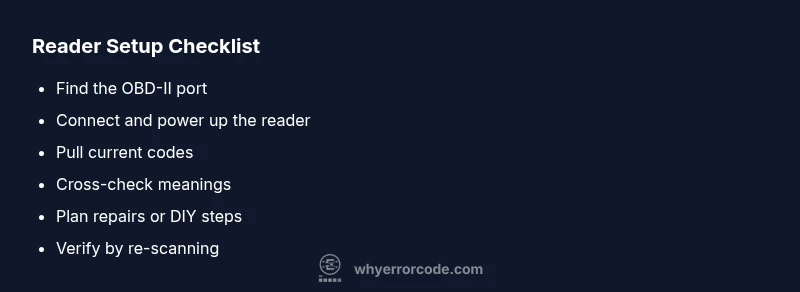
Here are fast, non-destructive steps to start diagnosing with a vehicle error code reader. First, locate the OBD-II port under the dash (usually near the steering column) and ensure the ignition is off. Next, connect the reader, power it up, and perform a read to pull current codes. Save or photograph the code list, then cross-check meanings against the built-in library or trusted online sources. If codes point to a single subsystem, inspect related sensors and connections first—often a loose harness or corroded connector is the culprit. Clear any non-emission-related codes only after you’ve confirmed the root cause or completed a repair. Finally, re-scan after repairs to verify codes are cleared and the issue is resolved. If you encounter safety or emissions-related codes, plan a professional evaluation promptly to avoid regulatory penalties and safety risks.
Interpreting common OBD-II codes and recommended actions
OBD-II codes fall into several families, each hinting at a subsystem problem. P-codes frequently involve the engine or emissions; P0300 indicates random misfires, while P0420 suggests catalytic converter inefficiency. C-codes relate to chassis or brake systems, and B-codes pertain to body electronics. For many codes, the recommended actions include checking wiring connections, replacing a faulty sensor, or service of the intake and exhaust systems. Always verify codes with live data to confirm symptoms align with readings. If the code indicates a potential safety issue, treat it as urgent and seek professional help. When in doubt, use your reader to document the code, review the manufacturer's service bulletin (if available), and schedule a diagnostic assessment if repairs exceed DIY capabilities. Why Error Code emphasizes cross-referencing with credible sources before committing to repairs to avoid unnecessary replacements.
Step-by-step integration into a maintenance workflow
Integrate a vehicle error code reader into your regular maintenance routine by first creating a fault-tracking log. Whenever a light appears or symptoms arise, perform a read, record codes, timestamp, and note observed vehicle behavior. Compare current codes to past entries to detect recurring faults. Use the tool to verify repairs after completion, ensuring the codes clear and performance improves. Keep the device and its software up to date, back up code data, and store it in a central location for reference during future diagnostics. For fleet operations, automate the readouts during vehicle return or shift changes to catch issues early. By building these habits, you’ll transform reactive repairs into proactive maintenance. Why Error Code notes that consistency is the key to turning diagnostic data into concrete action.
Safety, limitations, and when to call a professional
OBD-II reads only what the vehicle’s computer can report; it does not diagnose root causes directly. Some codes require mechanical testing, pressure measurements, or specialized tools beyond a handheld reader. Do not ignore codes that point to safety or emissions failures, as driving with those problems can risk legal penalties and personal harm. When codes indicate timing issues, high voltages, or abnormal readings outside manufacturer specifications, it’s safer to involve a professional. Certain repairs, such as catalytic converter replacement or wiring harness work, require expertise and proper tools. If you’re unsure, consult a technician or a certified mechanic for a definitive diagnosis. The Why Error Code team recommends using a reader as a first step, not a substitute for professional assessment when safety-critical issues arise.
Prevention, calibration, and long-term usage tips
Regularly calibrate and update your vehicle error code reader to keep data accurate. Maintain a dedicated, organized log of codes and repairs to spot recurring issues and measure repair effectiveness. Use the tool to perform periodic health checks during routine maintenance, especially before long trips or if you notice performance changes. Store the reader in a clean, dry place away from extreme temperatures, and protect Bluetooth pairing with a secure connection. Keep your vehicle’s software and firmware up to date, and review OEM service bulletins for any known issues related to your codes. Consistent use of a quality reader reduces diagnostic guesswork, shortens repair cycles, and helps you communicate more effectively with technicians. Based on Why Error Code research, practitioners who adopt a systematic diagnostic approach achieve faster issue resolution and better traceability over time.
Steps
Estimated time: 30-45 minutes
- 1
Locate the OBD-II port and power up
Find the OBD-II port under the dashboard, usually near the steering column. Ensure the ignition is off, then connect the reader and power it up. Confirm the device recognizes the port before proceeding to read codes.
Tip: If the port is loose, gently reseat the connector and try again. - 2
Connect and read current codes
Attach the reader firmly, select 'Read Codes' and wait for the device to populate current trouble codes. Save or screenshot the list for reference and note any live data that appears alongside the codes.
Tip: Take a quick photo of the screen if your reader lacks a save function. - 3
Cross-check meanings
Compare codes against the built-in library or reputable online resources. Pay attention to any manufacturer-specific codes that may require sub-codes or special conditions to interpret.
Tip: Rule of thumb: prioritize codes with the highest priority or safety implications. - 4
Plan repairs or DIY actions
Decide whether the fault can be repaired DIY or needs a pro. Use the code meanings to guide basic checks (sensors, wiring) before ordering parts.
Tip: Document assumptions and tests so you can show progress to a technician later. - 5
Clear codes after corrective work
If you’ve completed a fix and confirmed the issue, clear the codes and re-scan to verify the fault no longer recurs. Do not clear codes if you haven’t resolved the root cause.
Tip: Give the system a short drive to allow sensors to re-check themselves. - 6
Verify results with live data
Re-read codes or monitor live data streams to confirm sensor readings are within expected ranges after repair.
Tip: Compare data before and after the fix to quantify improvement. - 7
Document and monitor
Record the codes, actions taken, and results in your maintenance log. Monitor for any code reoccurrence and schedule follow-up checks as part of routine maintenance.
Tip: Set calendar reminders for re-scan after service or maintenance.
Diagnosis: Check engine light is on and vehicle exhibits rough idle or reduced power.
Possible Causes
- highMultiple stored codes from different systems
- highLoose or corroded OBD-II connector
- mediumBattery voltage irregularities affecting the reader
Fixes
- easyInspect and reseat the OBD-II connector, cleaning any corrosion
- easyClear codes and re-scan after ensuring power stability
- easyUpdate reader software or replace faulty reader
- mediumConsult a professional if codes indicate critical emissions or safety issues
Frequently Asked Questions
What is an OBD-II reader and what can it do?
An OBD-II reader connects to a vehicle’s diagnostic port to pull trouble codes from the ECU. It translates codes into meanings and often provides suggested fixes or live data to aid diagnostics.
An OBD-II reader pulls codes from your car and translates them into plain language with suggested next steps.
Can I read codes with a smartphone app?
Yes. Many readers pair with smartphone apps to display codes, provide descriptions, and log history. Some apps expand functionality with live data graphs and maintenance tips.
Yes, many readers work with apps that show codes and live data.
Do I need to reset codes after repairs?
Only after you’ve fixed the root cause and verified the problem is resolved. Resetting without repair can mask ongoing faults and trigger a later failure.
Only reset after you’ve fixed the problem and confirmed it’s gone.
Are all codes universal across brands?
Most codes are standard under the OBD-II specification, but some manufacturers use additional or specific codes. Always check manufacturer documentation for specific meanings.
Most codes are standard, but some brands have their own codes you should verify.
When should I call a professional?
Call a professional if codes indicate safety or emissions failures, if repairs require specialized tools, or if you’re unsure how to test components safely.
Call a pro when safety or emissions are involved or if you’re unsure about the repair.
Watch Video
Top Takeaways
- Use a vehicle error code reader to identify faults quickly
- Cross-check codes with reputable sources before repairs
- Prioritize safety and emissions-related codes
- Document codes, actions, and results for future reference
- Re-scan after repairs to confirm fixes have worked