Common Error Codes in API Testing: Diagnosis and Fixes
A comprehensive, urgent guide to understanding and handling common error codes in API testing, with practical steps to diagnose, fix, and prevent failures in 2026.


Root causes usually include invalid auth, expired tokens, and server-side rate limiting. Start by verifying API keys and tokens, then check rate-limit headers and retry policies. If failures persist, enable detailed logging and reproduce with a minimal payload to isolate the error codes in api testing. Also verify environment variables and base URLs.
What are common error codes in api testing and why they matter
In the world of API testing, error codes are more than numbers on a page—they are contracts that communicate what went wrong and where to look first. The phrase common error codes in api testing is not just academic; understanding these signals speeds up debugging, reduces test flakiness, and improves overall software reliability. When your test suite encounters a failing request, the status code, along with the response body and headers, guides you toward the root cause, whether it’s a malformed request, an authentication issue, or a server-side problem. In 2026, many teams report that most failures originate from authentication or throttling rather than unknown bugs; this makes strong error handling and clear expectations a must-have in your test strategy. Mastering these codes helps you design better tests, write precise assertions, and communicate issues to teammates without guesswork.
Common Categories of API Error Codes
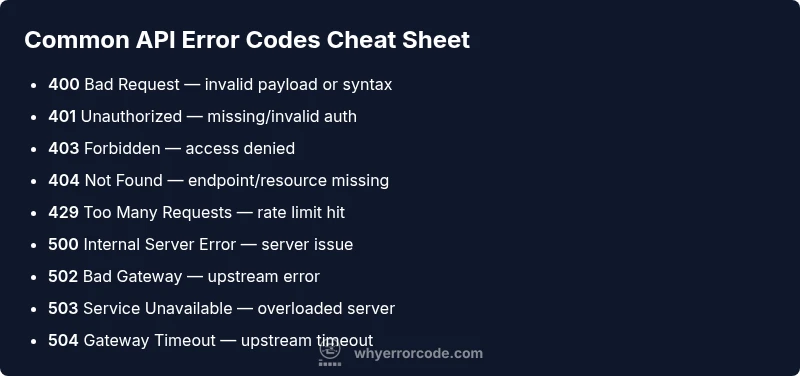
API error codes fall into a few broad categories that testers should know by heart. The two dominant groups are 4xx (client errors) and 5xx (server errors). A 400 Bad Request usually means the payload or query parameters are malformed. 401 Unauthorized indicates missing or invalid authentication, while 403 Forbidden signals that the credentials are valid but not permitted for this resource. 404 Not Found points to a missing endpoint or resource. 429 Too Many Requests signals rate limiting and the need for backoff. On the server side, 500 Internal Server Error, 502 Bad Gateway, 503 Service Unavailable, and 504 Gateway Timeout hint at back-end or upstream issues. In API testing, you will frequently encounter 429s and 5xx codes when scalability or resiliency tests are in play; your tests should verify proper handling and retry semantics while ensuring correct error payloads are returned.
Besides 4xx and 5xx, other useful codes like 409 Conflict, 422 Unprocessable Entity, and 415 Unsupported Media Type also show up in real-world APIs. Each code has a typical remediation path—for example, 409 often means conflicting resource state that your test must resolve before a retry. Always consult provider docs for code nuances, as implementations vary across services.
Understanding these categories helps you structure test cases, create precise assertions, and communicate failures clearly to developers and product owners. A well-aimed test that checks both status code and error payload can catch contract deviations early, reducing debugging time and speeding release cycles.
Steps
Estimated time: 20-30 minutes
- 1
Validate credentials and tokens
Begin by revisiting your authentication flow. Confirm that the access token is current, the token type is correct, and the required scopes are granted. Use a token refresh flow if your API uses short-lived credentials. Run a test call with a known-good token to verify basic access before proceeding.
Tip: Keep a separate test token for diagnostics to avoid affecting production credentials. - 2
Check the base URL and endpoint path
Ensure the base URL matches the intended environment (staging vs. production) and that the endpoint path exactly matches the API contract. A misplaced path or wrong version can produce 404 or 400 errors. Use a single source of truth for endpoints to minimize drift.
Tip: Automate URL validation with a centralized config and tests that fail fast on misconfig. - 3
Inspect rate-limiting headers and retry policy
If you encounter 429, review Retry-After headers and your retry strategy. Implement exponential backoff with jitter to avoid thundering the API. Confirm whether the provider imposes quotas and adjust test load accordingly.
Tip: Prefer deterministic test pacing to avoid flaky results from concurrency. - 4
Reproduce with minimal payload
Simplify the request to its essentials to isolate the error code. Remove optional headers and reduce the payload to a minimal, valid shape. If the error persists, it’s likely related to auth, resource state, or server configuration rather than data content.
Tip: Document the minimal reproducible example for faster triage. - 5
Enable verbose logging in the test environment
Turn on detailed request/response logging to capture headers, body, and status codes. When combined with a clean environment, logs help identify which header or field triggers the failure. Preserve logs for audit and debugging.
Tip: Mask sensitive data in logs to maintain security and compliance. - 6
Apply a controlled retry/backoff plan
If retries are appropriate (429 or 5xx), implement a backoff strategy with a cap on total retries. Track and report retry counts in test reports. Validate that successful responses after retries are correct and not partial or cached results.
Tip: Avoid infinite retry loops by setting a maximum retry limit.
Diagnosis: Test suite failing with varying HTTP error codes during API calls
Possible Causes
- highInvalid or expired authentication tokens
- mediumIncorrect base URL or endpoint path
- highRate limiting or throttling by the API
- lowServer-side outages or deployed changes
Fixes
- easyRefresh tokens / validate auth credentials
- easyVerify environment configuration (base URL, headers)
- mediumImplement and tune retry/backoff for 429/5xx
- mediumCheck API quotas and contact provider if needed
Frequently Asked Questions
What are the most common API error codes in testing?
In practice, you’ll often see 400, 401, 403, 404, 429, and the 5xx family (500, 502, 503, 504). Each points to a different issue: client input, authentication, access, missing resources, rate limiting, or server problems. Pair each code with a consistent error payload to improve debugging.
Common codes include 400, 401, 403, 404, 429, and 5xxs like 500. Pair with helpful error payloads for faster debugging.
How do I reproduce an error code reliably in tests?
Use deterministic test data, mock external dependencies where possible, and run in a controlled environment. Capture the exact status code, response body, and headers every time you reproduce so you can compare results across runs.
Use deterministic data and consistent setups to reproduce the same error code every time.
Should I retry on 5xx or 429?
Yes, but with a controlled backoff strategy. Retry on server errors and rate limits only after a safe delay, avoiding rapid repeated requests that could worsen the problem.
Yes—back off and retry with limits to avoid hammering the server.
What tools help test API error handling?
Popular tools like Postman, Insomnia, and HTTP clients integrated with CI pipelines let you test error handling, log responses, and verify payload structures. Use them to automate negative testing and capture consistent error messages.
Postman and similar tools are great for error-handling tests and logging.
When should I escalate to engineering or platform teams?
Escalate when repeated server errors occur with consistent payload failures, or when rate-limiting affects critical test runs. Provide reproducible steps, logs, and environment details to speed up investigation.
Escalate if server issues persist beyond your control with clear steps and data.
How can I prevent common API errors in future tests?
Automate auth token refresh tests, validate endpoint configurations, simulate realistic load with rate-limiting, and enforce consistent error payloads. Regularly review provider docs to stay aligned with API changes.
Automate credentials, config checks, and error payload validation to minimize repeats.
Watch Video
Top Takeaways
- Diagnose 4xx vs 5xx to narrow causes
- Validate auth flows early and often
- Test with deterministic data for reliability
- Implement safe retry/backoff for rate limits
- Automate error payload checks alongside status codes