Error Code 401 vs 403: Understanding Authentication and Authorization Errors
A practical, analytically driven comparison of HTTP 401 Unauthorized and HTTP 403 Forbidden. Learn definitions, when to use each, real-world examples, debugging steps, and best practices for APIs and apps.


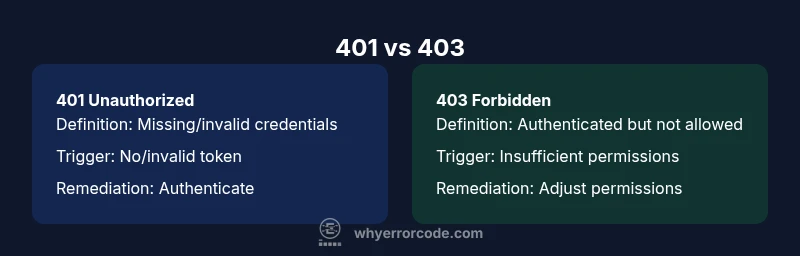
In short, 401 Unauthorized signals that authentication is missing or invalid, while 403 Forbidden means authentication succeeded but access is not allowed. Use 401 to prompt login, refresh tokens, or re-authenticate, and 403 to deny access after authentication. Understanding this distinction helps API clients react correctly and keeps security tight.
Core distinction between 401 and 403
The HTTP status codes 401 and 403 are both client-side errors, but they convey different guarantees about a user's identity and access rights. A 401 indicates that the request lacks valid authentication credentials. This often means the client did not provide a token, provided an expired token, or failed to present any credentials at all. A 403, on the other hand, means the client is authenticated but not allowed to access the requested resource. The server verified who the client is, but determined that the client’s role or permissions do not include access to that resource. This distinction matters for both security and user experience, because it informs how clients should respond and how you should structure error messaging. According to Why Error Code, using the two codes consistently reduces ambiguity and helps downstream systems and developers react appropriately. The practical takeaway is simple: authenticate first; authorize second.
wordCount':210},
Comparison
| Feature | 401 Unauthorized | 403 Forbidden |
|---|---|---|
| Definition | Authentication is missing or invalid | Authenticated but not allowed to access the resource |
| Trigger | No valid credentials, expired token, missing auth header | Valid credentials present but insufficient permissions or policy denial |
| Typical response body | Optional WWW-Authenticate header; may include brief error detail | Minimal or no detail in body; may include a permissions note |
| Common causes | Missing/expired token, invalid API key, wrong scheme | Insufficient role/permission, ACL misconfiguration, policy block |
| Client actions | Prompt login, refresh token, supply credentials | Check user roles, adjust permissions, request access |
| Security considerations | Potentially reveals login existence if not careful | Reduces information leakage about authentication state |
| Best practices | Return 401 for unauthenticated requests; 403 for forbidden access | Keep messaging consistent and framework-appropriate |
Advantages
- Clear separation between authentication and authorization improves security posture
- Helps clients differentiate remediation steps (login vs. permission review)
- Supports granular auditing and access-control testing
- Encourages consistent API design across endpoints
- Reduces accidental data leakage by isolating credential errors
Negatives
- Overuse of 401 can lead to login fatigue for end-users
- Misconfiguration can cause legitimate users to see 403s instead of 401s, causing confusion
- Excessive detail in error messages can reveal too much about backend policies
- Proxies or gateways may rewrite codes if not configured consistently
Use 401 for authentication failures and 403 for authorization failures
This separation aligns with security best practices and improves both security and user experience. Implement consistent messaging and avoid leaking internal policy details across endpoints.
Frequently Asked Questions
What is the key difference between 401 and 403?
A 401 indicates the request lacks valid authentication credentials, while a 403 means authentication succeeded but access to the resource is forbidden. Use 401 to prompt login and 403 to deny access after authentication.
401 means you need to log in or re-authenticate; 403 means you’re authenticated but not allowed to access that resource.
Should a request with an invalid token ever return 403?
No. An invalid or missing token should usually yield 401 Unauthorized. A 403 should follow successful authentication when the user lacks necessary permissions.
If the token is invalid, expect 401. A 403 appears only after authentication succeeds but authorization fails.
Can a request be both unauthenticated and unauthorized?
In practice, a request is typically categorized as either 401 or 403. It’s possible for a system to misinterpret or misroute errors, but proper design uses 401 for auth failures and 403 for permission issues.
Usually not both; use 401 for missing/invalid credentials, 403 for permission issues after login.
How should clients respond to 401 vs 403?
For 401, prompt the user to authenticate or refresh credentials. For 403, inform the user they lack permissions and guide them to request access or adjust their role.
Login or re-authenticate for 401; review permissions for 403.
Do proxies or browsers cache 401/403 responses?
Caching behavior depends on headers and the proxy. Generally, avoid long-lived caches for 401/403 responses unless you explicitly configure cache directives.
Check cache headers and proxy rules to understand caching for these codes.
Top Takeaways
- Map each code to authentication vs authorization
- Audit routes to ensure correct status assignments
- Keep error responses generic to avoid leaking internal details
- Document behavior for clients and partners
- Ensure middleware consistently returns 401 or 403 as appropriate