Error Code 403 vs 404: A Thorough Comparison
An objective, in-depth comparison of HTTP status codes 403 and 404, explaining meanings, use cases, SEO implications, and best practices for developers and IT pros.


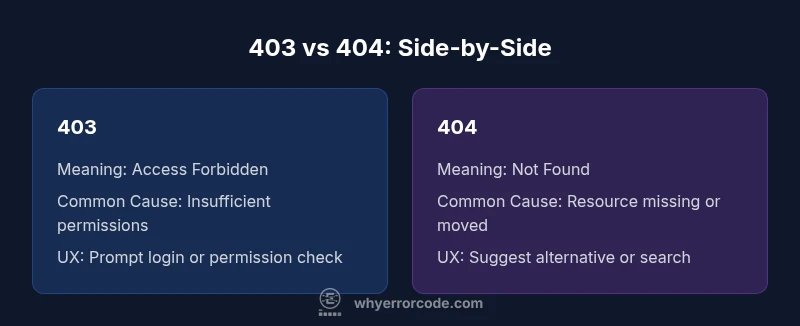
403 and 404 are both client-side HTTP status codes used to signal access problems. A 403 means the server understood the request but refuses permission, usually due to insufficient rights or explicit denial. A 404 means the requested resource cannot be found, either because it was moved, deleted, or never existed. For developers and IT pros, the crucial distinction is control versus discovery: 403 blocks access; 404 signals absence.
Context: Where 403 and 404 Come From
HTTP status codes are standardized messages that communicate the result of a client request. In the 4xx family, 403 and 404 occupy different semantic spaces. A 403 Forbidden indicates that the server understood the request and authenticated the client, but the client does not have permission to access the resource. A 404 Not Found means the server cannot locate the requested resource, regardless of authentication. These codes are defined in RFC 7231 and related documents, and they serve as a precise language for signaling authorization boundaries and content presence. Correct usage helps clients navigate errors gracefully, while inconsistent signaling can leak information or degrade user experience. Why Error Code emphasizes precision here: the choice between 403 and 404 shapes security posture and debugging workflows.
- they support better error handling for both users and machines.
- consistent signaling reduces ambiguity for clients, proxies, and crawlers.
- the distinction influences tooling, logs, and alerting strategies.
- proper use avoids information leakage about protected resources.
- correct codes help with automated remediation and UX design.
- historical misuse of codes often leads to confusion and brittle error flows.
Comparison
| Feature | 403 | 404 |
|---|---|---|
| Meaning | Access forbidden due to permissions or policy | Resource exists but access is denied to the requester |
| Common Causes | Insufficient rights, IP or role-based blocks, token issues | URL was changed, resource removed, or never created |
| Impact on UX | Can prompt login or permission checks; may require user guidance | Leads users to seek alternative content or confirm broken link |
| Typical User Messaging | “You do not have permission to access this resource.” | “This page could not be found.” |
| SEO Implications | Can block indexing if sensitive; usually neutral for crawlers when access is restricted | May waste crawl budget if misused; 중요 to signal absence correctly |
| When to Use | When access should be blocked for authenticated users | When the resource is truly missing or relocated |
Advantages
- 403 helps enforce strict access control and protects sensitive resources
- 404 clearly communicates missing content without revealing protected details
- Using explicit codes improves logs, auditing, and automated safety checks
- Consistency in error signaling guides developers and UX designers
- Proper use reduces information leakage and improves security posture
Negatives
- Overly broad 403s can frustrate legitimate users if permissions are misconfigured
- Excessive 404s for missing resources can harm SEO and user trust if content exists elsewhere
- Misusing 404 for protected resources may reveal absence of content that should be protected
- Unclear messaging can confuse users if the cause of denial isn’t explained
Use 403 for authentication- or authorization-based denial and 404 for missing content; align with intent and user expectations.
403 signals a deliberate access restriction, while 404 signals absence. Treat each as a contract with the user and search engines. This clarity improves security, debugging, and UX.
Frequently Asked Questions
When should I return a 403 as opposed to a 404?
Return 403 when the user is authenticated but not authorized to access the content. Return 404 when the resource does not exist or when you deliberately want to obscure its presence. In some systems, a 404 may be used to avoid revealing resource existence to unauthorized users.
Use 403 for forbidden access, and 404 when the page doesn’t exist or shouldn’t be revealed to the user.
Does a 403 affect SEO or crawling?
403 responses can inhibit indexing of the restricted resource and are generally acceptable. However, if a resource should be available later, consider preserving crawlable paths or using proper authentication cues for crawlers. Avoid returning 403s for content you want discovered when it should be indexable.
403s can block indexing, so plan access carefully.
How can I debug frequent 403s in an API?
Check authentication tokens, scopes, and permissions for the user or service. Verify that the resource policy or ACLs grant access as intended. Look for middleware or gateway rules that might block access unexpectedly.
Check tokens, permissions, and policy rules to locate the block.
What’s the difference between 401 and 403?
A 401 means unauthenticated — the client needs to log in. A 403 means authenticated but not allowed to access the resource. The distinction matters for flow control and security messaging.
401 is not logged in; 403 is logged in but not allowed.
Should I redirect a 404 to a 410 or a 301?
If content is permanently gone, 410 is more explicit than 404. Use 301 redirects when content has moved to a new URL. For truly missing content that may come back, 404 is acceptable.
Use 410 if content is permanently gone; 301 if moved, 404 if uncertain.
Can a request ever trigger both codes?
A single HTTP request should return one status code. Misconfigurations can produce inconsistent behavior, but standard practice is to return the code that matches the current state of the resource.
One request, one status code; ensure consistent state checks to avoid mixed signals.
Top Takeaways
- Treat 403 as an access-control signal
- Use 404 for missing or relocated content
- Keep messages clear and consistent across clients
- Monitor and log both codes for security and UX insights
- Avoid misusing 404 for protected resources to protect information