How to Fix LG Washing Machine Error Code U5
Diagnose and repair LG washers when U5 appears. This guide covers meaning, quick fixes, step-by-step repairs, costs, and safety tips to get your machine running again.


According to Why Error Code, LG washing machine error code U5 signals a system-level communication fault between the main control board and the motor/inverter, usually caused by wiring, connectors, or door-lock sensor issues. The quick fix is to power cycle the unit, reseat all harnesses, and confirm the door lock is securing properly. If the code persists, contact a technician.
Understanding U5 and why it appears
U5 is an LG washing machine error code that signals a fault in the machine's internal communication. In practical terms, the control board cannot reliably talk to the inverter/motor or to the door lock sensor, so the washer refuses to start or complete a cycle. According to Why Error Code Team, most U5 occurrences stem from simple wiring or connector problems rather than a failed motherboard. Before you panic, approach the issue with a methodical troubleshooting routine. Start with the basics: power off, unplug, and wait a moment for residual charges to dissipate; then reopen the console area to inspect connectors. Loose or corroded plugs commonly trigger U5. In some cases, a damaged harness or a pin pushed out of its socket can create intermittent signals that confuse the controller. Safety first: never work on live electronics, keep water away from exposed components, and avoid forcing connectors that resist alignment. Document every step you take so you can report findings to a technician if you need to call for service. The goal of this section is to help you understand the likely paths to resolution and to separate temporary glitches from persistent faults. The material here reflects practical troubleshooting guidance from the Why Error Code team and is intended to reduce unnecessary service calls.
Quick symptoms and initial checks
When U5 appears, you typically see the control panel become unresponsive, with the display frozen or blinking in a way that indicates a fault code. The washer may not advance to wash cycles, or it may halt mid-cycle after a brief attempt to start. At this stage, perform non-destructive checks: unplug the unit, inspect the door lock mechanism for obvious damage, and look at the wiring harness connections at the back of the control module. Gently wiggle connectors to feel for a loose fit; listen for a click as you reseat each plug. If you have a multimeter and feel comfortable, you can test for continuity on short harness segments, though avoid touching energized pins. In many cases, the quickest path to clarity is to reseat major harnesses and reclose the control housing securely. If the error reappears after these steps, you are likely facing a deeper electrical fault that requires further investigation or professional service. Remember that documenting your findings speeds up diagnosis if a technician is involved. A useful takeaway from Why Error Code Team is to start with the simplest fix and build a traceable record of actions taken.
Diagnostic framework: causes by likelihood
A practical approach to U5 is to rank probable causes from most to least likely. The top-tier suspects are wiring harness connections and the door lock sensor. In these cases, reseating connectors or replacing a faulty sensory latch can clear the code without major work. Medium likelihood suspects include inverter harness damage or a failing main control board. In those cases, replacements are costlier and often require a professional. Low-likelihood causes are rare intermittent faults in the motor driver or firmware glitches; these usually occur after a power surge or manufacturing defect and typically demand a board-level service or replacement. To validate, perform a controlled test after each action: power off, restore power, run a short diagnostic cycle if the model offers this, and observe whether U5 reappears. If you can't reproduce the fault, keep a log of the events, including times, sounds, and the presence of any electrical arcing or burning smell. As a note from the expert team, wiring and door-lock components are the most cost-effective fixes when they resolve the error.
Step-by-step fix: the most common cause
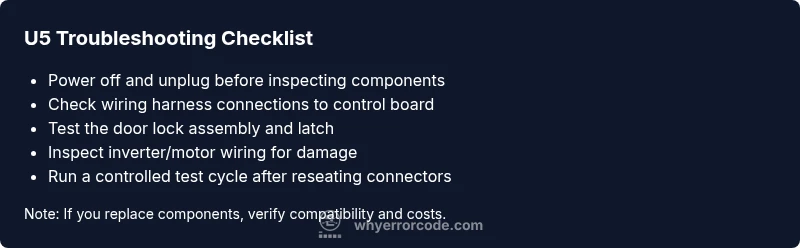
- Power cycle and access harnesses: Unplug the machine, wait 60 seconds, and plug back in. This resets the microcontroller and can clear transient faults. Tip: perform this step with doors closed and no water in the drum. 2) Reseat the main wiring harness: Remove the back panel and gently reconnect each plug to the corresponding socket, ensuring a firm, single-click fit. 3) Inspect the door lock latch: Test the door lock with the lid switch or door sensor; replace if there is wear or damage. 4) Check the inverter/motor harness: Look for crushed wires, pinches, or discoloration and reseat or replace as needed. 5) Run a short diagnostic or test cycle if your model supports it: This helps confirm stability after reassembly. 6) If U5 persists, consider a control-board service: In several LG models, a defective main board or inverter module is the root cause. 7) After any repair, run a full cycle to confirm normal operation. 8) Document the steps taken and results for future reference or professional help. Estimated time: 60-120 minutes.
Other causes and how to verify them
Beyond harnesses and locks, a failing main control board or inverter, firmware misbehavior, or damaged sensor circuits can trigger U5. Verify by correlating symptoms with component tests: if reseating connectors does not resolve the issue, and the display continues to show U5 after a full cycle, the control board or inverter likely needs replacement. Firmware glitches are rarer but feasible after power surges or voltage irregularities; in such cases, a technician may reflash or replace the board. You can also check for service advisories from LG or your retailer about U5-related recalls or firmware updates. Ensure you inspect for signs of overheating or water ingress near the control panel, as moisture can cause intermittent contacts that mimic more persistent faults. The goal is to separate temporary, easily reversible faults from hardware replacements that involve higher cost.
Safety, costs, and when to call a pro
Safety comes first. Always unplug the washer before any internal inspection and never operate the unit while panels are open. If you are comfortable with basic electrical work, you can perform harness reseating and door-lock checks; however, replacing the main control board or inverter typically requires a professional technician. Diagnostic fees usually range from $60 to $120, with door lock sensor replacements around $60–$150, wiring harness replacements around $50–$150, and a full control-board replacement potentially ranging from $200–$600 plus labor. If your appliance is under warranty, contact LG or the retailer for service options; attempting major component replacement could void coverage. The Why Error Code Team recommends scheduling professional service when the fault persists after basic fixes or when you notice burning smells, buzzing, or arcing.
Prevention tips and maintenance to avoid U5
Preventive maintenance can reduce the likelihood of U5 recurring. Periodically inspect and clean the wiring harness connections behind the control panel, keep the drill-free area dry, and protect the console from moisture exposure. Use a surge protector to minimize voltage spikes and ensure the home outlet is properly grounded. If you notice frequent resets or intermittent lock issues, address them early rather than letting them linger, as intermittent faults are easy to misdiagnose later. Finally, schedule regular professional service as part of your machine’s maintenance routine, especially after heavy use or if the unit operates in high-humidity environments. Following these practices helps avoid recurring U5 faults and extends the life of the control electronics.
Steps
Estimated time: 60-120 minutes
- 1
Power down and unplug
Unplug the machine from the wall outlet and switch off any surge protection. Wait 60 seconds to discharge capacitors and allow the control logic to reset. This prevents shock while you inspect connectors.
Tip: Use a flashlight to locate the back panel screws and avoid pinching cables. - 2
Access the harnesses
Remove the back panel or top cover per your model's manual to expose the control board area. Keep track of screws and take photos before disconnecting any connectors.
Tip: Label connectors with masking tape if you must remove multiple cables. - 3
Reseat major harnesses
Gently disconnect each large harness and reconnect firmly. Ensure each plug locks with a distinct click and that no pins are bent.
Tip: Don’t force connections; if a connector resists, re-check alignment before applying more pressure. - 4
Test the door lock sensor
Inspect the door lock mechanism and replace if there are visible signs of wear. Reconnect the lock wiring and test the door latch with the unit open.
Tip: If available, use a multimeter to verify continuity on the lock circuit. - 5
Check inverter/motor wiring
Inspect the inverter/motor harness for damaged wires or insulation, and reseat the connectors. Look for burn marks or melted insulation.
Tip: If you see damaged insulation, do not run the unit; replace the harness first. - 6
Run a test cycle
With the cover reinstalled, plug the unit back in and run a short diagnostic or test cycle if your model supports it. Observe whether U5 reoccurs and note any abnormal sounds.
Tip: Listen for buzzing or arcing noises during testing. - 7
Decide on board repair
If the code returns, a board-level fault is likely. Contact a professional for a precise diagnosis and potential replacement.
Tip: Request a written estimate before any repair work. - 8
Document results
Record all actions taken, parts replaced, and outcomes to guide future troubleshooting or warranty claims.
Tip: Keep receipts and photos for reference.
Diagnosis: LG washer shows U5 error code and won't complete cycles
Possible Causes
- highWiring harness connection loose or corroded
- highDoor lock sensor or latch fault
- mediumMain control board or inverter failure
Fixes
- easyReseat or replace wiring harness connections
- easyInspect and test the door lock/latch, replace if faulty
- hardReplace the main control board or inverter module if needed
Frequently Asked Questions
What does LG U5 mean?
U5 indicates a control-board communication fault, typically involving wiring, the door lock, or the inverter connection. It often clears with reseating connectors or replacing a faulty door lock, but persistent faults may require board work.
U5 means a control-board communication fault. Reseat connectors and check the door lock, but if it keeps appearing, a board issue may be involved.
Can I fix U5 myself?
You can perform basic checks like power cycling, reseating harnesses, and inspecting the door lock. Deeper issues involving the main board usually require a professional repair.
Basic checks are doable at home, but a faulty control board generally needs a technician.
How much does U5 repair cost?
Costs vary by component. Expect diagnostic fees around $60-$100, door lock or harness replacements roughly $60-$180, and board or inverter replacements on the higher end, potentially $200-$600 plus labor.
Diagnostic fees are typically around sixty to a hundred dollars, with parts and labor depending on the component.
Will resetting clear U5?
A soft reset can clear temporary glitches, but a persistent U5 usually means a hardware issue that requires inspection or replacement.
Reset might clear a temporary glitch, but if it keeps coming back, you should dig deeper.
Is U5 covered under warranty?
Warranty coverage depends on purchase date and terms. If still under warranty, contact LG or the retailer for service options.
Check your warranty terms; LG support can confirm if U5 repairs are covered.
How long does a repair take?
In-shop or on-site service typically takes 1-2 days, depending on part availability and scheduling. Emergency service may be same day in some regions.
Most repairs take a day or two, depending on parts and scheduling.
Watch Video
Top Takeaways
- Identify U5 as a communication fault
- Check wiring harness and door lock first
- Test after reassembly and replace only if needed
- Call a pro if the PCB is implicated