HTTP Error Code When Server Is Down: Quick Fixes Guide
A fast, urgent guide to diagnosing and fixing HTTP error codes when the server is down. Learn quick checks, diagnostic flow, step-by-step repairs, and prevention tactics from Why Error Code.


According to Why Error Code, an http error code when server is down means the web service can't fulfill requests because the server is unavailable or unreachable. Common indicators include 503 Service Unavailable, 502 Bad Gateway, or 504 Gateway Timeout, often due to DNS, network, or load issues. The fastest fix is to verify uptime, then inspect services, dependencies, and network paths before retrying.
What the error means in practice
When users encounter an http error code while the server is down, it typically signals that the web application cannot respond to requests at that moment. This may be a temporary blip or a sign of a fuller outage. In most cases, the server returns a 5xx family code (server-side error), with 503 Service Unavailable being the most common indicator of a downtime scenario. Other plausible codes include 502 Bad Gateway and 504 Gateway Timeout, which point to gateway or upstream service problems rather than a single server failure. For developers and IT pros, this means you should start by confirming whether the underlying service is reachable, whether dependent services are healthy, and whether any recent deployments or configuration changes could be triggering the outage. In the trenches of troubleshooting, the distinction between server downtime and DNS or network issues is critical, because it determines the fastest path to restoration. Consider also the role of load balancers, reverse proxies, and CDN edge nodes, which can mask or exacerbate upstream failures.
In practice, you’ll often be chasing downtime signals across logs, uptime dashboards, and performance monitors. While the error code tells you where the failure happened at a high level, you still need to verify end-to-end connectivity, service health, and resource availability. This is where systematic checks beat ad-hoc tinkering: a structured approach reduces mean time to recovery (MTTR) and minimizes business impact. Throughout, remember that the goal isn’t to guess what’s broken but to map symptoms to likely causes and apply proven fixes quickly.
wordCountPlaceholder
Steps
Estimated time: 45-60 minutes
- 1
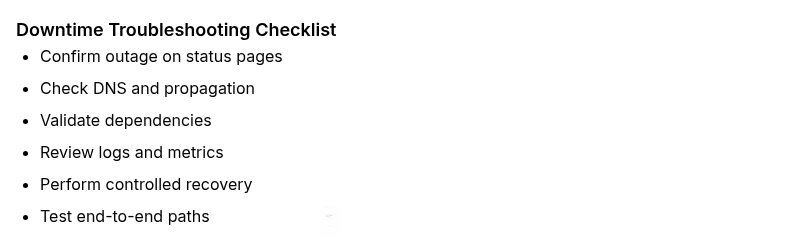
Confirm outage with status sources
Open status pages, monitoring dashboards, and incident communications to verify whether the server truly down or if the issue is isolated to a region, path, or user segment.
Tip: Capture screenshots and timestamps for incident postmortems. - 2
Check service health and logs
Inspect application-, web-, and database-layer logs for restart events, errors, or timeouts. Look for recent deployments or configuration changes that coincide with the outage.
Tip: Use centralized logging to correlate events across components. - 3
Validate DNS and network reachability
Run DNS lookups for your domain, confirm propagation status, and verify that the authoritative resolver responds. Ping or traceroute to identify where the path breaks.
Tip: Consider temporary DNS aliases to bypass propagation delays. - 4
Assess upstream dependencies
Test critical upstream services (auth, cache, third-party APIs) to see if a downstream failure cascades into the 5xx error. Replace or fallback if possible.
Tip: Implement graceful degradation where feasible. - 5
Review configuration and resources
Check server load, memory, and disk usage to rule out resource exhaustion. Review reverse proxy and load balancer health checks for misconfigurations.
Tip: Set alert thresholds to avoid silent outages. - 6
Perform controlled recovery steps
If safe, perform a staged restart of services, ensuring dependencies come back online in the correct order. Monitor immediate response and error rate after restart.
Tip: Keep a maintenance window and rollback plan ready. - 7
Test end-to-end user paths
After fixes, run representative user flows and verify responses across geographies and networks. Validate that EDGE/CDN nodes serve fresh content.
Tip: Document post-recovery checks and success criteria. - 8
Document, monitor, and learn
Record root cause, corrective actions, and future prevention steps. Update runbooks and implement improved monitoring to detect similar issues sooner.
Tip: Schedule a post-incident review.
Diagnosis: User requests fail with HTTP error codes when server is down
Possible Causes
- highServer downtime or crash
- mediumDNS resolution failure
- lowNetwork path outage
Fixes
- easyCheck server status dashboards and uptime metrics; restart services if safe and permitted
- easyVerify DNS records, propagation, and TTL; ensure authoritative servers respond
- mediumInspect network hardware, firewall rules, and load balancer health checks
Frequently Asked Questions
What does a 503 error mean and when is it expected to clear?
A 503 means the server is temporarily unavailable, typically during maintenance or overload. It usually resolves once resources are restored or load subsides. Check status pages and enqueue a rollback or scaling plan if needed.
A 503 means the service is temporarily unavailable; check status pages and restore resources to return to normal operation.
Can DNS problems cause http error codes when the server is down?
Yes. DNS misconfigurations or propagation delays can trigger HTTP errors by misrouting requests. Verify NS records, A/AAAA records, and TTLs across authoritative and recursive resolvers.
DNS problems can cause HTTP errors by misrouting requests; check DNS records and propagation.
Should I contact my hosting provider during a suspected outage?
If uptime dashboards show an outage or you cannot make progress, contact your hosting provider or CDN vendor. They can confirm infrastructure-wide issues or regional outages and advise on mitigations.
If you suspect a larger outage, contact your hosting provider for status and guidance.
What monitoring helps prevent future http error code outages?
Robust uptime and performance monitoring, with alerting on error rates and latency, helps catch outages early. Include synthetic transactions, DNS health checks, and dependency maps for rapid triage.
Use uptime monitoring and synthetic tests to catch outages early.
Is a 500-series error always server-side?
Not always. While 5xx codes point to server-side problems, gateway and network components can return similar errors. Always verify all layers from app to edge to network.
Most 5xx errors point to server issues, but gateway and network components can also trigger them.
Watch Video
Top Takeaways
- Verify server availability before diving deep fixes
- Differentiate DNS/network issues from server outages
- Prioritize changes with the least blast radius
- Document all steps and monitor after restoration