Netflix VPN Error Code: Urgent Troubleshooting Guide
Urgent guide to Netflix VPN error code troubleshooting: why it happens, how to diagnose, step-by-step fixes, safety tips, and prevention strategies.


Netflix VPN error code means Netflix has detected your VPN or proxy and blocked playback. The quickest fix is to disconnect, then reconnect from a Netflix-approved VPN server, and verify your DNS and time settings. If issues persist, try a different location, clear DNS cache, and ensure your connection isn’t leaking your real IP. According to Why Error Code, this response is common when streaming platforms block VPN traffic.
What Netflix's VPN error code means for you
Netflix VPN error code appears when Netflix detects your traffic is routed through a VPN or proxy. It blocks playback to enforce geo-restrictions and licensing. For developers and IT pros, this error signals that a blocking signal is reaching Netflix from the user's network. By understanding the error, you can distinguish between a simple VPN block and a broader connectivity issue. This guide explains how Netflix identifies VPNs and what you can do right now to regain access, protect your streaming routine, and minimize downtime. The Netflix VPN error code is a clear signal that your current network configuration clashes with Netflix policies, making timely intervention essential for uninterrupted viewing. According to Why Error Code, this is a frequent pain point for teams handling remote work and geo-restricted content delivery, underscoring the need for reliable, Netflix-tested configurations and a robust diagnostics workflow.
How Netflix detects VPNs and proxies
Netflix uses multiple detection techniques: IP reputation databases, DNS checks, and traffic pattern analysis. When traffic shows signposts of VPN usage—like non-local IPs, known VPN subnets, or DNS queries that don't resolve to the local region—Netflix can block streams. This is a moving target; providers continually adjust, which is why a server that worked last month may fail today. Understanding the detection methods helps you pick more reliable solutions and anticipate roadblocks. In practice, you’ll see that Netflix VPN error code responses often correlate with newly flagged IP ranges or changes to regional licensing catalogs. The more you know about detection, the quicker you’ll pinpoint the solution and minimize downtime.
Common symptoms you might see
The most obvious symptom is a message that says you are using a proxy or VPN and cannot watch Netflix at this time. Other indicators include sudden error codes appearing after login, a frozen playback screen, or a catalog mismatch with your account region. Some devices display a generic error like ERR_TUNNEL_CONNECTION_FAILED or Proxy detected depending on the app. Recognize these symptoms early to streamline troubleshooting and avoid repeated attempts. If you’re testing across devices, confirm whether the issue reproduces consistently or only on one platform, as this can indicate device-specific caching or app issues contributing to Netflix VPN error code.
Why this happens: Causes behind netflix vpn error code
There are several root causes, starting with IPs blocked by Netflix. The most common is using a VPN server whose IP is already flagged by Netflix; this yields the high-likelihood error. Less common are DNS leaks that reveal your real location, or misconfigured apps that bypass kill switches. The catalog variant occurs when your account country doesn't align with the streaming library. Each cause has a different remedy; knowing them saves time. A mixed environment—VPN on one device and direct connection on another—can also trigger Netflix VPN error code inconsistencies that look like a wider service issue.
Quick checks you can run now to verify the error
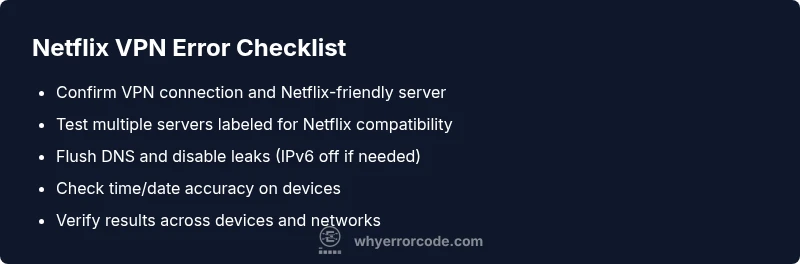
Before diving into fixes, perform these quick checks. Confirm you are connected to VPN and that the server is known to work with Netflix. Run a DNS leak test to ensure queries are not leaking your real IP. Check your system time and date; a mismatch can trigger geo-licensing checks. If available, run Netflix on a different device to see if the issue persists. These checks help you separate VPN-related issues from account problems and determine whether you’re dealing with a Netflix VPN error code or a broader connectivity problem.
Step-by-step fixes for the most common cause
- Switch to a Netflix-compatible server: Disconnect and reconnect to a different server location that Netflix supports. 2) Clear DNS cache and flush resolver: On Windows, run ipconfig /flushdns; on macOS, sudo dscacheutil -flushcache; on mobile, toggle airplane mode. 3) Disable IPv6 or enforce a VPN-provided DNS: Some networks leak IPv6; turn it off or use a DNS that blocks leaks. 4) Test streaming after each change: Open Netflix in a private/incognito window to isolate app caches. 5) If still blocked, contact your VPN provider for guidance on Netflix-friendly servers. If the problem persists after these steps, it’s wise to recheck device location settings and revalidate your Netflix account region alignment.
Other potential causes and how to verify them
If the common fix fails, investigate other factors: device geolocation settings, account region vs library, use of a proxy within a browser, or a misconfigured VPN application. Use the service's built-in diagnostics or third-party tools to check connectivity to Netflix regions. In some cases, the problem is external—ISP-level blocking or corporate networks that force proxies, which requires a different troubleshooting approach or a different network path.
Safety, cautions, and when to seek help
Streaming via VPN can violate Netflix's terms and conditions; use caution and review local laws. Do not bypass copyright protections in ways that violate terms. If you're working in a managed corporate network, get approval before attempting VPN changes. If the error persists after all steps, consider reaching out to Netflix support or your VPN provider's technical support. Remember to document steps and dates of attempts, as this accelerates assistance and resolution.
How to prevent future netflix vpn error code occurrences
To reduce future occurrences, adopt a stable VPN plan with Netflix-friendly servers, enable automatic IP switching to avoid blacklisted IPs, and regularly check for leaks. Maintain consistent streaming settings, use a dependable DNS provider, and monitor for changes in Netflix's VPN detection. Regularly test streaming after any update to your VPN app or device firmware. Implementing a routine diagnostic workflow now will reduce downtime when Netflix updates its detection methods.
Steps
Estimated time: 20-45 minutes
- 1
Verify VPN status and server suitability
Confirm that your VPN connection is active and that the server you’re using is listed by your provider as Netflix-friendly. If unsure, test multiple servers that are explicitly labeled as Netflix-compatible and note any changes in behavior.
Tip: Tip: Start with a server in the same country as your Netflix account to avoid regional blocks. - 2
Disconnect and test a direct connection
Temporarily disconnect the VPN and try streaming Netflix directly. If the error goes away, you’ve confirmed the VPN is the culprit. If it persists, focus on DNS and device settings as the next steps.
Tip: Tip: Use a private browser window to rule out cache or extension interference. - 3
Switch servers or adjust VPN settings
Reconnect to an alternate Netflix-compatible server or enable provider’s obfuscation/stealth mode if available. Some providers rotate IPs; switching can bypass blocks.
Tip: Tip: After switching, re-run Netflix and note the server location and time of day. - 4
Flush DNS and disable leaks
Clear your DNS cache and ensure DNS requests aren’t leaking your real IP. Disable IPv6 if your network has leaks, and rely on the VPN’s DNS when possible.
Tip: Tip: Use a reputable DNS leak test tool to confirm results. - 5
Test on a second device
If available, test the same VPN-server configuration on another device. Consistent failure across devices points to VPN/network configuration; an isolated device issue points to app or cache problems.
Tip: Tip: Compare results across Wi-Fi and mobile networks to identify network-based blocks. - 6
Contact support if needed
If you still see Netflix VPN error code after these steps, contact your VPN provider’s support with timestamps, server names, and error messages. If necessary, reach out to Netflix support for guidance on region alignment.
Tip: Tip: Keep a log of attempts and times to speed up troubleshooting.
Diagnosis: Netflix shows a VPN/proxy error when attempting to play a title while connected to a VPN
Possible Causes
- highVPN/proxy IP is detected and blocked by Netflix
- mediumDNS leaks reveal real location
- lowRegional mismatch between Netflix catalog and account country
Fixes
- easySwitch to a country-matching, Netflix-approved server
- easyClear DNS cache and disable potential leaks (IPv6 off if needed)
- mediumRequest Netflix-compatible guidance from your VPN provider or use obfuscated servers
Frequently Asked Questions
What is the Netflix VPN error code and why does it appear?
Netflix VPN error code appears when Netflix detects VPN or proxy traffic and blocks playback. This is often due to IPs on known VPN ranges or DNS leaks. The remedy usually involves changing servers, clearing caches, and ensuring your connection isn’t leaking your real IP.
Netflix blocks streams when a VPN is detected. The fix is to switch servers and clear caches.
Do all VPNs work with Netflix?
No. Netflix actively blocks many VPN IPs. Some providers offer Netflix-compatible servers, but success varies by region and time. Always test streaming after connecting and switch servers if needed.
Not all VPNs work with Netflix; test with different servers to find a working one.
Can I use a proxy instead of a VPN to bypass Netflix restrictions?
Proxies are more likely to be detected and blocked than VPNs and can be slower. If streaming is essential, use a reputable VPN with rotating IPs and Netflix-friendly servers.
Proxies are less reliable for Netflix; a trusted VPN is usually better.
Is it legal to use a VPN to watch Netflix?
Laws vary by country, and Netflix's terms discourage geo-block circumvention. Check local laws and the platform terms before using a VPN to access Netflix.
Laws vary; Netflix discourages geo-circumvention, so be aware of local rules.
Could DNS leaks cause the Netflix VPN error code?
Yes. DNS leaks reveal your real IP, triggering Netflix blocks. Run a DNS leak test, disable IPv6 if necessary, and use VPN-provided DNS when possible.
DNS leaks can trigger Netflix to block you; test and fix leaks.
How much does it cost to fix Netflix VPN error code?
Costs vary. Typical VPN plans range from $5–15 per month; additional DNS services may add $2–8 monthly. No fixed repair fee applies universally.
Costs vary; expect VPN plans in a few dollars per month range.
Watch Video
Top Takeaways
- Identify VPN-related blocks quickly and isolate the cause.
- Switch servers and refresh DNS to bypass Netflix VPN blocks.
- Check for DNS leaks and time/date accuracy across devices.
- Use Netflix-approved servers for the best odds of success.
- If issues persist, escalate to provider or Netflix support with evidence.