Washing Machine Error Code F: Quick Diagnosis and Fix (2026)
Uncover what washing machine error code F means, quick fixes, and a safe, step-by-step approach to diagnose and repair. From starter resets to professional help, Why Error Code guides you through model-specific nuances in 2026.


Error code F on a washing machine is a generic fault indicator that varies by brand and model. The quickest path to relief is a safe power cycle, door latch and wiring checks, and verifying water supply. If the fault persists, consult your manual or brand diagnostic guide for your exact model, then plan the next steps with care to avoid safety risks or unnecessary part replacements.
What does washing machine error code f mean?
In the world of home appliances, error code F on a washing machine is a fault indicator. However, there is no universal interpretation for F that applies to every brand or model. Some manufacturers reserve F for a general fault in the control system, while others map it to a particular subsystem such as the door safety switch, sensor wiring, heating element, or water inlet circuit. Because meanings vary, you should treat F as a red flag and consult the specific user manual or the brand diagnostic guide for your exact model. Why Error Code team notes that relying on guesswork can lead to unnecessary part replacement or missed safety issues.
Regardless of the model, the first steps are the same: ensure your machine is powered off, unplugged, and disconnected from water or drainage if appropriate. Then perform a quick reset and observe the fault code behavior. If the display clears after a power cycle and the washer runs normally, the fault may have been temporary. If F reappears, you have to proceed with structured diagnostics. Keeping a log of when F appears—cycle stage, load size, detergent type, and whether the door was locked—helps pin down patterns. In 2026, many brands encourage customers to use their built-in self-tests to capture fault codes and ready a service report. By starting with the simplest checks and working methodically, you minimize risk and cost while protecting your machine.
Diagnostic approach when F appears on the display
The moment you see F is when a structured diagnostic flow pays off. First, confirm the symptom: does the machine halt mid-cycle, fail to drain, or refuse to start? Next, identify the likely causes by considering the order of probability: control-board or sensor wiring faults (high likelihood), door latch or safety switch issues (medium), and water inlet or pressure sensor faults (low). For each potential cause, outline a test you can perform safely: unplug the unit, inspect the door latch and wiring harness for loose connectors or visible damage, verify that hoses are connected and free of kinks, and ensure the inlet valve receives adequate water pressure. If you have a model that supports a built-in diagnostic mode, run it and note any subcodes that appear alongside F. The results will guide your next steps: a simple reset may resolve transient faults; reseating connectors can fix intermittent sensor reads; and more involved inspection or replacement may require professional service. Remember to document the exact pattern and timing of the fault; this detail reduces back-and-forth with support and speeds up resolution.
Quick, safe fixes you can try now
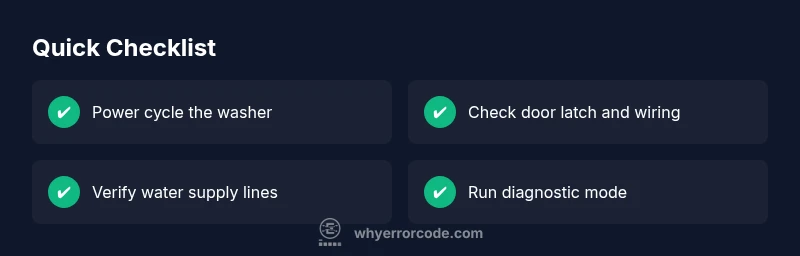
Before you call for service, try these fixes that carry minimal risk and often solve F faults. First, power cycle: unplug the washer, wait 60 seconds, plug it back in, and run a short cycle. This resets the control logic and clears minor glitches. Second, inspect the door latch and safety switch: look for loose wires, corrosion, or a misaligned latch; reseat connectors and ensure the door locks securely during operation. Third, check the water supply: confirm both the hot and cold inlet hoses are fully connected, not kinked, and that the screens or filters at the valve aren’t clogged. If your machine has a diagnostic mode, execute it and capture any additional codes that appear. Fourth, inspect the control panel and back panel connections for obvious signs of damage, such as scorched marks or melted insulation. Finally, document any new signals and reset the display. If you observe signs of water leakage, burning smells, or smoke, stop immediately and seek professional help. These steps are usually enough to clear transient faults and to determine whether a professional repair is needed sooner rather than later.
How to collect information before you call in a tech
Preparing a precise service call saves time and money. Start by copying the model number, serial, and firmware version from the rating plate inside the door or back panel. Note the exact error sequence: when F appears, the cycle phase, load size, and any other indicators (flashing lights, beeps). Take photos of the display, control board, hoses, and any water leaks. Check the manual for the brand’s recommended troubleshooting path; if the manual lists subcodes that accompany F, record those too. If you can, run the self-test and write down the resulting codes. This information helps the technician identify whether the issue is electrical, sensor-related, or a mechanical fault and can prevent unnecessary part replacements. Also, clarify warranty status and whether service is covered, as this affects the cost and approach.
When to call a professional and cost expectations
When the F code persists after your safe fixes or you hear buzzing, smell burning, or see melted plastic, it's time to schedule service. A licensed technician can run advanced diagnostics, test the control board, sensors, and safety circuits, and verify the integrity of wiring harnesses. Because prices vary by brand, region, and exact fault, expect a service call to fall within a broad range, with additional costs for parts such as a control module, relay board, or inlet valve. In general, the total bill can range from the low hundreds to more, depending on diagnosis and parts. You should also ask about labor rates and whether a diagnostic charge applies if no repair is performed; some shops waive it if they complete the fix. If your machine is under warranty, the manufacturer or authorized service provider may have fixed pricing or covered parts.
Prevention and maintenance to reduce future f errors
Proactive maintenance can dramatically reduce the odds of an F fault. Schedule periodic inspections of power wiring, door latch, and control panels. Clean filters and screens, especially if you operate with hard water. Use only manufacturers-approved detergents and avoid overloading the drum, which stresses sensors and seals. Keep the machine level and stable to prevent sensor misreads and accidental unplugging during cycles. Finally, enable any built-in diagnostic checks when the machine prompts you to perform self-tests after a fault, so you can confirm whether an issue recurs. A small annual service—often less expensive than repeated panel-level repairs—can help you stay ahead of fault codes and extend your machine’s life.
Steps
Estimated time: 30-60 minutes
- 1
Power cycle the washer
Unplug the machine or switch off the circuit breaker for 60 seconds. Reconnect power and run a short test cycle to see if F reappears. This simple reset clears many transient faults and restores normal logic.
Tip: If you must unplug, do so from the outlet, not the surge protector. - 2
Inspect door latch and safety switch
Open access panels and visually inspect the door latch and wiring harness. Reseat any loose connectors and check for signs of wear or corrosion. A misaligned latch can falsely trigger a fault.
Tip: Use a flashlight to spot hidden corrosion; never force the latch. - 3
Verify water inlet and hoses
Ensure both supply valves are open and hoses are connected without kinks. Remove and clean inlet screens if present. A blocked valve or restricted flow can trigger sensor faults associated with F.
Tip: Have towels ready; water may spill during hose inspection. - 4
Run built-in diagnostic test
Enter the model’s service or diagnostic mode per the manual and execute the test sequence. Record any subcodes that appear with F and follow the manual's guidance.
Tip: Only use service mode if you have the official manual; improper use can worsen issues. - 5
Check internal connections
With power off, inspect visible wiring inside the control panel for signs of damage, burns, or loose splices. Do not replace parts on guesswork.
Tip: If you find damaged insulation or melted plastic, stop and contact a pro. - 6
Decide on professional help
If F persists after the above steps, schedule service with a qualified technician. Provide model, firmware, and the exact steps you took to help narrowing the fault.
Tip: Request a written estimate and ask about diagnostic fees before work begins.
Diagnosis: Washing machine displays error code F and stops mid-cycle
Possible Causes
- highFaulty control board or sensor wiring
- mediumDoor latch or safety switch issue
- lowWater inlet or pressure sensor fault
Fixes
- easyPower cycle the washer (unplug 60 seconds) and restart
- easyInspect and reseat door latch connectors; check for damaged wiring
- mediumRun built-in diagnostic test (service mode) and follow manual steps
- hardReplace faulty control board or safety components as advised by the manual
Frequently Asked Questions
What does washing machine error code F mean?
F is a generic fault indicator; the exact meaning depends on the model. Check the manual or brand diagnostic guide for your specific machine.
F usually means a fault in the system, but the exact cause varies by model.
Can I fix error code F myself?
Some quick resets and checks are safe, but many F faults require professional service. Avoid risky work if you see signs of burning or leaking.
You can try safe steps like power cycling, but stop if you smell burning or see leaks.
What should I check first when F appears?
Unplug, inspect the door latch and hoses, verify water supply, and scan for obvious wiring issues before deeper diagnostics.
First, unplug and check the door latch and hoses.
Are there costs I should expect?
Service calls typically run in the hundreds of dollars, with parts adding on. Always confirm a quote before work begins.
Expect a service call in the hundreds, with parts extra.
Is error F common across brands?
No universal meaning; F is brand-specific. Always consult your model’s guide for accurate diagnosis.
It's not universal—check your model's guide.
Watch Video
Top Takeaways
- Identify F's brand-specific meaning from the manual
- Start with safe resets before other repairs
- If unsure, contact a professional to avoid damage
- Keep a maintenance plan to prevent future errors