Xbox error code 87dd0033: Quick Fixes and Troubleshooting
Urgent guide to Xbox error code 87dd0033: meaning, quick fixes, diagnostic steps, and when to contact support. Why Error Code provides practical, step-by-step troubleshooting for gamers and IT pros.


Xbox error code 87dd0033 typically signals a network or account authentication problem preventing sign-in or online play. The quick fix is to restart the console and your router, run a network test, and confirm Xbox Live service status is online. If the issue persists, sign out and back in, clear local cache, and check for available system updates. If you still see the code, contact Xbox Support for urgent assistance.
What Xbox error code 87dd0033 means
Xbox error code 87dd0033 is a connectivity and authentication signal. When this error appears, your console struggles to verify your Microsoft account with Xbox Live, which blocks sign-in, online multiplayer, and access to cloud-synced content. The root cause can be a short-lived service outage on Microsoft’s side, a congested or misconfigured home network, or stale credentials cached on the console. Because it touches both network access and account authentication, 87dd0033 often shows up across multiple apps and games, rather than being tied to a single title. Treating it as a network/auth problem helps you pick fixes with the highest chance of success.
Symptoms and typical scenarios associated with 87dd0033
Users commonly report being unable to sign in to their Xbox profile, sudden disconnects from online multiplayer, or getting frequent prompts to re-authenticate. You might also notice slow store access, cloud saves failing to sync, or error messages when loading a game that requires online verification. If you see 87dd0033 after a recent system update or router change, the timing points toward a connectivity or authentication mismatch. This awareness helps you prioritize network tests and account sign-in steps first.
Quick fixes you can try now
The fastest path to relief is a set of beginner-friendly, low-effort steps that often clear transient glitches causing 87dd0033. Start with a full power cycle of your hardware—console, router, and modem. Then run a built-in network test on the Xbox to confirm you have a stable path to Xbox Live. Check the Xbox Live service status page for any ongoing outages. If you still see the error after confirming service status, sign out of the Xbox profile and sign back in, clear the local cache, and verify you have the latest system update installed. These steps cover the majority of cases and buy you time to plan deeper diagnostics if needed.
Diagnostic approach: mapping symptoms to probable causes
Think of 87dd0033 as a triage signal: either the console can’t authenticate with Microsoft servers, the network path to Xbox Live is blocked or degraded, or the account credential state is stale. By checking service status, running network tests, and refreshing sign-in state, you can separate server-side outages from your own network issues. If service status is green and your network tests pass, focus on account-related things like signed-in state and recent credential changes. If either area fails, recursing through the fixes in the next sections usually resolves the problem.
Step-by-step fix for the most common cause (network/authentication hiccups)
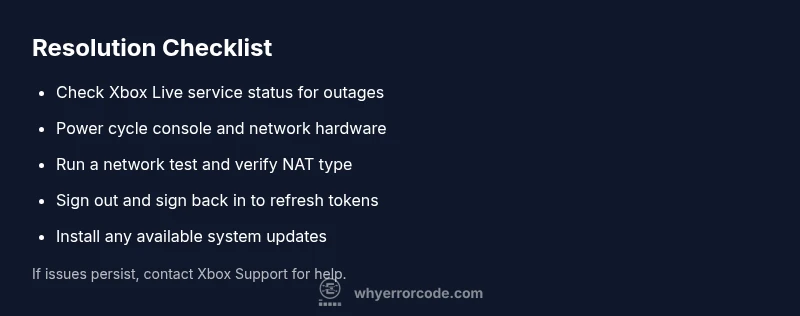
Step by step, this guide focuses on restoring a clean, authenticated connection to Xbox Live. First, power cycle the console and network hardware. Then run a network test on the console and verify NAT type is open or moderate. Next, check the Xbox Live service status and ensure there are no outages. Sign out of your Xbox account and sign back in to refresh tokens. Finally, install any available system updates. If the problem persists, review router firewall settings and consider alternating between wired and wireless connections to rule out local interference.
Other potential causes and how to verify them
Beyond network/authentication, 87dd0033 can arise from cached data corruption, incorrect time settings on the console, or a pending system update that didn’t complete. To verify, clear the persistent cache, ensure the date/time is correct, and re-run system updates. If issues continue, test on a different network (for example, a mobile hotspot) to determine whether the problem is router- or ISP-related. In rare cases, a faulty network adapter or hardware fault within the console could be a factor, requiring professional support.
Steps
Estimated time: 30-45 minutes
- 1
Power cycle devices
Turn off the Xbox, unplug the power cords, and wait 60 seconds. Plug back in, power on the router and modem, then wait for all lights to stabilize before testing again.
Tip: A full power cycle clears transient network sessions that can cause authentication hiccups. - 2
Test network connection on Xbox
Open Settings > General > Network Settings and run a full network test. Note the NAT type and any error messages returned by the test.
Tip: A NAT type of open or moderate is ideal for smooth online play. - 3
Check Xbox Live service status
Visit the official Xbox Live status page or status indicators within the console to confirm there are no outages or service warnings impacting authentication or online services.
Tip: Outages are usually regional and temporary; they can affect many users simultaneously. - 4
Sign out and sign back in
Sign out of your Microsoft account on the Xbox, then sign back in to refresh authentication tokens. If you use two-factor authentication, ensure you can complete the prompt.
Tip: Refreshing tokens often resolves sign-in errors without further changes. - 5
Update system and apps
Navigate to Settings > System > Updates to install any available console updates. Also check for updates for your games and apps that require online verification.
Tip: Updates can fix protocol issues that cause 87dd0033 in online scenarios.
Diagnosis: Error code 87dd0033 appears when signing in or launching online multiplayer
Possible Causes
- highNetwork connectivity issues (router/modem, NAT type)
- mediumXbox Live service outage or service-side authentication problem
- lowCorrupted cache or sign-in token on the console
Fixes
- easyPower cycle the console and network hardware (wait 60 seconds between power-ons)
- easyRun a network test and verify NAT type is open
- easyCheck Xbox Live service status and sign out/in to refresh credentials
- easyClear local cache and install available system updates
Frequently Asked Questions
What does Xbox error code 87dd0033 mean?
87dd0033 usually points to a networking or authentication problem that blocks sign-in or online play. It can be triggered by service outages, router issues, or corrupted sign-in data. Follow the quick fixes and the diagnostic flow to resolve it.
87dd0033 is a network or sign-in error. Try the quick fixes and check Xbox Live status to fix it.
Is this typically a Xbox Live outage or a local network issue?
It can be either. Start by checking the Xbox Live service status; if there’s no outage, test your home network and NAT type. If outages are reported, wait for service to restore before deep troubleshooting.
It could be service-side or your network. Check service status first, then troubleshoot locally if needed.
Can I fix 87dd0033 without contacting support?
Many users resolve it with a few steps: power cycle, run network tests, sign out/in, clear cache, and install updates. If the problem persists after these steps, contacting Xbox Support is recommended for persistent issues.
Yes, try the basic steps first; if it still persists, reach out to support.
Will this error affect only specific games or all online features?
The error can affect all online features if authentication fails, including sign-in, multiplayer, and cloud saves. Some single-player modes may still function offline, but online features will be impacted until the issue is resolved.
Online features will be impacted across games until the issue is fixed.
How long should I expect to wait for a fix when Xbox Live is down?
Outage durations vary by incident. Most service issues are resolved within a few hours, but regional outages can take longer. Monitor the status page for updates and plan for a window of offline play.
Outages usually get fixed within hours; check the status page for updates.
If I get 87dd0033 again after fixes, what should I do next?
Revisit the diagnostic steps, check for new updates, and consider a fresh sign-in with a new session. If the code recurs, there may be a deeper account or network issue; contact support.
If it repeats, go through the steps again and contact support if needed.
Top Takeaways
- Start with quick network and sign-in checks.
- Check Xbox Live service status before deeper troubleshooting.
- Power cycles fix many transient 87dd0033 issues.
- Update software after network fixes to prevent reoccurrence.