Dishwasher Error Code Not Draining: Troubleshooting Guide
Diagnose and fix dishwasher error code not draining with a practical, step-by-step guide. From quick checks to professional help, restore drainage fast and safely.


Immediate suspects: a clogged pump filter or a blocked drain hose. Start with a quick pump filter clean and ensure the disposer/air gap is clear, then run a diagnostic reset. If the error code remains, inspect the float switch and check the drain hose for kinks. This guide helps you fix it fast.
Quick diagnostics you can run before you pull the drain hose
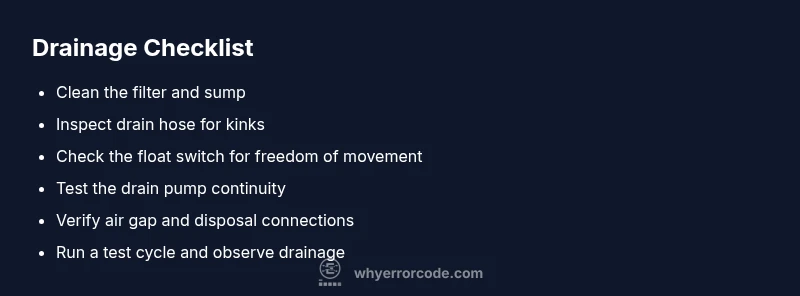
If your dishwasher shows the not draining error code, start with a quick, non-destructive set of checks. According to Why Error Code Team, most drainage problems are caused by simple blockages or sensor hiccups rather than wholesale failures. Begin by powering off the appliance and unplugging it for safety. Remove standing water with a sponge, then inspect the drain filter and sump area for debris. A clogged filter is the most common culprits and is easy to fix in minutes. Rinse the filter under running water and scrub away soap scum or food residue. Reinsert securely and run a short diagnostic cycle to see if drainage improves. Next, ensure the drain hose isn’t kinked or crushed behind the machine; a pinched hose can prevent gravity drainage. If you have a garbage disposal, confirm the knockout plug is removed and the disposal is clear. Finally, check the air gap (if your installation has one) and confirm the drain outlet is not blocked. If the error persists after these checks, continue with deeper diagnostics and step-by-step fixes.
Common culprits that stop drainage
There are several frequent causes behind a dishwasher not draining. A blocked or worn pump impeller, a clogged filter or sump, and a kinked drain hose top the list. Debris from recent washes can accumulate in the filter or chopper blade area, choking the drain. The float switch, which signals when to stop draining, can also stick if debris collects around its base. A misaligned check valve or a disconnected hose from the pump can create backflow or prevent proper drainage. External factors like hard water mineral buildup, soap residue, or improper loading (too many dishes or large utensils) can aggravate the problem. If your unit is connected to a garbage disposal, ensure the disposal is clear and the knockout plug is removed. Finally, inspect the dishwasher’s wiring for loose connections or signs of moisture; electrical issues can mimic mechanical drainage failures.
How to safely test the pump and float switch
Testing these components requires care. Start with unplugging the unit and removing the lower access panel if your model provides one. Visually inspect the drain pump for signs of cracks or burned smells. If you have a multimeter, test the pump terminals for continuity; replace the pump if readings are open or shows resistance outside the manual’s specs. For the float switch, ensure it moves freely—press it gently and look for resistance. Debris around the float stem can prevent accurate signaling. Some models include a diagnostic mode you can activate via control buttons; follow the manual to run a pump flow test. If the test shows the pump struggling or not engaging, this points to a faulty pump or control board rather than a simple clog. Always prioritize safety; never operate the unit with access panels off while plugged in.
When to reset, bypass, or replace components
If a clog isn’t the issue, a reset of the control logic can clear erroneous drainage codes. Start by unplugging the machine for 60 seconds, then plug back in and run a drain cycle. If the code reappears, consider a more targeted approach: reseat or replace the drain hose, verify the check valve, and check the wiring harness for corrosion. Bypassing components is not recommended; instead, replace a suspected failed part with an OEM-specified part. In some cases, the drain pump may be stuck due to mechanical wear, requiring replacement. For units under warranty, contact the manufacturer or a certified technician to avoid voiding coverage. If the unit is beyond repair or outputs the same code after replacement parts, a professional service visit is warranted.
How to prevent future drainage errors
Preventive maintenance reduces repeat drainage issues. Clean the filter every one to three months and after heavy use; rinse with warm water and a mild detergent. Run an empty wash every few months to keep the pump and hose clear of buildup. Use high-quality detergent and avoid overloading the dishwasher. Check the drain hose for kinks and secure clamps so the hose remains straight. If your home uses hard water, consider a water softener or rinse aid to minimize mineral buildup on the pump and hoses. Finally, keep an eye on error codes and document any patterns; early intervention makes repairs simpler and cheaper.
Real-world tips and troubleshooting myths
Some homeowners swear by vinegar flushes or baking soda jerks; while occasional cleaning can help, avoid aggressive chemical cleaners inside the dishwasher as they can damage seals or venting. Always consult the manual before attempting advanced diagnostics. If you must remove panels, use the correct tools and avoid touching exposed electronics. For persistent codes after all checks, the fault may reside in the control board or a faulty wiring harness, which is a job for a trained technician. Keep a service log with dates, error codes, and what you’ve tested; this helps when you call support. Remember: not every not-draining code is the same across brands, so refer to the specific model’s diagnostic flow. The Why Error Code Team emphasizes a methodical approach and safety-first mindset.
Steps
Estimated time: 45-60 minutes
- 1
Power cycle and reset controls
Unplug the dishwasher for at least 60 seconds, then plug back in and run a drain-only cycle to observe whether drainage resumes. This resets the control logic and can clear transient fault codes.
Tip: Always unplug before handling any internal components. - 2
Inspect and clean the filter and sump
Remove the bottom access panel, locate the pump filter, and rinse under warm water. Clear any food debris or soap scum and reassemble securely.
Tip: Take a quick photo of the filter orientation before removal. - 3
Check the drain hose for kinks
Trace the hose from the dishwasher to the drain connection. If you see bends or pinches, straighten or replace the hose. Ensure clamps are tight.
Tip: Keep the hose straight to avoid future kinks. - 4
Test the drain pump and float switch
With power off, access the drain pump and test for continuity with a multimeter if available. Check the float switch for free movement and absence of debris.
Tip: If uncertain, consult the model’s service manual before testing electronics. - 5
Inspect air gap and disposal connection
If your install includes an air gap, ensure it’s clear. If connected to a garbage disposal, verify the knockout plug is removed and the disposal is free of clogs.
Tip: Do not bypass the air gap—it prevents backflow. - 6
Run a test cycle and confirm drainage
After addressing filters, hoses, and pumps, run a full wash cycle empty with water to verify drainage. Repeat if necessary and note any error codes.
Tip: Record results to guide service if codes reappear.
Diagnosis: Dishwasher not draining and displays a not draining error code
Possible Causes
- highClogged pump or filter
- highKinked or clogged drain hose
- mediumFaulty drain pump
- lowBlocked air gap or disposal connection
Fixes
- easyClean the pump filter and sump area to remove debris
- easyStraighten or replace the drain hose and check for kinks
- mediumTest the drain pump and replace if non-functional
- easyVerify air gap/disposal connection and reseat hoses
Frequently Asked Questions
What does dishwasher not draining error code mean?
Not draining often points to a blockage in the pump, filter, or drain hose, or a faulty float switch. It can also stem from a loose connection to the disposal or an air gap issue. Start with the simplest checks and progress to component testing if needed.
Not draining usually means a blockage or sensor issue. Start with the filter and hose, then test the pump if needed.
Why is the drain pump buzzing while trying to drain?
A buzzing or humming pump often indicates the impeller is jammed or the motor is failing. Debris in the impeller area or a seized motor can prevent proper rotation. Stop the cycle and inspect or replace the pump as required.
A buzzing pump usually means it’s trying to run but can’t turn freely, often from debris or wear.
Is unplugging the dishwasher safe for inspection?
Yes. Always unplug the unit before opening access panels or handling electrical components. If you’re unsure, consult the user manual or contact a qualified technician.
Yes—unplug first and only then inspect any internal parts.
Can hard water cause drainage issues?
Hard water can lead to mineral buildup in the pump, filter, and hoses, reducing flow and causing clogs. Consider a water softener or rinse aid to minimize deposits.
Hard water builds up minerals that can clog channels and slow drainage.
When should I call a professional?
If basic checks don’t fix the issue, or you notice burnt smells, moisture on wiring, or persistent error codes after cleaning, it’s time to schedule service with a technician.
Call a pro when basic checks don’t resolve the code or you see signs of electrical issues.
Are chemical cleaners safe for dishwasher drainage?
Most chemical drain cleaners are not suited for dishwashers and can damage seals or venting. Rely on mechanical cleaning and proper parts replacement instead.
Avoid chemical cleaners inside the dishwasher; they can damage seals and vents.
Watch Video
Top Takeaways
- Start with easy checks: filter, hose, and pump.
- Test pump and float after cleaning.
- If unresolved, seek professional help.
- Prevent clogs with regular maintenance.
- Keep a service log for future fixes.