Error Code 400 Fix: Quick Diagnosis and Step-by-Step Repair
Learn fast how to fix error code 400 (Bad Request) across websites, apps, and APIs. This urgent guide covers symptoms, causes, step-by-step fixes, safety notes, and prevention tips to keep your systems reliable.


Error code 400 fix means a Bad Request: the server can't process your message due to client-side issues like a malformed URL, invalid headers, or a corrupted payload. The quickest path to relief is to verify the request format, clean any cached data, and retry with a clean, correctly formed request. If the problem persists, inspect authentication, query parameters, and payload size.
What error code 400 means
Error code 400, often called Bad Request, signals that the server cannot or will not process the request due to something that is perceived as a client error. This is not a server fault; it points to how the request was formed, not to a failure within the server itself. When you encounter 400, the first step in the error code 400 fix is to review the request syntax and any accompanying data. The goal is to create a clean, well-formed request that the server can understand. Common triggers include a malformed URL, invalid query parameters, corrupted headers, or an oversized payload. In API scenarios, ensure your authentication tokens are current and that you are not accidentally sending conflicting parameters. By methodically validating each part of the request, you can often resolve the issue without further escalation. Based on Why Error Code analysis, many 400s originate from client-side mistakes rather than server faults.
Quick checks you can do immediately
Start with the obvious sanity checks. Copy the URL exactly as it appears, including all query strings and parameters. Clear browser cache or try in an incognito window to rule out stale cookies. If you are making an API call, regenerate or refresh tokens, and re-run with a minimal payload to isolate the problem. Verify content-type headers, encoding (UTF-8 is standard), and that there are no stray spaces or invisible characters in the request. Finally, test the same request in a different environment (different device, browser, or client library) to determine if the problem is client-side or server-side.
Common causes of 400 Bad Request
- Malformed URL or query string: stray characters, improper encoding, or broken syntax can trip the server.
- Invalid or missing headers: especially Content-Type, Accept, and Authorization headers that don’t match the payload.
- Bad payload: malformed JSON or XML, missing required fields, or incorrect data types.
- Oversized payload or very long query strings: servers may reject oversized requests.
- Authentication issues: expired tokens or invalid credentials can trigger a 400 with a confusing message.
- Conflicting or duplicated query parameters: repeated keys or invalid combinations can lead to a Bad Request.
Quick fixes you can try now
- Refresh the page or restart the client to clear transient errors.
- Re-enter the URL or rebuild the API request with properly encoded parameters.
- Clear caches and cookies, then try again in a clean session.
- Reduce the payload to a minimal, valid example and verify each field.
- Check authentication tokens; refresh or re-authenticate if needed.
- Ensure Content-Type matches the payload format (e.g., application/json for JSON bodies).
Step-by-step fix for the most common cause
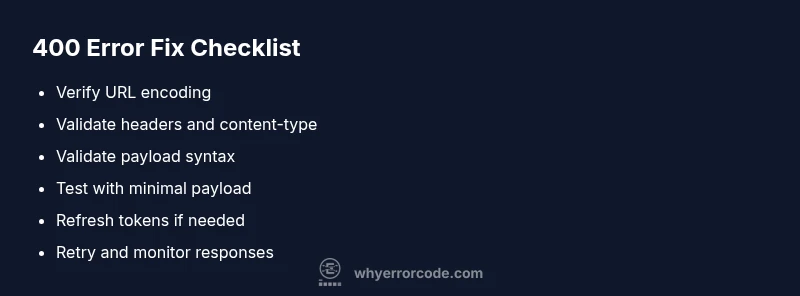
- Verify the URL is correctly formed and encoded; retype or copy from a trusted source.
- Remove or re-encode query parameters that may include special characters.
- Validate headers; ensure Content-Type and Accept align with the payload.
- Check the request body for valid syntax (JSON/XML) and required fields.
- Reduce payload size by trimming data to essentials, then retry.
- If the issue persists, test with a simple GET/HEAD request to confirm server availability.
Tip: Use a REST client or curl with verbose output to inspect the exact request sent and the server’s response. This often reveals where the mismatch lies.
Other causes and how to address them
- Invalid cookies or session state: clear cookies or reset sessions to ensure clean state for requests.
- Browser or client library bugs: update to the latest version or switch to a different library to rule out client-side bugs.
- Proxy or VPN interference: disable proxies temporarily to see if they modify request headers or payload.
- Server-side validation changes: verify API version and validator expectations; update client accordingly.
Safety, data integrity, and when to call a professional
Always back up your request schemas and payload templates before making changes. If a production API or critical service begins returning 400s after a deployment, roll back or stage in changes with feature flags. For complex enterprise integrations or regulated data flows, contact a professional to audit requests, authentication flows, and validation rules.
Prevention and best practices to avoid 400 errors
- Implement strict input validation on the client side before sending requests.
- Use consistent encoding and predictable payload formats.
- Version your APIs and communicate breaking changes clearly.
- Maintain idempotent request design where possible to avoid repeated errors.
- Build robust error handling that surfaces actionable details to developers.
Steps
Estimated time: 30-45 minutes
- 1
Verify the URL and encoding
Recreate the URL exactly from a trusted source, ensuring proper percent-encoding for special characters. Validate the query string for correctness and order.
Tip: Use a URL encoder tool to confirm percent-encoding. - 2
Check headers and content-type
Make sure headers reflect the actual payload type. If sending JSON, Content-Type should be application/json and charset should be UTF-8 when applicable.
Tip: Avoid sending conflicting headers. - 3
Validate the payload syntax
Run the payload through a validator (JSON or XML) and ensure all required fields are present with correct data types.
Tip: Use schema validation if available. - 4
Test with minimal payload
Send a minimal, valid request to confirm basic server handling, then gradually reintroduce fields to locate the fault.
Tip: This isolating technique quickly identifies the problematic field. - 5
Authenticate and retry
Refresh tokens or credentials if needed, then retry the request in a clean session.
Tip: Expired tokens commonly cause 400s in APIs. - 6
Review server and client logs
Compare client logs with server responses to locate any mismatches in parameter names or values.
Tip: Logs are your best source of truth for debugging.
Diagnosis: User receives 400 Bad Request when submitting a form
Possible Causes
- highMalformed URL or query string
- mediumInvalid headers or content-type
- lowBad or oversized payload
Fixes
- easyVerify URL encoding and reconstruct the request with clean parameters
- easyValidate headers and Content-Type; align with payload
- mediumReduce payload size or compress payload to fit server limits
Frequently Asked Questions
What does error code 400 mean?
400 Bad Request means the server cannot process the request due to a client-side error, such as a malformed URL or invalid payload. It is not a server fault. The fix starts with validating the request structure.
A 400 Bad Request means your client sent something the server couldn't understand; check the URL, headers, and payload.
How can I fix a malformed URL causing 400?
Reconstruct the URL from a trusted source, ensure proper encoding for special characters, and test in a controlled environment before retrying.
Fix the URL by encoding special characters and rebuilding from a reliable source.
Can cookies cause a 400 Bad Request?
Cookies can contribute to a 400 in some setups if they interfere with headers or payload validation. Clearing cookies or using a fresh session often resolves this.
Yes, cookies can contribute; clearing them often helps.
Is 400 the same as 404 or 500?
No. 400 indicates a bad request from the client, while 404 means the resource isn’t found, and 500 indicates a server error. They point to different failure modes.
400 means the request is malformed; 404 and 500 indicate different problems.
Should I contact the API provider when 400 continues?
Yes. If you’re certain your client data is correct, contact the API provider with logs to determine if server-side validation rules changed.
If it keeps happening after you’ve checked, reach out with logs.
Will clearing caches fix persistent 400s?
Clearing caches and cookies can resolve stale or conflicting client state that triggers 400s in web apps and APIs.
Clearing the cache can often fix persistent 400s.
Watch Video
Top Takeaways
- Validate the URL and encoding first
- Clear caches and retry with minimal payload
- Verify headers and authentication state
- Escalate to a professional if complex integrations fail